
LLM Quantization: Shrinking Models Without Wrecking Quality
Back with another entry in the series where I break down the parts of building with LLMs that took me embarrassingly long to actually understand. This time it is LLM quantization, the change that let me fit a model I thought needed two GPUs onto a single card, and mostly get away with it.
The setup was familiar. I had a 13-billion-parameter model that ran fine on a beefy rented GPU, but the bill was ugly and I wanted to move it onto cheaper hardware. The model in full precision simply would not load. It was not close. I kept staring at the out-of-memory error thinking the only options were a smaller model or a bigger wallet. LLM quantization turned out to be the third option I did not know existed, and it is the highest-leverage change you can make when a model barely fits.
What LLM quantization actually does
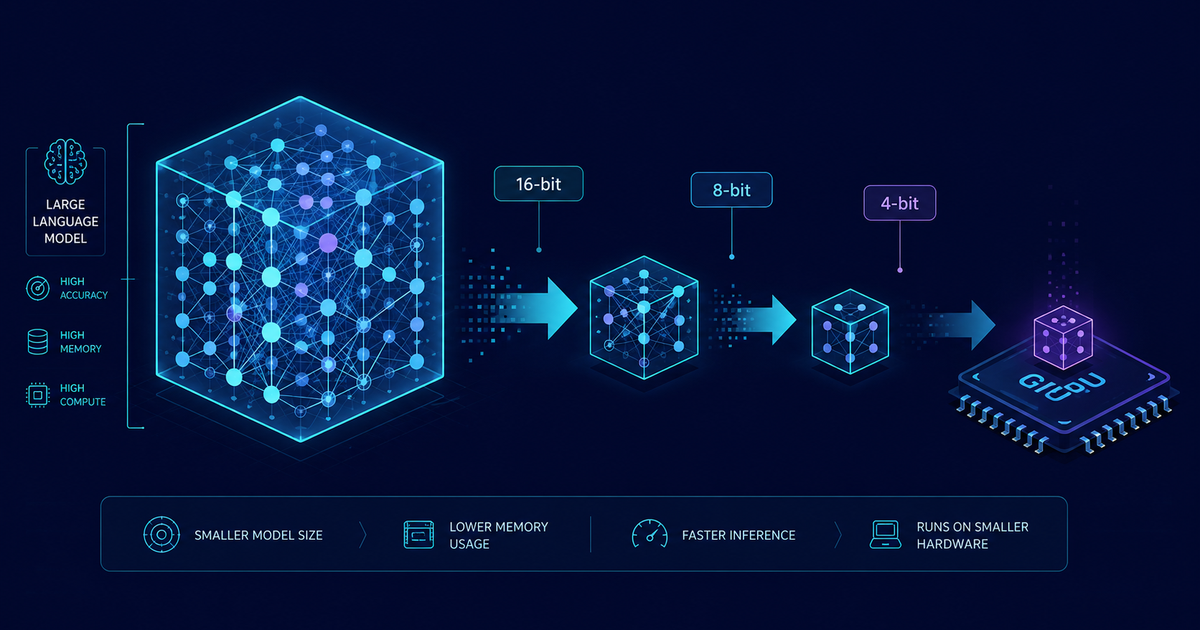
A model is a giant pile of numbers called weights. By default each of those numbers is stored as a 16-bit floating point value, which is precise but heavy. Quantization stores those same weights using fewer bits, usually 8-bit or 4-bit integers instead of 16-bit floats. Same weights, coarser representation, far less memory.
The intuition that made it click for me: a weight of 0.4213788 does not need to be recorded to seven decimal places for the model to work. If you round it to a nearby value on a much smaller grid of allowed numbers, the network still behaves almost identically, because there are billions of these weights and small rounding errors tend to wash out rather than compound. Quantization is the disciplined version of that rounding. You map a continuous range of float values onto a small set of integer buckets, store the integers, and keep a tiny scale factor so you can approximately reconstruct the original number when you need it.
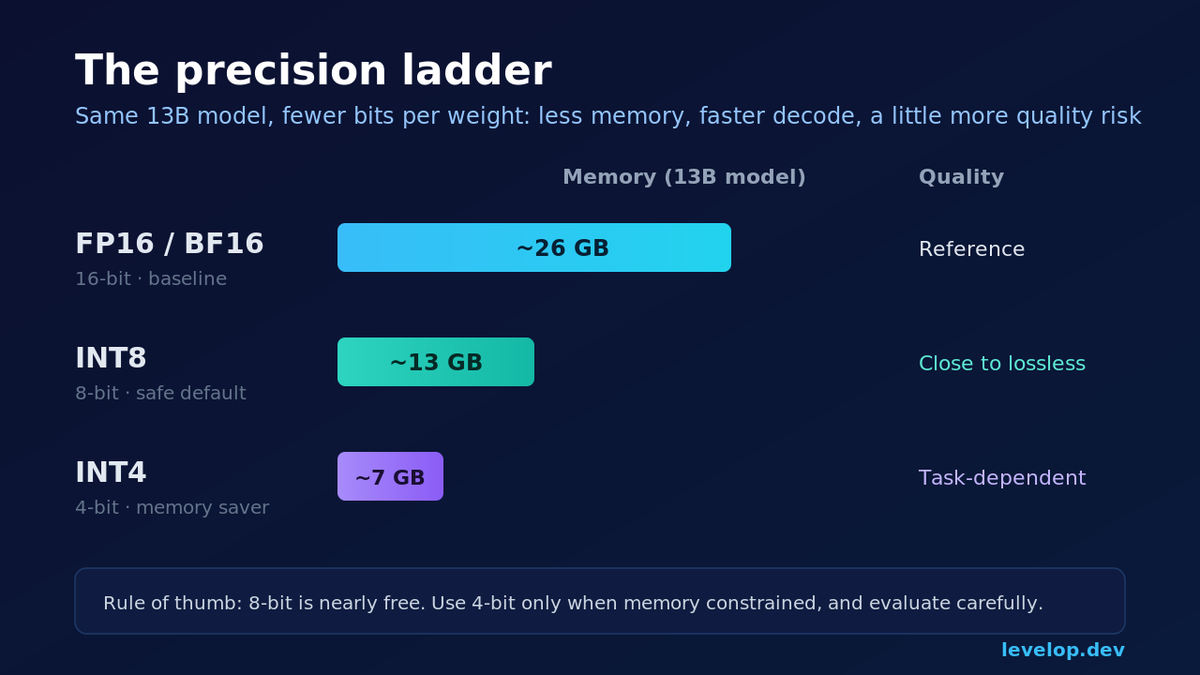
The payoff is direct. Going from 16-bit to 8-bit roughly halves the model size. Going to 4-bit roughly quarters it. A 13B model that eats about 26 GB in 16-bit drops to around 13 GB at 8-bit and roughly 7 GB at 4-bit, which is the difference between "needs a data center card" and "runs on a gaming GPU."
Why fewer bits make inference faster, not just smaller
Smaller memory footprint is the obvious win. The less obvious one, and the reason quantization shows up in every serious inference stack, is speed.
Text generation is memory bound during the decode phase, the part where the model produces the answer one token at a time. I unpacked why in the LLM inference optimization guide, but the short version is that for each token the GPU has to move the entire set of model weights from memory into the compute units, do a bit of math, and repeat. The bottleneck is not the arithmetic. It is shuttling those weights back and forth.
If your weights are half the size, you move half the bytes per token. That is a real latency win on top of the memory savings, and it is why 8-bit quantization often makes a model both smaller and faster with barely any quality cost. You are attacking the exact thing that makes the decode phase slow.
The precision formats you will actually meet
You do not need a numerics degree, but a few terms come up constantly and it helps to know what they mean.
FP16 and BF16 are the 16-bit floating point formats most models ship in. This is your baseline, the "full precision" people usually mean when serving. INT8 is 8-bit integer quantization, the safe default that is close to lossless for most workloads. INT4 is 4-bit integer quantization, the aggressive option that saves the most memory and carries the most quality risk. FP8 is a newer 8-bit floating point format supported on recent NVIDIA hardware that keeps more dynamic range than INT8 and is becoming popular for both training and serving.
The rule of thumb I use: 8-bit is close to free, 4-bit is worth trying when you are memory constrained, and anything below 4-bit is a research adventure you should only take on with careful evaluation.
Post-training quantization versus quantization-aware training
There are two broad ways to quantize, and knowing which one you are doing saves confusion.
Post-training quantization, or PTQ, takes a model that is already trained and compresses it after the fact. You do not retrain anything. You run a small amount of sample data through the model to figure out good scale factors, then convert the weights. This is fast, cheap, and what almost everyone uses. Every method in the next section is a form of PTQ.
Quantization-aware training, or QAT, bakes the quantization into the training process so the model learns to be robust to the lower precision from the start. It produces better results at very low bit widths, but it requires the training pipeline, the data, and the compute to actually train. For most of us serving open models we did not train, QAT is not on the table. It matters mainly to the teams building the base models.
If you are a developer taking an existing model to production, you are doing post-training quantization. Full stop.
The methods you will run into
Post-training quantization is not one algorithm. A handful of named methods dominate, and they show up as file formats and library flags more than as papers you need to read.
GPTQ is a widely used method that quantizes weights layer by layer while compensating for the error introduced at each step, which lets it push down to 4-bit with modest quality loss. You will see GPTQ versions of popular models posted on model hubs, ready to load.
AWQ, which stands for activation-aware weight quantization, is based on the observation that a small fraction of weights matter far more than the rest. It protects those salient weights and quantizes the rest harder. In practice AWQ often preserves quality slightly better than GPTQ at the same bit width and has become a common default for 4-bit serving.
GGUF is the format used by llama.cpp and the tools built on it. It is the go-to for running quantized models on CPUs, Apple Silicon, and consumer machines, and it offers a whole ladder of quantization levels so you can trade quality against size in small steps.
bitsandbytes is the library that made on-the-fly quantization easy inside the Hugging Face ecosystem. It lets you load a full-precision model directly into 8-bit or 4-bit with a single argument, without hunting for a pre-quantized copy. It is the fastest way to just try quantization on a model you already use.
You rarely implement any of this. You pick a method that matches where you are serving, then either download a pre-quantized model or quantize it with a few lines of setup.
How much quality do you actually lose
This is the question everyone asks, and the honest answer is: less than you fear at 8-bit, and it depends at 4-bit.
At 8-bit, the quality difference is usually within noise for most tasks. Summaries, chat, classification, and routine code generation come out effectively unchanged. I have shipped 8-bit models to production and never had a user notice.
At 4-bit, it gets task dependent. Easy and medium tasks hold up well, especially with AWQ or a good GPTQ build. Where 4-bit shows cracks is on hard multi-step reasoning, precise math, and long chains of logic, where small errors compound across steps. A model that was already near the edge of a capability can tip over the edge once you quantize it.
The trap is trusting a leaderboard number. A published benchmark tells you how a quantized model did on someone else's tasks, not yours. Quality loss from quantization is uneven across tasks, so the only number that matters is how the quantized model does on your prompts. Which brings us to measurement.
A practical quantization workflow
Here is the loop I run when I want to quantize a model for serving. It mirrors the checklist from the inference optimization guide: make the change, then prove it did not break anything.
First, load the model at 8-bit and confirm it fits and runs. Second, evaluate it on a held-out set of your real prompts, not toy ones. Third, only if you are still memory constrained, drop to 4-bit and re-evaluate. Fourth, compare outputs side by side with the full-precision model on your hardest cases before you trust it.
Loading a model in 4-bit with bitsandbytes is genuinely a few lines:
# quantize_load.py
# Load an existing model directly in 4-bit for serving
from transformers import AutoModelForCausalLM, AutoTokenizer, BitsAndBytesConfig
import torch

quant_config = BitsAndBytesConfig(
    load_in_4bit=True,
    bnb_4bit_quant_type="nf4",          # normalized float 4, good default
    bnb_4bit_compute_dtype=torch.bfloat16,  # math still runs in bf16
    bnb_4bit_use_double_quant=True,     # quantize the scale factors too
)

model = AutoModelForCausalLM.from_pretrained(
    "your-org/your-model",
    quantization_config=quant_config,
    device_map="auto",
)
tokenizer = AutoTokenizer.from_pretrained("your-org/your-model")
Notice that the compute still happens in bfloat16. The weights are stored in 4-bit and unpacked to a higher precision for the actual matrix math. That is the standard pattern: quantize storage, compute in a wider type. It is why you get the memory and bandwidth savings without doing genuinely 4-bit arithmetic.
How to measure the quality you traded away
You cannot ship a compression you did not measure. Two signals cover most cases.
Perplexity on a text sample is the cheap, automatic check. It measures how surprised the model is by real text, and a quantized model should stay within a small margin of the original. A big jump in perplexity means the quantization went badly and you should back off a bit width or switch methods. It is a smoke test, not a product metric.
A task evaluation on your own prompts is the one that actually matters. Take a fixed set of representative requests, run them through both the full and quantized models, and compare. For anything with a checkable answer, score it. For open-ended output, read a sample by hand or use a stronger model as a judge, an approach I lean on for exactly this kind of check.
# perplexity_check.py
# Quick perplexity smoke test to compare quantized vs full precision
import torch

def perplexity(model, tokenizer, text):
    enc = tokenizer(text, return_tensors="pt").to(model.device)
    with torch.no_grad():
        out = model(**enc, labels=enc["input_ids"])
    return torch.exp(out.loss).item()

sample = open("eval_sample.txt").read()
print("perplexity:", round(perplexity(model, tokenizer, sample), 2))
Run the same sample through both models. If perplexity barely moves, keep going with the task evaluation. If it spikes, stop and reconsider before your users find the regression for you.
When not to quantize
Quantization is not always the right move, and reaching for it reflexively can waste your time.
If the model already fits comfortably and runs fast enough, quantizing to squeeze out a little more headroom is often not worth the evaluation effort. If your workload is dominated by hard reasoning or precise math where every bit of quality counts, be cautious with 4-bit and lean toward 8-bit or full precision. And if latency, not memory, is your real problem and you already fit, other levers like continuous batching and speculative decoding may buy you more than shaving bits will.
Quantization shines in one specific situation: your model is memory constrained, barely fits, or does not fit at all, and you need it on smaller or cheaper hardware. That is where it goes from a nice optimization to the thing that makes the deployment possible.
Where this fits
Quantization is one technique in a larger toolkit for making models cheap and fast to serve. It pairs naturally with the batching and KV cache work in the LLM inference optimization guide, and with speculative decoding when you want more tokens per pass rather than smaller weights. Most teams get the biggest wins by combining a good serving engine, 8-bit weights, and continuous batching before reaching for anything exotic. More engineering breakdowns like this one live on the Levelop blog.
I keep coming back to how much runway a single flag bought me here. I went from planning a hardware upgrade to running the same model on a card I already had, and the only cost was an afternoon of evaluation. That trade shows up constantly once you start building on Levelop, and quantization is one of the cleanest examples of it.
Frequently asked questions
What is LLM quantization?
LLM quantization is the practice of storing a model's weights using fewer bits than the original, typically 8-bit or 4-bit integers instead of 16-bit floats. This shrinks the model's memory footprint and, because text generation is memory bound, speeds up inference by moving fewer bytes per token. The tradeoff is a small, task-dependent loss in output quality that you verify by testing on your own prompts.
Does quantization make an LLM dumber?
Not much at 8-bit, where the quality difference is usually within noise for most workloads. At 4-bit it becomes task dependent: easy and medium tasks hold up well, while hard multi-step reasoning and precise math can degrade because small errors compound. The right approach is to quantize, then evaluate on your own representative prompts rather than trusting a general benchmark, since the loss is uneven across tasks.
What is the difference between 4-bit and 8-bit quantization?
8-bit quantization halves a model's size versus 16-bit and is close to lossless for most tasks, making it a safe default. 4-bit quantization quarters the size and saves the most memory, but carries more quality risk on difficult tasks. Use 8-bit as your starting point and only drop to 4-bit when you are still memory constrained after trying 8-bit.
What are GPTQ, AWQ, and GGUF?
They are common post-training quantization methods and formats. GPTQ quantizes layer by layer while correcting error, reaching 4-bit with modest loss. AWQ protects the most important weights and often preserves quality slightly better at the same bit width. GGUF is the format used by llama.cpp for running quantized models on CPUs and consumer hardware. You usually download a model already quantized with one of these, or apply it with a few lines of setup.
Do I need to retrain a model to quantize it?
No. Almost everyone uses post-training quantization, which compresses an already-trained model without retraining. You run a small amount of sample data through the model to compute scale factors, then convert the weights. Quantization-aware training, which bakes low precision into training, produces better results at very low bit widths but requires the full training pipeline and is mainly used by teams building base models, not developers deploying them.