
Claude Code vs Cursor 2026: Honest Side-by-Side Comparison
A few months ago I had three tabs open: one comparing claude code vs cursor feature lists, one watching a YouTuber declare Cursor the clear winner, and one from a blogger saying Claude Code had made every other AI coding tool obsolete. I closed all three more confused than when I started.
Here is what those comparisons usually miss: these ai coding tools are not competing for the same job.
I have run both on real production codebases over the past several months: actual refactors, greenfield services, late-night debugging sessions. The honest answer to which is better is that it depends almost entirely on how you prefer to work, what coding tasks dominate your day, and whether you think in terminals or editors.
If you want the wider field instead of a head-to-head, see our 2026 ranking of the best AI coding agents.
Claude Code is a terminal-native AI coding agent built by Anthropic. You run it from the command line, point it at a repo, and it operates like an autonomous collaborator that can read files, write code, run commands, and chain multi-step coding tasks without you babysitting every move.
Cursor is an IDE-first experience built on VS Code. It wraps a familiar editor with inline completions, chat, and context-aware suggestions that show up where you are already looking: right inside your code.
One is built around your terminal and your workflow. The other is built around your editor and your cursor position. That distinction matters more than any feature comparison, and it is the thread I will pull on throughout this post.
Claude Code: What It Does Well and Where It Struggles
Claude Code operates more like an autonomous engineer than an autocomplete engine: instead of suggesting the next line, it reads your entire codebase, reasons about it, and executes multi-step tasks end to end. That shift in mental model makes it a genuinely different kind of ai coding assistant.
Strengths That Matter in Production
Claude Code handles large-scale, multi-file work surprisingly well. I pointed it at a 50-file migration from Express to Fastify, and it handled the routing changes, middleware rewrites, and test fixes in a single run without me babysitting each step. That kind of agentic coding capability is difficult to replicate with tools that only see one file at a time.
As of mid-2026 Claude Code runs on Anthropic's frontier claude models such as Opus 5 and Fable 5, which score between 95 and 96 percent on SWE-bench Verified, and it now supports subagents that fan work out across a repo in parallel. That agentic depth, combined with MCP and custom hooks, is what lets it drive large refactors end to end from the terminal.
The extensibility is where Claude Code separates itself from every other ai agent in the category. MCP (Model Context Protocol) support means you can wire in your own tools, databases, and APIs, and custom hooks let you trigger actions before or after specific coding tasks. It is a platform you can shape to fit your process rather than a closed product.
Context handling is another significant advantage. Claude Code can reason across hundreds of files in a single session. When you are debugging an issue that spans your API layer, your database models, and your frontend state management, it holds all of that context simultaneously. Most ai coding assistants lose the thread after three or four files.
Where It Falls Short
There is no visual IDE integration. You are reading terminal output, which works well if you live in the CLI, but it creates friction for engineers who rely on inline diffs, hover docs, or a split-pane layout. The learning curve is steeper than it looks.
The lack of inline suggestions is a real gap for everyday feature work. When you are writing a new function and just want the AI to finish your thought in real time, switching to a terminal-based workflow adds unnecessary friction.
There is no free tier for Claude Code. Unlike Cursor, which offers a limited free plan for individual developers, Claude Code requires an Anthropic API subscription from day one. This means you cannot trial the tool without committing to usage-based billing, which is a barrier for students, hobbyists, and developers evaluating ai coding tools before making a team-wide decision.
If you are already comfortable in the terminal, this is likely the most capable ai coding agent available right now.
New to this category? Start with what AI coding agents are and how they work.
Cursor: What It Does Well and Where It Struggles
Cursor is an AI editor, a VS Code fork with AI integrated at every layer. It is not a plugin or extension sitting on top of your editor. The AI is the editor, which is why the experience feels seamless compared to most ai coding assistants bolted onto existing workflows.
Strengths That Keep You in Flow
The inline completions are fast and accurate. Tab-to-accept with ghost text previews, visual diff overlays before you commit a change, and Composer mode for touching multiple files at once. This ai assistance is surfaced right where you type, so for quick feature work where you are bouncing between three or four files, it feels like the ai agent is reading your mind.
Cursor's approach to code review and refactoring within a single session is also strong. You can highlight a block of code, ask it to refactor for performance, and see the diff overlay before accepting, which keeps code quality high. For targeted coding tasks like renaming variables across a module or extracting utility functions, Cursor handles these cleanly because the scope is contained.
The onboarding experience is another advantage. Cursor offers a free tier that lets individual developers try the core features without any financial commitment. If you have used VS Code before, you can be productive with Cursor in under an hour.
Where It Falls Short
The context window becomes a real constraint on large monorepos. When your codebase has hundreds of interconnected modules, Cursor starts losing the thread, and you end up manually pinning files to context, which defeats some of the magic that makes it feel effortless on smaller projects.
The bigger limitation is the lock-in. If you use Neovim, JetBrains, or anything other than VS Code, Cursor simply does not exist for you. There is no CLI, no API surface, no way to bring it into your existing toolchain. You adopt the Cursor environment or you do not use it at all.
Agent mode, Cursor's attempt at multi-step autonomous coding tasks, is improving but still feels like it is catching up. For targeted, single-session edits it is excellent, but for longer autonomous workflows that require reasoning about system architecture or cross-cutting concerns, it remains inconsistent. This is the gap where Claude Code's ai agent architecture genuinely outperforms.
How They Handle Multi-File Refactors
Take a concrete job: rename a function and update every call site across 20 files. In Cursor you drive it from Agent mode or a multi-file edit, review each change in a visual diff, and accept file by file, which keeps you in control but keeps you in the loop. In Claude Code you describe the change once, and the agent plans the edit, sweeps all 20 files from the terminal, updates imports and tests, and runs the suite before handing it back. Cursor optimizes for reviewed, in-flow edits; Claude Code optimizes for hands-off breadth. On a 3-file rename the difference is negligible, but on a 200-file rename it is the whole ballgame.
Feature-by-Feature Comparison
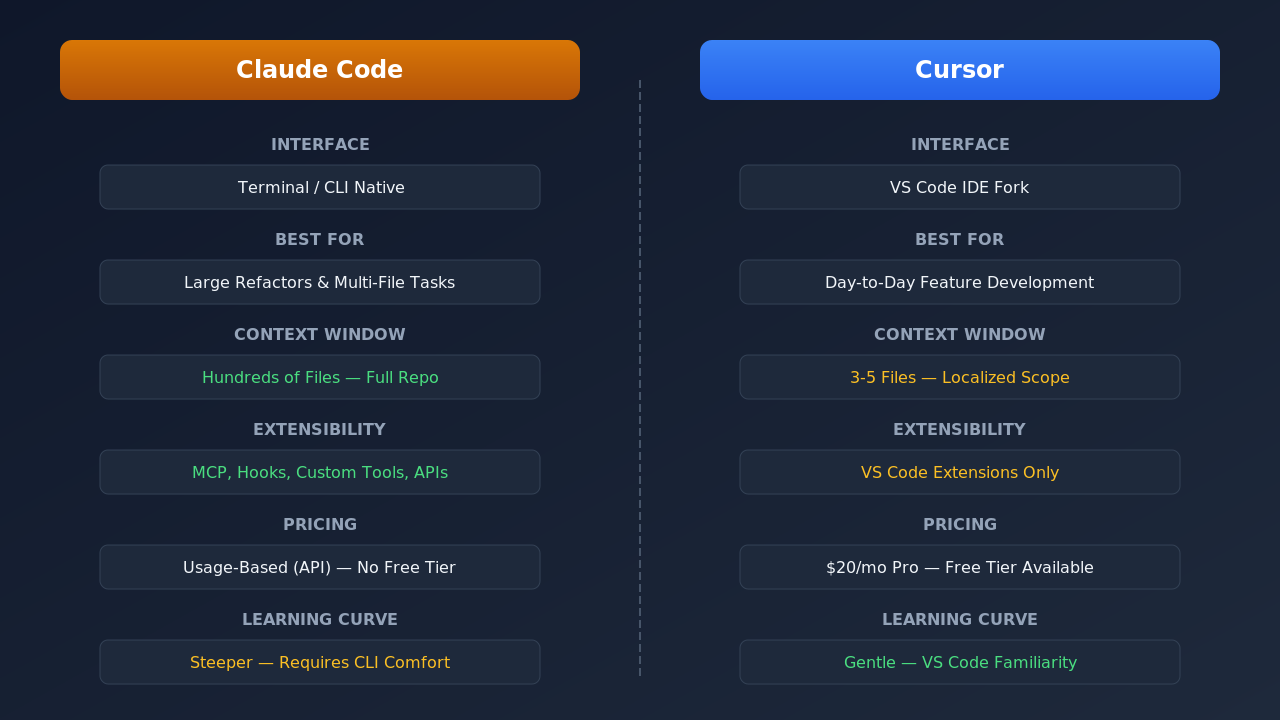
Context window and codebase awareness represent the largest architectural difference. Claude Code can hold an entire repository in context, reasoning across hundreds of files, while Cursor works best within a localized scope of three to five files. For large monorepos or complex distributed systems, that difference is decisive.
Extensibility and integration follow a similar pattern. Claude Code supports MCP servers, custom hooks, shell scripting, and API integrations that let you build it into any workflow. Cursor supports VS Code extensions well, but it does not expose an API or plugin system for external tool orchestration.
Editor experience is where Cursor dominates. Inline completions, visual diffs, split-pane editing, and hover documentation create a development experience that feels polished and intuitive. Claude Code offers none of these; its interface is the terminal, which is powerful for automation but not where most developers want to spend the whole day.
Pricing and accessibility also matter. Cursor keeps a free Hobby tier (2,000 completions per month) and, in 2026, a clearer paid ladder: Pro at 20 dollars per month unlocks every frontier model (Claude Sonnet 4.6, GPT-5.4, Gemini 3.1 Pro) plus Cursor's own Composer 2 and unlimited tab completions, Pro+ at 60 dollars per month triples that usage, and Ultra at 200 dollars per month gives roughly twenty times the Pro allowance for the heaviest users. Teams start at 40 dollars per user per month with pooled usage and admin controls. Every paid plan now runs a dual-pool model: a low-cost Auto plus Composer pool for everyday agentic coding and a separate API pool billed at each model's rate. Claude Code still has no free tier and stays usage-based through the Anthropic API, so costs scale with consumption.
The Real Comparison: When to Use Which and When to Use Both
The honest answer is that these tools solve different problems, and framing it as a binary choice misses the point.
For day-to-day feature development, rapid prototyping, or single-file edits, Cursor is faster. The inline suggestions, visual diffs, and tight VS Code integration mean you stay in flow without a context switch. If you are already living in VS Code, Cursor feels like the obvious extension of that environment.
Claude Code earns its place on the harder software development jobs: large refactors across dozens of files, codebase-wide renaming, CI/CD automation, and test generation across a module, anything that requires reasoning about how components connect rather than autocompleting the next line. It is a terminal-first ai agent that suits engineers who already think in scripts and pipelines.
Which to Choose for Team Use
Individual pricing tells only half the story. Cursor Teams starts at 40 dollars per user per month with pooled usage, centralized billing, and admin controls, which makes it easy to roll out across a whole engineering org that already lives in VS Code. Claude Code scales through Claude Team and Enterprise plans, where the draws are SSO, audit logs, centralized policy, and per-seat usage governance for a terminal-native agent. If your team wants one editor everyone opens on day one, Cursor is the lower-friction rollout. If your team runs large migrations and wants agents wired into internal tools through MCP, Claude Code's governance and extensibility matter more.
If you are asking which ai coding agent is best in absolute terms, there is no clean answer. Devin and OpenAI Codex are worth knowing about as alternatives, but neither has meaningfully displaced either tool for most working engineers.
For teams evaluating both ai coding tools, start with Cursor for your daily development workflow and choose Claude Code when you hit a task that requires cross-file reasoning or automation.
Weighing a third option? Read Claude Code vs GitHub Copilot.
Frequently Asked Questions
Is Claude Code or Cursor better for beginners?
Cursor is the easier starting point for anyone new to ai coding tools. The visual interface, inline completions, free tier access, and VS Code familiarity lower the barrier significantly.
Can I use Claude Code and Cursor together?
Yes, and this is actually the setup many software development teams adopt. Cursor handles day-to-day feature work and quick edits, while Claude Code takes over for large refactors, multi-file tasks, and anything that benefits from a scripted, automated approach.
How much do Claude Code and Cursor cost in 2026?
Cursor offers a free tier with limited completions, plus a Pro plan at approximately 20 dollars per month. Claude Code pricing is usage-based through the Anthropic API with no free tier.
Which AI coding agent handles large codebases better?
Claude Code has a meaningful edge here. Its extended context window and terminal-native design mean it can reason across hundreds of files in a single session.
Will AI coding agents replace developers?
Not the way most people frame it. The floor for solo productivity in software development is rising fast, so smaller teams can ship what used to require larger ones.
Is Claude Code better than Cursor?
Neither is strictly better; they win different jobs. Claude Code is the stronger agent for large, multi-file refactors, migrations, and terminal-driven automation.
Which AI coding agent is faster?
For small, single-file edits Cursor feels faster because inline tab completions are near-instant. For large tasks that would take you many manual steps, such as a 50-file migration, Claude Code is faster overall because it finishes the whole job in one agentic run instead of edit by edit.
Which is better for teams, Claude Code or Cursor?
Cursor Teams (from 40 dollars per user per month) is the lower-friction rollout for an org already on VS Code, with pooled usage and admin controls. Claude Code fits teams that need SSO, audit logs, and agents wired into internal tools via MCP.