

Cursor Alternatives in 2026: A Practical Guide
For two years, "AI code editor" and "Cursor" were nearly the same phrase in most engineering conversations. Cursor took the VS Code base, wrapped it in a genuinely good agent experience, and became the default answer when someone asked what to try. That default is no longer automatic. By mid 2026 the field of ai coding tools has filled out with editors and agents that each solve a slightly different problem, and a lot of teams are re-evaluating whether Cursor is still the right seat.
This post is a practical tour of the strongest Cursor alternatives available right now, who each one is for, and how to think about switching without turning your whole workflow upside down. If you want the broader landscape first, our practical ranking of the best AI coding agents in 2026 covers the full field. This piece zooms in on the "instead of Cursor" question specifically, and it treats each cursor ai alternative on its own terms rather than as a knockoff.
Why developers are looking past Cursor in 2026
Cursor is still an excellent product. The reasons people shop around are rarely "it is bad" and usually one of these.
Cost is the first. Cursor's pricing shifted toward usage based billing as the underlying models got more expensive to run, and heavy agent users started seeing bills that felt unpredictable. Once you are running an ai coding assistant across multiple files all day, token spend adds up fast. A predictable flat plan, or the ability to bring your own api keys and pay the model provider directly, matters more when a team of twenty is working like this every day.
The second is the editor lock. Cursor is a fork of VS Code, which is great if you live in VS Code and want minimal friction. It is less great if your team standardizes on JetBrains, Neovim, or a terminal based workflow. You either accept a second editor or you look for something that meets you where you already work.
The third is trust and control. As agents started to write code in larger chunks, teams got more careful about what leaves their machine, how much context gets uploaded, and whether they can run a local model or route through their own cloud. Enterprises with strict data rules often need options Cursor does not prioritize.
None of these are dealbreakers for everyone. They are simply the reasons the "just use Cursor" answer stopped being universal. Naming your specific friction is the whole game, because it points directly at which category of tool you should be shopping in.
The main categories of Cursor alternatives
Before the specific tools, it helps to sort them into buckets, because "alternative" means different things to different people.
The first bucket is the drop in editor replacement: another IDE or IDE fork that gives you the same in editor autocomplete plus chat plus agent, so switching feels familiar. The second is the terminal based agent: coding agents that live in your shell rather than a GUI, aimed at people who want the agent close to git and the command line. The third is the plugin or extension route: keep your existing editor and add AI on top, which is the lowest friction path of all. The fourth is the enterprise and self hosted option, where control and privacy outrank raw polish.
Most teams end up mixing two of these rather than picking one. A developer might run an in editor tool for day to day autocomplete and a terminal agent for big multi file edits. Here are the strongest options in each bucket.
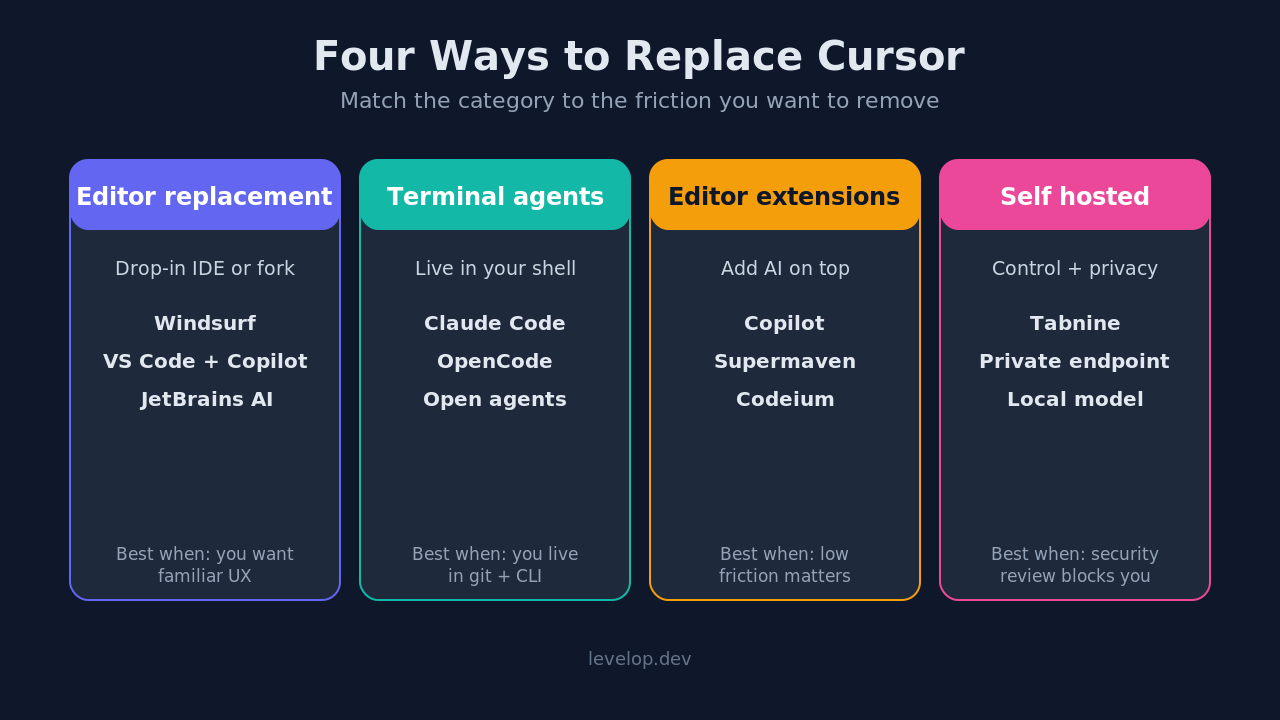
Drop in editor replacements
Windsurf
Windsurf, from the Codeium team, is the most direct "you could switch tomorrow" alternative. It is also a VS Code style editor with an agent built in, and its flow feature that keeps the agent context aware of what you are doing across multiple files was a genuine differentiator when it launched. The ai features line up closely with Cursor's, so most of your muscle memory transfers. If your main complaint with Cursor is pricing or a specific UX quirk, Windsurf is the lowest risk experiment because almost everything, from keybindings to extensions, carries over.
VS Code with GitHub Copilot's agent mode
The plainest alternative is the one many people forget: regular VS Code with github copilot. Copilot's agent mode closed much of the gap with Cursor through 2025 and 2026, and it has the advantage of running inside the editor Microsoft actively maintains, with first party extension support. It handles code completion, chat, and multi file edits in one package. For teams already paying for GitHub, it can be the cheapest path to a solid AI workflow. We compared the two agent experiences directly in our Claude Code vs Cursor breakdown, and a lot of that reasoning applies to Copilot too.
JetBrains AI and Junie
If your team lives in IntelliJ, PyCharm, or another JetBrains IDE, the strongest move is often not to leave at all. JetBrains built its own assistant plus the Junie agent directly into the IDEs, so you keep the refactoring tools and support for your programming languages that made you choose JetBrains in the first place. For strongly typed, large codebase work, that native understanding of your project is worth a lot. It also does context aware completion that respects your existing type system, which generic tools sometimes fumble.
Terminal based agents
Claude Code
Claude Code is the flag bearer for the terminal based approach. Instead of an editor, you get an agent in your shell that reads your repo, plans, edits files, runs commands, and works with git directly. It is one of the strongest coding agents for people who think in terms of the command line rather than a GUI. Developers who found the graphical agent loop distracting often prefer this because it keeps them in the flow they already had. It pairs well with any editor, since it does not care which one you use to view the diff afterward.
OpenCode and other open source tools
A wave of open source tools arrived to give people a model agnostic, inspectable version of the same idea. These terminal based agents let you point the agent at whichever model you want, plug in your own api keys, and see exactly what it is doing when it edits multiple files. If you care about avoiding vendor lock or running a local model, this category is worth a look. We are publishing a dedicated comparison of these agents in this cluster, so watch the Levelop blog for the OpenCode versus Cursor versus Claude Code piece.
# The terminal-first pattern most of these tools follow
cd your-project
claude            # or: opencode
# then describe the change in plain language:
# "add input validation to the signup handler and write a test"
The appeal here is simple. The agent sits next to git, so review and rollback use tools you already trust, and nothing about how you write code has to change. You describe the outcome, the agent proposes an edit across the relevant files, and you approve it with a normal diff.
Keep your editor, add AI on top
Not everyone wants to switch editors at all. If you are happy in your current setup, the extension route is the least disruptive way to get an ai coding assistant without moving house.
Copilot remains the default extension for VS Code, JetBrains, and Neovim, and its free tier covers a lot of individual use. Codeium (now folded into the Windsurf ecosystem) offered a generous free tier that made it popular with individuals and students. Supermaven built a reputation for very fast, low latency code completion. Tabnine leaned into privacy and self hosting for teams that cannot send code to a third party.
The trade off is real: extensions generally give you excellent autocomplete and decent chat, but the deep multi file agent loop and full multi file edits are where dedicated editors like Cursor still tend to lead. If autocomplete plus occasional chat and light pair programming is 90 percent of your usage, an extension may be all you need. If you regularly hand the agent a whole feature to implement, you will feel the ceiling.
Enterprise and self hosted options
For regulated industries or security conscious orgs, the deciding factor is often not features but where the code and context go.
Tabnine and a handful of enterprise focused platforms let you run models in your own cloud or on premises, so nothing sensitive leaves your boundary. Some teams pair an open source terminal agent with a self hosted or private model endpoint to get agent behavior without sending source to an outside vendor. This keeps your code review and your source firmly inside your own network. If your blocker with Cursor is a security review rather than a feature gap, start here and work backward toward developer experience, not the other way around.
How to actually choose
A short decision guide that maps the complaint to the fix.
If your issue is cost, try Windsurf or VS Code with Copilot before anything exotic, since both have predictable plans and a usable free tier. If your issue is that you do not use VS Code, stay in your editor: JetBrains AI for JetBrains users, an extension for Neovim users. If your issue is that the graphical agent loop distracts you, move to a terminal based agent like Claude Code. If your issue is privacy or compliance, start with self hosted options like Tabnine or a private endpoint with a local model. If you are simply curious whether the grass is greener, Windsurf is the cleanest one to one swap.
The meta point: "best Cursor alternative" is the wrong question. The right question is which specific friction you are trying to remove. Once you name that, the field narrows to one or two obvious choices, and the endless list of ai coding tools stops feeling overwhelming.
What we would not recommend
Do not switch tools every month chasing benchmarks. The productivity cost of relearning muscle memory usually swamps the marginal gain from a slightly better model, and model quality changes hands often enough that today's leader may not be next quarter's. Pick a tool that fits your real workflow, give it a fair trial on real work, and only move when a concrete, repeated pain point pushes you.
Also, resist judging these tools purely on autocomplete demos. The thing that actually changes your week is how the agent handles a messy change across multiple files with tests, not how fast it finishes a for loop. Evaluate on your hardest realistic task, not the easy one. A tool that nails a toy example can still fall apart the moment it has to reason about your real project structure.
Frequently asked questions
Is Cursor still worth using in 2026?
Yes, for many teams it remains a top choice. It has a polished agent experience and a large user base. The alternatives matter when you have a specific reason to leave, such as cost, editor preference, or data control, rather than a general sense that something newer must be better.
What is the closest free alternative to Cursor?
VS Code with GitHub Copilot is the most practical near free path for anyone already in the GitHub ecosystem, and its free tier plus extensions like Codeium cover most everyday needs. None are a perfect one to one match, but they handle the majority of routine AI coding tasks without a paid plan.
Which Cursor alternative is best for JetBrains users?
Staying inside JetBrains with its built in AI assistant and the Junie agent is usually the strongest option, because you keep the deep language tooling and refactoring that made JetBrains worth using. Switching to a VS Code fork means giving up those strengths.
Are terminal based agents better than editor based ones?
Neither is strictly better. Terminal based agents like Claude Code suit developers who want to stay close to git and the command line and find the graphical agent loop distracting. Editor based tools suit people who want inline suggestions and a visual diff experience. Many developers use both for different tasks.
How do I switch from Cursor without disrupting my team?
Run a small, time boxed bake off. Have a few developers use the alternative on real backlog items for two weeks alongside the current setup, then compare merged work and developer sentiment. Migrate gradually and keep your existing editor available until the new tool clearly wins.
Where to go next
If you want the full picture rather than just the Cursor comparison, read our ranking of the best AI coding agents in 2026 and the head to head Claude Code vs Cursor comparison. For more engineering focused writing, browse the Levelop blog.