

How to Build an MCP Server: A Step-by-Step Tutorial for Developers
I spent a weekend building my first MCP server. The official docs got me running in about 30 minutes. But it took another few hours to understand what was actually happening under the hood and to build something useful beyond the basic example. This guide covers both: the quick start and the deeper understanding you need to build real MCP servers for production use.
If you are new to MCP entirely, start with our explainer on what Model Context Protocol actually is. This post assumes you know the basics and want to get your hands dirty building your first server.
What You Are Building
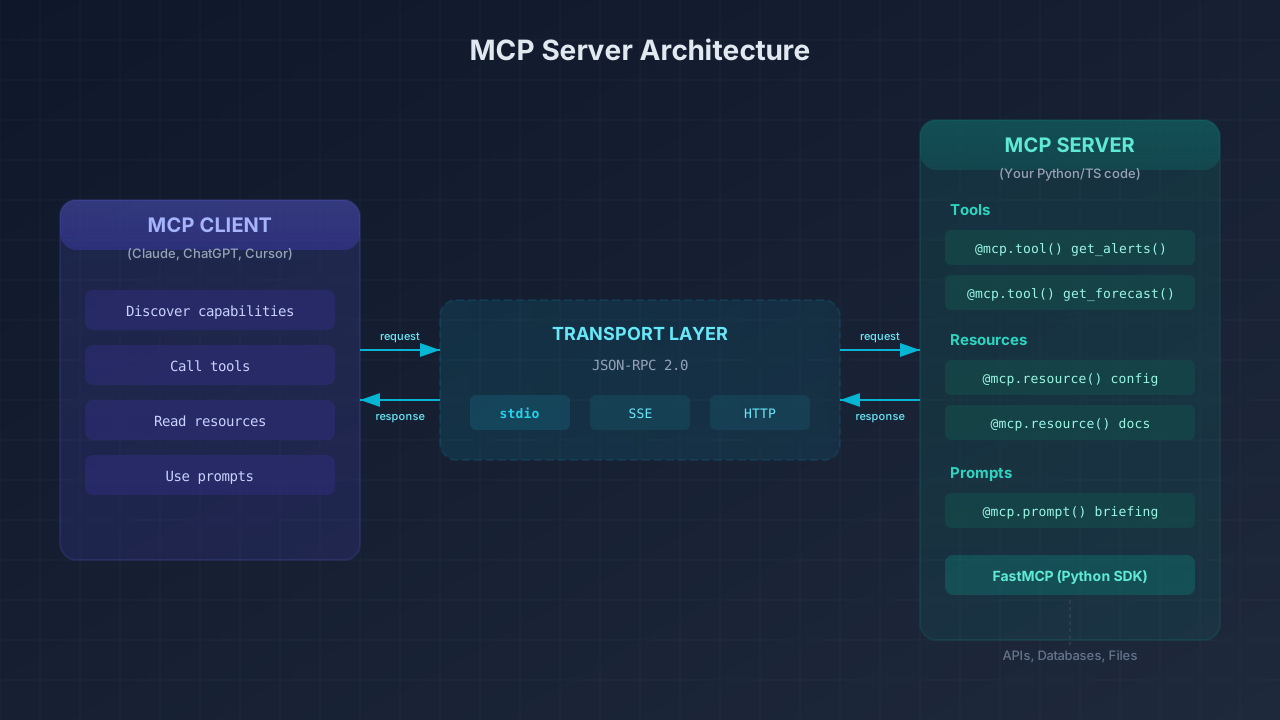
By the end of this tutorial, you will have a working MCP server that exposes custom tools to AI assistants like Claude, ChatGPT, or Cursor. You will understand the three primitives that every MCP server can expose: tools, resources, and prompts. You will also understand how the transport layer works, how to test and debug your server with the MCP Inspector, and how to connect your server to a real AI client like Claude Desktop.
The example uses Python with the official MCP SDK, but I will point out where the TypeScript approach differs. Both produce the same JSON Schema that any MCP client can consume.
Prerequisites
You need Python 3.10 or higher and uv (Astral's Python package manager). You will also want Claude Desktop or the MCP Inspector for testing. Both are free. The MCP Inspector is particularly useful during development because it shows the raw JSON-RPC messages between your server and the client.
Step 1: Scaffold the Project
Create a new project directory and install dependencies:
uv init weather-mcp
cd weather-mcp
uv venv
source .venv/bin/activate  # Windows: .venv\Scripts\activate
uv add "mcp[cli]" httpx
The mcp[cli] package gives you the FastMCP class (the high-level server framework) plus the mcp CLI for development. httpx is an async HTTP library we will use in our example tool.
Step 2: Initialize Your Server with FastMCP
FastMCP is the official high-level API for building MCP servers in Python. It handles all the JSON-RPC plumbing, input validation, and transport negotiation so you can focus on writing your tools.
from typing import Any
import httpx
from mcp.server.fastmcp import FastMCP

# Initialize the server with a name
mcp = FastMCP("weather")
That one line creates a fully functional MCP server instance. The name identifies your server to any connected client.
Step 3: Define Your First Tool
Tools are the core of most MCP servers. They are functions that an AI model can call to perform actions or retrieve data. In FastMCP, you define tools with the @mcp.tool() decorator on an async function:
NWS_API_BASE = "https://api.weather.gov"
USER_AGENT = "weather-app/1.0"

async def make_nws_request(url: str) -> dict[str, Any] | None:
    """Make a request to the NWS API with error handling."""
    headers = {"User-Agent": USER_AGENT, "Accept": "application/geo+json"}
    async with httpx.AsyncClient() as client:
        try:
            response = await client.get(url, headers=headers, timeout=30.0)
            response.raise_for_status()
            return response.json()
        except Exception:
            return None

@mcp.tool()
async def get_alerts(state: str) -> str:
    """Get weather alerts for a US state.

    Args:
        state: Two-letter US state code (e.g. CA, NY)
    """
    url = f"{NWS_API_BASE}/alerts/active/area/{state}"
    data = await make_nws_request(url)

    if not data or "features" not in data:
        return "Unable to fetch alerts or no alerts found."

    alerts = []
    for feature in data["features"]:
        props = feature["properties"]
        alerts.append(f"Event: {props.get('event', 'Unknown')}\n"
                      f"Area: {props.get('areaDesc', 'Unknown')}\n"
                      f"Severity: {props.get('severity', 'Unknown')}")

    return "\n---\n".join(alerts)
What makes FastMCP powerful is the automatic schema generation. Your type hints (state: str) become the JSON input schema. Your docstring becomes the tool description that the AI model reads. The Args section provides parameter descriptions. You never write JSON Schema by hand.
Step 4: Add More Tools with Complex Parameters
@mcp.tool()
async def get_forecast(latitude: float, longitude: float) -> str:
    """Get weather forecast for a location.

    Args:
        latitude: Latitude of the location
        longitude: Longitude of the location
    """
    points_url = f"{NWS_API_BASE}/points/{latitude},{longitude}"
    points_data = await make_nws_request(points_url)

    if not points_data:
        return "Unable to fetch forecast data for this location."

    forecast_url = points_data["properties"]["forecast"]
    forecast_data = await make_nws_request(forecast_url)

    if not forecast_data:
        return "Unable to fetch detailed forecast."

    periods = forecast_data["properties"]["periods"]
    forecasts = []
    for period in periods[:5]:
        forecasts.append(f"{period['name']}: {period['temperature']}\u00b0{period['temperatureUnit']}, "
                         f"{period['windSpeed']} {period['windDirection']}\n{period['detailedForecast']}")

    return "\n---\n".join(forecasts)
FastMCP validates that latitude is a float and longitude is a float before your function even runs. If the client sends a string where a float is expected, FastMCP returns a structured validation error automatically.
Step 5: Wire Up the Transport and Run
if __name__ == "__main__":
    mcp.run(transport="stdio")
The stdio transport means your server communicates over standard input/output using JSON-RPC. This is the default for local MCP servers and the transport that Claude Desktop, Cursor, and the MCP Inspector all support.
import sys
import logging

# Wrong - corrupts the JSON-RPC stream
print("Processing request")

# Right - goes to stderr
print("Processing request", file=sys.stderr)

# Also right - logging defaults to stderr
logging.info("Processing request")
Step 6: Test with MCP Inspector
Before connecting to Claude Desktop, test your server with the MCP Inspector:
npx @modelcontextprotocol/inspector uv run server.pyIt opens a web UI that acts as an MCP client, letting you call tools individually and see the raw JSON-RPC traffic. You can list your tools, send test inputs, and inspect the full request/response cycle.
Step 7: Connect to Claude Desktop
Open your Claude Desktop config file and add your server:
{
  "mcpServers": {
    "weather": {
      "command": "uv",
      "args": [
        "--directory",
        "/absolute/path/to/weather-mcp",
        "run",
        "server.py"
      ]
    }
  }
}
Always use absolute paths. Relative paths will silently fail. After saving, fully quit Claude Desktop (Cmd+Q on macOS) and reopen it. The Claude client will discover all your exposed tools automatically.
Beyond Tools: Resources and Prompts
MCP servers can also expose two other primitives beyond tools. Resources are read-only data endpoints the client can access for context:
@mcp.resource("config://app-settings")
def get_settings() -> str:
    """Current application configuration."""
    return json.dumps({"env": "production", "version": "2.1.0"})
Prompts are reusable templates that guide how the AI uses your tools:
@mcp.prompt()
def weather_briefing(state: str) -> str:
    """Generate a morning weather briefing."""
    return f"Check all active weather alerts for {state} and provide a forecast for the state capital."
Most developers start with just tools. Resources and prompts become valuable as your server grows more complex.
The TypeScript Alternative
If you prefer TypeScript, the pattern is similar but uses server.registerTool() instead of decorators:
import { McpServer } from "@modelcontextprotocol/sdk/server/mcp.js";
import { StdioServerTransport } from "@modelcontextprotocol/sdk/server/stdio.js";
import { z } from "zod";

const server = new McpServer({ name: "weather", version: "1.0.0" });

server.registerTool(
  "get_alerts",
  {
    description: "Get weather alerts for a state",
    inputSchema: {
      state: z.string().length(2).describe("Two-letter state code")
    }
  },
  async ({ state }) => {
    // ... implementation
    return { content: [{ type: "text", text: alertsText }] };
  }
);
The main difference: TypeScript uses Zod schemas for input validation instead of type hints. Both generate the same JSON Schema that any MCP client can consume.
Common Mistakes When Building MCP Servers
- Forgetting async: All tool handlers should be async functions. Synchronous HTTP calls block the entire server.
- Using print() for debugging: This corrupts the stdio stream and produces unrelated-looking errors.
- Relative paths in Claude Desktop config: They silently fail. Always use absolute paths.
- Not restarting Claude Desktop properly: Closing the window does not stop the process on macOS. Use Cmd+Q.
- Returning complex objects instead of strings: AI models work better with formatted text than raw JSON.
When to Build an MCP Server vs a REST API
Build an MCP server when your primary consumer is an AI agent. Build a REST API when your primary consumer is a frontend or microservice. Many teams build both, with the MCP server wrapping the existing REST API. For a deeper comparison, see our post on MCP vs REST API: When to Use Each.
What to Build Next
- Database query tool that lets an AI run read-only SQL against your dev database
- Git history server that exposes commit logs, diffs, and branch info as tools
- Internal docs server that surfaces Confluence or Notion pages as MCP resources
- Deployment status tool that checks CI/CD pipeline status across your services
The MCP ecosystem has over 2,000 community server implementations as of 2026, and every major AI platform now supports MCP natively. For security considerations before deploying, see our upcoming guide on MCP security risks developers need to know.
For more system design and developer tooling deep dives, explore the Levelop blog.
Frequently Asked Questions
What programming languages can I use to build an MCP server?
The official SDKs support Python, TypeScript, Java, Kotlin, and C#. Python and TypeScript have the most mature tooling. FastMCP (Python) and the TypeScript SDK are the most commonly used, with Python being the fastest path for prototyping. Community SDKs exist for Ruby, Rust, and Go.
Do I need to deploy my MCP server to a cloud provider?
Not necessarily. MCP servers using the stdio transport run locally on the same machine as the AI client. This is the simplest setup and works well for personal tools or development workflows. For shared or production use, deploy with HTTP/SSE transport on any cloud provider.
How is building an MCP server different from building a REST API?
The biggest difference is the consumer. REST APIs serve frontends and microservices with structured request/response patterns. MCP servers serve AI models with a tool-call interface where the AI decides which tool to invoke. MCP handles protocol negotiation, input validation, and capability advertisement automatically.
Can one MCP server expose multiple tools?
Yes. A single MCP server can expose as many tools, resources, and prompts as needed. The client discovers all available capabilities when it connects. Group related tools in one server rather than creating a separate server per tool.
How do I debug an MCP server when something goes wrong?
Start with the MCP Inspector (npx @modelcontextprotocol/inspector). It shows raw JSON-RPC traffic and lets you test tools in isolation. For Claude Desktop, check the logs at ~/Library/Logs/Claude/. Stdout corruption from stray print() calls is the most common cause of mysterious failures.