

What Is MCP (Model Context Protocol)? The Complete Developer Guide for 2026
MCP keeps coming up in every AI tools conversation I've had this year. Everyone mentions it, most developers have a fuzzy understanding of it, and the official docs assume you already know why you need it. Here is the complete MCP developer guide I wish existed when I started building AI applications.
The Integration Problem That Drove Everyone Crazy
Before MCP, connecting an AI model to your development tools meant custom integration code for every combination. Five development tools and three AI clients? Fifteen separate integrations, each with its own auth flow, data format, and error handling. Every AI application maintained its own pile of connectors to interact with external systems.
Anthropic recognized a pattern the industry had solved before. USB-C replaced proprietary chargers. OAuth replaced custom login flows. MCP does the same for AI-to-tool connections.
What Is Model Context Protocol?
MCP (Model Context Protocol) is an open standard that defines how any AI system connects to external tools, data sources, and services. Anthropic released it in November 2024, and within 18 months it became the universal standard every major AI vendor adopted.
The core idea: instead of every AI application building custom integrations for every external service, you build one MCP server for your tool, and any MCP-compatible AI assistant can use it. Build once, connect everywhere.
As of mid-2026, MCP has surpassed 97 million monthly SDK downloads, over 10,000 public MCP servers exist, and it is supported by Anthropic, OpenAI, Google, Microsoft, and every major IDE. In December 2025, Anthropic donated MCP to the Agentic AI Foundation under the Linux Foundation, making it a true open standard for the industry.
MCP Architecture: How the Pieces Fit Together
MCP follows a client-server architecture with a host layer on top. Understanding how MCP clients and servers interact is essential to building reliable integrations.
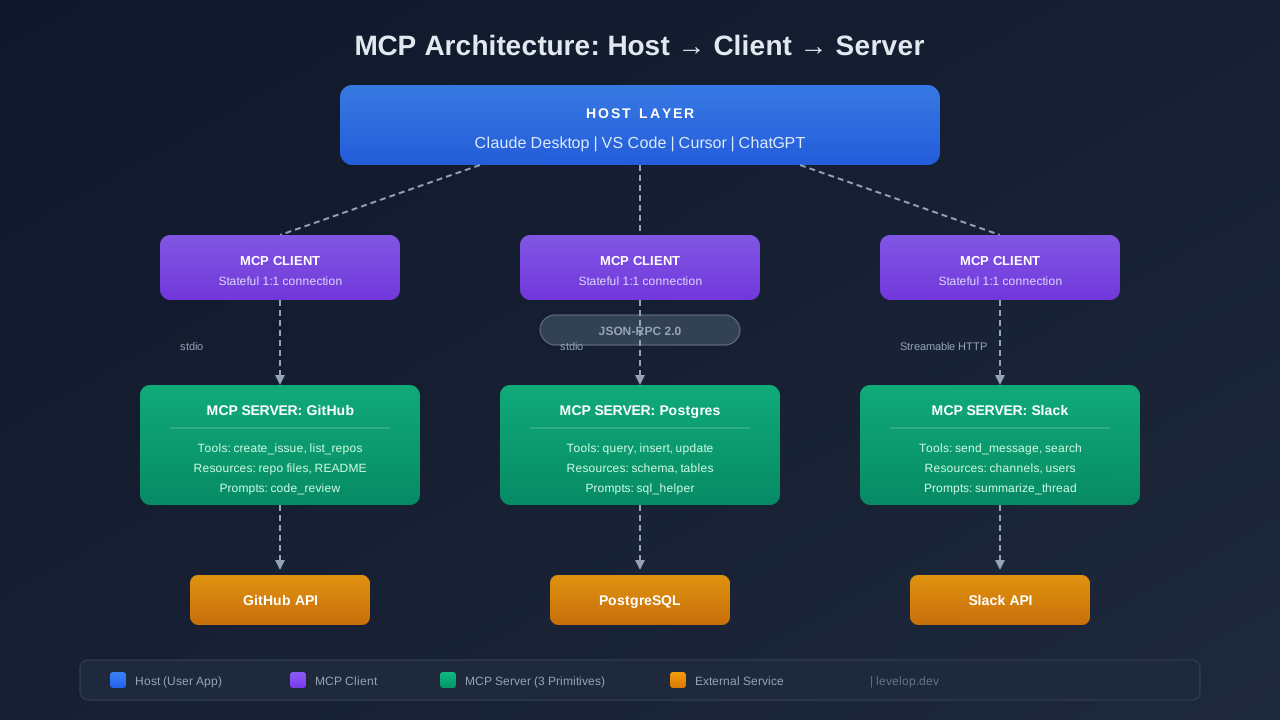
Host, Client, and Server
The host is the user-facing AI application: Claude Desktop, VS Code, Cursor, or ChatGPT. It manages multiple MCP clients.
Each MCP client maintains a stateful, one-to-one connection with a single MCP server. Connect Claude Desktop to GitHub and Postgres? Two separate client instances, each talking to its own server.
The MCP server wraps your tool or external service, exposing capabilities in a standardized format. A Postgres server runs queries. A GitHub server lists repos and creates issues. The server handles tool-specific complexity so the AI assistant does not have to.
JSON-RPC 2.0: The Wire Protocol
All MCP communication uses JSON-RPC 2.0. Every message is a JSON object with a method, params, and an id for matching responses.
{
  "jsonrpc": "2.0",
  "id": 1,
  "method": "tools/call",
  "params": {
    "name": "query_database",
    "arguments": {"sql": "SELECT count(*) FROM users WHERE active = true"}
  }
}
The protocol supports three message types: requests (expecting a response), responses (answering a request), and notifications (fire-and-forget). This maps cleanly to how AI systems process natural language requests and translate them into tool calls.
Transport: stdio and Streamable HTTP
MCP supports two transport mechanisms.
stdio is for local servers. The host spawns the server as a child process and communicates over stdin/stdout. Zero network configuration, no ports, no auth tokens.
Streamable HTTP is for remote servers. Introduced in November 2025, it replaced the older SSE transport. The client sends HTTP POST requests, and the server responds with JSON or an SSE stream for long-running operations. This enables cloud-hosted MCP servers where multiple MCP clients connect in real time over the internet.
The Three Core Primitives
MCP servers expose capabilities through exactly three primitives. This is what MCP standardizes across every AI system and external service.
Tools: Actions the AI Model Can Take
Tools are executable functions the AI model can invoke. They produce side effects: running queries, creating issues, sending messages. Each tool has a name, description, and a JSON Schema defining its input parameters.
@server.tool()
async def create_github_issue(
    repo: str,
    title: str,
    body: str,
    labels: list[str] = []
) -> str:
    """Create a new issue in a GitHub repository."""
    issue = await github.create_issue(repo, title, body, labels)
    return f"Created issue #{issue.number}: {issue.html_url}"
The LLM decides when to call a tool based on natural language understanding. No hard-coded routing — the AI model reasons about which tool fits. If you have read about how agentic AI coding tools work under the hood, the pattern is the same: plan, then act through tools.
Resources: Read-Only Data Access
Resources let the AI assistant read data without modifying anything — files, schemas, configuration. They are read-only by design. The client can list resources, read contents, and subscribe to real time changes. No side effects.
Prompts: Reusable Interaction Templates
Prompts are parameterized templates that standardize common LLM interactions. A code-review prompt might accept a programming language and file path, then assemble a system message with review instructions. They encode domain expertise into reusable templates any team member can invoke.
The Connection Lifecycle
When a client connects to a server, MCP clients and servers negotiate capabilities. The client sends an initialize request with its supported protocol version. The server responds with its version plus which tools, resources, and prompts it exposes. MCP is self-describing — the client asks what the server can do and gets a structured answer.
The session stays alive until either side disconnects, with bidirectional communication. The server can push notifications, and the client can call any advertised capability. Because MCP standardizes both discovery and invocation, adding a new tool requires zero changes to client code.
Building a Simple MCP Server in Python
Here is a minimal MCP server using the official Python SDK:
from mcp.server.fastmcp import FastMCP

mcp = FastMCP("weather")

@mcp.tool()
async def get_forecast(city: str) -> str:
    """Get the current weather forecast for a city."""
    return f"Weather in {city}: 72°F, partly cloudy"

@mcp.resource("weather://supported-cities")
async def list_cities() -> str:
    """List all supported cities."""
    return "New York, San Francisco, London, Tokyo, Mumbai"

if __name__ == "__main__":
    mcp.run(transport="stdio")
Add it to your claude_desktop_config.json, restart Claude Desktop, and the AI assistant discovers and calls your tool automatically. No API wrapper needed. This is how any development team can interact with external systems through a single open standard.
Who Supports MCP in 2026?
Anthropic shipped first-class MCP support in Claude Desktop and Claude Code. OpenAI adopted MCP in March 2025, Google DeepMind in April 2025, and Microsoft integrated it across Azure OpenAI, Copilot, and VS Code. Cursor and Windsurf support MCP natively. One MCP server works with every compatible AI application. See our ranking of the best AI coding agents in 2026 or our deep dive on MCP vs REST API.
MCP vs A2A: Complementary Protocols
MCP handles vertical integration — connecting an AI system to tools and data. Google's A2A (Agent-to-Agent) protocol handles horizontal integration — letting AI agents communicate with each other. MCP gives an agent its hands to interact with external services. A2A lets agents delegate work to other agents. They are complementary, not competing.
Getting Started: Your First MCP Integration
Use existing servers: install Claude Desktop or Cursor, browse the MCP server registry, add to config, restart. Servers exist for GitHub, Slack, Postgres, Notion, Linear, and hundreds of other external systems.
Build your own: start with the Python or TypeScript SDK. FastMCP handles protocol boilerplate. Start with one or two tools and iterate.
Evaluate for your org: if your team uses multiple AI clients (Claude, Copilot, Cursor), one MCP server beats maintaining separate integrations for each AI application. The break-even is two or more clients.
Common Mistakes When Getting Started
- Overloading tools with too many parameters. A tool with 15 optional parameters confuses the AI model. Break it into focused tools: query_database, insert_record, update_record instead of one manage_database.
- Skipping tool descriptions. The LLM uses descriptions to decide when to call tools. Write them as if you are explaining to a smart colleague who has never seen your codebase.
- Ignoring error handling. Return clear error messages, not stack traces. The AI system needs to understand what went wrong to retry or try alternatives.
- Confusing Resources and Tools. If data changes frequently or involves computation, use a Tool. Resources are for static data the client might cache.
Where MCP Is Heading
The November 2025 spec added OAuth 2.1 for remote auth and Streamable HTTP transport. The 2026 roadmap includes stateless server operation for horizontal scaling, automatic discovery via MCP Server Cards, and tighter A2A integration.
MCP is becoming the infrastructure layer for agentic AI — the same way HTTP became infrastructure for the web. If you are building development tools that an AI assistant should use, MCP is how you expose them. For more on how platforms are evolving, see our guide on what platform engineering means for developers.
Frequently Asked Questions
What is Model Context Protocol (MCP)?
MCP is an open standard created by Anthropic that defines how AI models connect to external tools, data sources, and external services. It replaces custom integrations with a universal protocol, so you build one MCP server for your tool and any compatible AI application can use it.
Is MCP only for Anthropic's Claude?
No. While Anthropic created MCP, it is fully open source and now governed by the Agentic AI Foundation under the Linux Foundation. OpenAI, Google, Microsoft, and major IDEs like VS Code and Cursor all support MCP natively.
How is MCP different from a REST API?
REST APIs require each client to understand the specific API format, authentication, and error handling. MCP provides a standardized protocol where the AI model automatically discovers available tools and knows how to call them. The key difference is that MCP is self-describing — clients ask servers what they can do, eliminating the need for separate API documentation.
What programming languages support MCP?
Official SDKs exist for TypeScript and Python. Community SDKs cover Go, Rust, Java, C#, and more. The protocol itself is language-agnostic since it is built on JSON-RPC 2.0.
Do I need to rewrite my existing APIs to support MCP?
No. You can wrap existing APIs in a thin MCP server layer. The MCP server calls your existing API internally and exposes the functionality as MCP tools. This is the most common adoption pattern for teams looking to interact with external systems through a single open standard.
Published on Levelop — practical guides for developers who build with AI. Explore more on the Levelop blog.