
Context Engineering Best Practices: 10 Techniques That Make AI Coding Agents Reliable
This post continues the AI tools series, and it gets concrete about the single factor that decides whether your coding agent ships clean work or flails: the context you feed it.
I have spent the last year wiring agents into real workflows at Levelop, and the pattern is always the same. The model is rarely the bottleneck. The context is. Two teams point the same Claude or GPT model at the same codebase, and one gets an agent that lands clean pull requests while the other gets a confident machine that edits the wrong file. The difference is almost never the prompt phrasing. It is context engineering best practices, applied or ignored.
So this is the practical companion to my guide to context engineering. That post defines the discipline. This one is the checklist: ten context engineering techniques I use, each with the reasoning underneath it and, where it helps, a small example you can copy.
What context engineering best practices actually optimize for
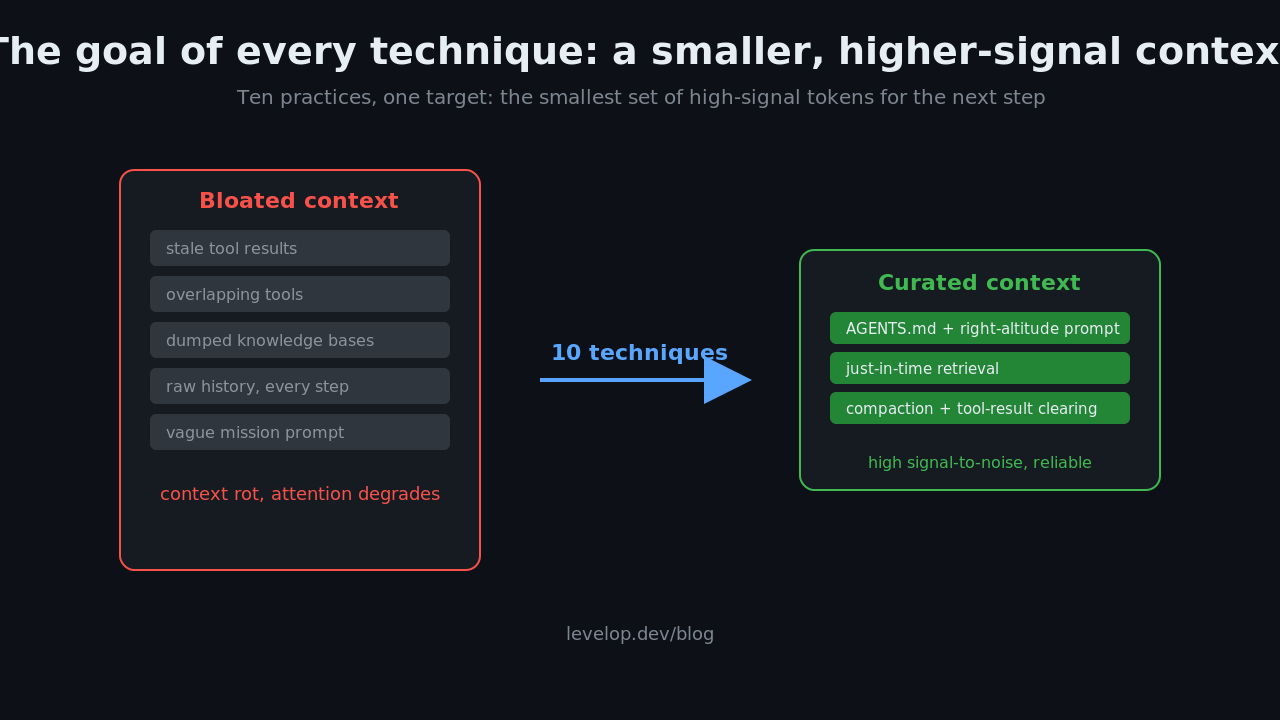
Before the list, the one idea everything hangs on. Andrej Karpathy described context engineering as filling the window with "just the right information for the next step," and Anthropic's engineering team sharpens it into a goal worth memorizing: find the smallest set of high-signal tokens that maximizes the chance of the outcome you want.
That is the whole game. Not the most context. Not the cleanest prompt. The smallest high-signal set. Every technique below is a different way to push toward that target, because a context window is a budget, and an LLM's attention degrades as you fill it with noise. The published research even has a name for the decay now, "context rot," and it is the reason a bloated 100k-token context often performs worse than a curated 8k-token one.
1. Write the system prompt at the right altitude
The most common failure I see is a system prompt pitched at the wrong altitude. Too low and it reads like brittle if-this-then-that logic that breaks the moment reality differs from your script. Too high and it is a vague mission statement the agent cannot act on.
The right altitude is specific about behavior and principles, but not a decision tree. "Prefer editing existing files over creating new ones; when a test fails, read the full error before changing code" is actionable without being rigid. Organize it into clear sections with headers, because the agent navigates your prompt the same way you would, by scanning for the relevant block.
2. Keep the tool loadout small and non-overlapping
Every tool you expose is context the model has to read and reason about on every step. A bloated toolset is one of the quietest ways to wreck an agent, because two tools that do almost the same thing force a decision the model will sometimes get wrong.
Anthropic's framing is that tools should be self-contained, robust to error, and unambiguous about their purpose. My rule at Levelop is blunter: if I cannot explain to a new engineer why two tools both exist, the agent cannot tell them apart either. Curate the loadout the way you would curate an API surface, and prune relentlessly.
3. Make AGENTS.md your shared instruction file
By early 2026, AGENTS.md became the closest thing the industry has to a universal agent instruction format. Claude Code, OpenAI Codex CLI, Cursor, Aider, GitHub Copilot, Gemini CLI, and Windsurf all read it natively. One file at the repo root that encodes your conventions, and every agent your team uses inherits them.
This is the highest-leverage context engineering template you can adopt, because it moves knowledge out of individual prompts and into the repository where it is versioned and shared. It is also the backbone of Claude Code context engineering specifically: Claude Code reads this file on every run, so a good AGENTS.md is the cheapest reliability win available to a Claude Code context engineering workflow.
# AGENTS.md

## Stack
- TypeScript, React 19, Vite. Postgres via Drizzle ORM.

## Conventions
- Prefer editing existing files. Do not add a dependency without flagging it.
- Tests live next to source as *.test.ts. Run `pnpm test` before declaring done.

## Error handling
- Never swallow errors. Log with context, rethrow or surface to the user.

## Do not touch
- /migrations is append-only. Never edit an existing migration.
Keep it tight. An AGENTS.md that grows into a 2,000-line wiki defeats the purpose, because now you are back to dumping low-signal tokens into every run.
4. Retrieve just in time, not everything up front
The instinct from the RAG era was to pre-load the window with everything that might be relevant. The better pattern for agents is just-in-time retrieval: keep lightweight identifiers like file paths or query handles in context, and let the agent pull the full content only when it actually needs it.
This mirrors how a human engineer works. You do not memorize the whole codebase before starting a task. You keep a mental index and open the file when the task points you at it. Giving your agent the same progressive-disclosure ability keeps the working context lean and lets it follow the trail to exactly what each step requires.
5. Compact long histories before they overflow
On any run long enough to matter, you will approach the window limit. Compaction is the workhorse of long-run context management: it summarizes the conversation so far and reinitiates a fresh window with that summary, so the agent continues with minimal loss.
The art is in what you keep. A good compaction preserves architectural decisions, unresolved bugs, and implementation details, while discarding raw tool outputs that have already served their purpose. Anthropic's Claude cookbook walks through compaction, memory, and tool clearing as concrete patterns. Tune it by watching what gets dropped, because the failure mode here is brevity bias, throwing away the specific detail that was the whole point. I dug into that trap in my piece on agentic context engineering, where uncontrolled rewriting degrades into context collapse.
6. Clear stale tool results
The lightest, safest form of compaction is tool-result clearing. Once an agent has read a file, run a search, or made a dozen other tool calls, the raw results sitting deep in the message history are dead weight. The agent already extracted what it needed; the verbose payload just crowds the budget.
Clearing or truncating those old results is low-risk because you are removing data the agent has already consumed, not decisions it might still need. It is the first knob I reach for when a long-running agent starts to slow down or lose the thread.
7. Take structured notes outside the window
Some information is too important to risk losing to a compaction pass. The answer is to persist it outside the context window entirely, in a memory file or one of the small knowledge bases the agent can write to and read back after a reset. Claude Code's approach of maintaining a to-do or progress file is the everyday version of this.
# memory.py: the agent persists durable state outside the window
def checkpoint(note, path="AGENT_NOTES.md"):
    # append-only: never rewrite the whole file, just add the new lesson
    with open(path, "a") as f:
        f.write("- " + note + "\n")

def recall(path="AGENT_NOTES.md"):
    # read durable memory back in after a context reset
    return open(path).read()
The discipline that matters is append, do not overwrite. A memory file that the agent regenerates wholesale on every step is a memory file that slowly corrupts itself, which is exactly the failure I unpack in the agentic context engineering deep dive.
8. Isolate work in sub-agents that return summaries
For anything multi-stage, do not make one agent hold the entire project in a single window. Spin up sub-agents with clean context windows for focused subtasks, let each do its deep exploration, and have it return a condensed summary of one to two thousand tokens instead of its full trace.
The main agent stays focused on orchestration and never sees the thousands of tokens the sub-agent burned getting to its answer. This is how you scale an agent across a large task without the context bloating past the point of usefulness. It is also a clean architectural boundary, which I covered in how agentic AI coding tools work under the hood.
9. Format context so the model can scan it
How you structure context is nearly as important as what is in it. Models, like people, parse well-organized text faster and more reliably than a wall of prose.
Use headers to segment context into addressable units. Use bullet lists for rules, because they are direct and unambiguous. Use code blocks liberally, and when you want to steer style, show a Preferred and an Avoid example side by side rather than describing the rule in words. A concrete example of the code you want is worth a paragraph of instruction about it, and it removes the ambiguity that vague phrasing leaves on the table.
10. Add metadata and maintain your context like code
Context files rot. A convention you wrote six months ago, a tool that no longer exists, a "preferred" pattern you have since abandoned: stale context is actively misleading, worse than no context at all, because the agent trusts it.
A small metadata block at the top of each context file solves most of this.
---
last_updated: 2026-06-09
owner: platform-team
scope: backend services
reviewed_by: avinash
---
Then treat these files as code. Review them, diff them between runs, and prune what is no longer true. Context engineering tools are starting to bake this in, but the habit matters more than the tooling. The teams that win at this are the ones that keep a tight feedback loop on their context, not the ones with the fanciest stack. If you want the conceptual foundation under all ten of these, start with context engineering versus prompt engineering, then browse the rest of the Levelop blog.
Putting the techniques together
You do not adopt all ten on day one. Here is the order I would add them in, because each one earns the next.
Start with an AGENTS.md and a right-altitude system prompt, since those two give you the biggest reliability jump for the least effort. Trim your tool loadout next. Once your runs get long enough to hit the window, add compaction and tool-result clearing. When you need state to survive a reset, reach for structured notes. Bring in sub-agents only when a single window genuinely cannot hold the task. And from the very start, format for scannability and stamp your context files with metadata, because those two cost almost nothing and pay off every single run.
The throughline is the same target Anthropic and Karpathy keep pointing at: the smallest set of high-signal tokens for the next step. Every technique above is a different lever on that one number.
FAQ
What are the most important context engineering best practices?
The highest-leverage practices are writing a system prompt at the right altitude, keeping a small non-overlapping tool loadout, maintaining a shared AGENTS.md instruction file, retrieving information just in time, and compacting long histories before they overflow the window. All of them serve one goal: the smallest set of high-signal tokens for the next step.
What is the difference between context engineering and prompt engineering?
Prompt engineering is about phrasing a single instruction well. Context engineering is the broader discipline of curating the entire set of tokens an agent sees across a multi-step run, including tools, retrieved data, memory, and history. As agents got more autonomous, context engineering became the more important skill. I cover the full distinction in context engineering versus prompt engineering.
What is an AGENTS.md file and do I need one?
AGENTS.md is a single file at your repository root that encodes your conventions, stack, and rules for AI coding agents. By 2026 it is read natively by Claude Code, Cursor, Codex CLI, GitHub Copilot, and most major agents, making it the closest thing to a universal instruction format. If your team uses any AI coding tool, it is the single highest-value context engineering template to adopt.
How does compaction differ from just using a bigger context window?
A bigger window lets you hold more tokens, but model attention degrades as the window fills, a decay sometimes called context rot. Compaction fights that by summarizing old history into a high-signal digest and continuing in a fresh window, so the agent keeps the important decisions without carrying the noise. Curating beats hoarding even when you have the room.
What are good context engineering tools for a coding team?
The most useful tooling sits in the agents your team already runs: Claude Code, Cursor, and similar tools that read AGENTS.md, support memory files, and let you manage tool loadouts. The habit matters more than any single product. A disciplined feedback loop on your context files, with metadata and regular pruning, beats any tool used carelessly.
Where should I start if I am new to context engineering?
Start with the foundations in the developer's guide to context engineering, add an AGENTS.md to one repository, and trim your agent's tool loadout. Those three steps deliver most of the reliability gain. From there, layer in compaction, structured notes, and sub-agents as your runs grow longer and more complex.