
LangChain vs LangGraph: Which to Use for AI Agents
If you have spent any time building AI agents in 2026, you have run into both LangChain and LangGraph. They come from the same team, share a lot of vocabulary, and are constantly mentioned together. That overlap is what makes the choice confusing. People assume they are competitors, or that one replaces the other, and pick the wrong tool for the job. The langchain vs langgraph question, and the reverse langgraph vs langchain framing, usually comes down to one thing: which layer of the stack you are working at.
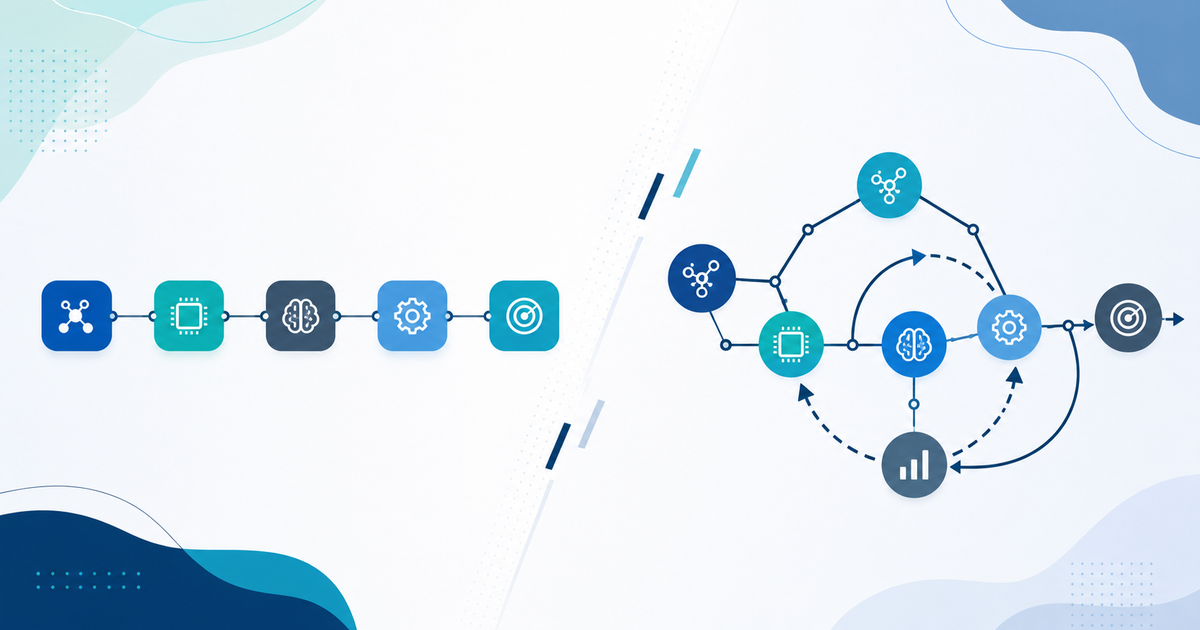
They are not competitors. LangChain and LangGraph solve different problems at different layers of the stack. LangChain is the broad toolkit for wiring language models to prompts, tools, and data. LangGraph is a lower-level orchestration engine for building stateful, multi-step agents that can loop, branch, and recover. Once you see where each one sits, the decision gets a lot simpler.
This guide breaks down what each library actually does, shows the same agent built both ways, and gives you a decision framework you can apply to your own project. It is part of our larger guide to AI agent frameworks, so if you are still mapping the whole landscape, start there and come back.
The Short Answer
Use LangChain when you need to assemble a pipeline quickly: call a model, format a prompt, hit a tool, parse the output. It shines for retrieval-augmented generation, simple tool-using agents, and anything where the control flow is mostly linear.
Reach for LangGraph when your agent needs real control flow: loops that keep calling tools until a goal is met, branches that route to different sub-agents, persistent state across steps, human approval in the middle of a run, or the ability to resume after a crash. LangGraph models your agent as a graph of nodes and edges, which gives you explicit control over what happens next.
The nuance most tutorials skip: LangGraph is built by the LangChain team and plays nicely with LangChain components. You often use both together. LangChain gives you the model wrappers, tool abstractions, and integrations. LangGraph gives you the orchestration layer that decides how those pieces execute.
What LangChain Actually Is
LangChain launched in late 2022 and became the default way to build LLM-powered applications. At its core it provides a set of composable building blocks for LLM workflows: model wrappers, prompt templates, output parsers, retrievers, and tool interfaces. The LangChain Expression Language (LCEL) lets you pipe these blocks together with a clean syntax.
Here is a minimal LangChain agent that can use a tool:
from langchain_openai import ChatOpenAI
from langchain.agents import create_tool_calling_agent, AgentExecutor
from langchain_core.tools import tool
from langchain_core.prompts import ChatPromptTemplate

@tool
def get_weather(city: str) -> str:
    "Return the current weather for a city."
    return f"It is 22C and sunny in {city}."

llm = ChatOpenAI(model="gpt-4o")
prompt = ChatPromptTemplate.from_messages([
    ("system", "You are a helpful assistant."),
    ("human", "{input}"),
    ("placeholder", "{agent_scratchpad}"),
])

agent = create_tool_calling_agent(llm, [get_weather], prompt)
executor = AgentExecutor(agent=agent, tools=[get_weather])
print(executor.invoke({"input": "What is the weather in Paris?"}))
The AgentExecutor runs a loop under the hood: the model decides whether to call a tool, the executor runs it, feeds the result back, and repeats until the model returns a final answer. This is powerful and fast to set up. The catch is that the loop is a black box. You do not get fine-grained control over the branching, and inspecting or modifying the intermediate state is awkward.
For linear workflows, that black box is a feature, not a bug. You do not want to hand-write the control flow for a straightforward retrieval question. LangChain lets you ship in an afternoon.
What LangGraph Actually Is
LangGraph arrived in early 2024 to solve the exact problem the AgentExecutor hides: complex, stateful, cyclical control flow. Instead of a hidden loop, you define your agent as an explicit graph. Nodes are units of work, usually a function or a model call. Edges decide which node runs next. Critically, edges can be conditional, and the graph can contain cycles, which is what makes true agentic behavior possible.
Every LangGraph run carries a shared state object that each node reads from and writes to. That state is a first-class citizen, not something buried inside an executor. Here is the same weather agent, expressed as a graph:
from langgraph.graph import StateGraph, END
from langgraph.prebuilt import ToolNode
from langchain_openai import ChatOpenAI
from langchain_core.tools import tool
from typing import Annotated, TypedDict
from langgraph.graph.message import add_messages

@tool
def get_weather(city: str) -> str:
    "Return the current weather for a city."
    return f"It is 22C and sunny in {city}."

class State(TypedDict):
    messages: Annotated[list, add_messages]

llm = ChatOpenAI(model="gpt-4o").bind_tools([get_weather])

def call_model(state: State):
    return {"messages": [llm.invoke(state["messages"])]}

def should_continue(state: State):
    last = state["messages"][-1]
    return "tools" if last.tool_calls else END

graph = StateGraph(State)
graph.add_node("model", call_model)
graph.add_node("tools", ToolNode([get_weather]))
graph.set_entry_point("model")
graph.add_conditional_edges("model", should_continue)
graph.add_edge("tools", "model")
app = graph.compile()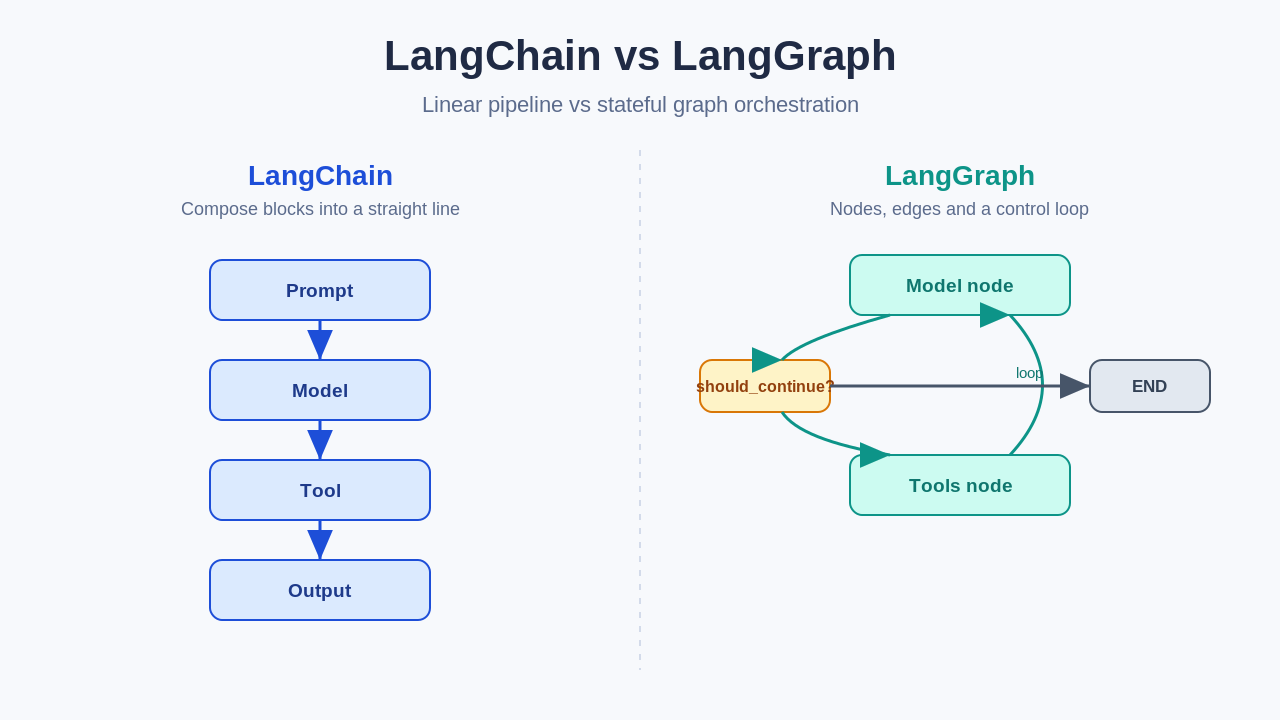
It is more code. In return you get something the LangChain executor cannot easily give you: a visible, editable control flow. You can see that after the model runs, should_continue decides whether to route to the tools node or finish. After tools run, control returns to the model. That cycle is explicit, testable, and yours to modify.
The Features That Only Show Up at Scale
The gap between the two libraries widens once your agent leaves the demo stage. Three LangGraph capabilities tend to be the deciding factors.
Persistence and checkpointing. LangGraph can save the full state of a run to a checkpointer (in memory, SQLite, or Postgres). If a run crashes on step 7 of 10, you can resume from step 7 instead of starting over. For long-running agents, batch jobs, or anything that calls expensive models, this alone justifies the switch. Our deeper walkthrough of graph orchestration in LangGraph covers how checkpointers plug into a running graph.
Human-in-the-loop. Because state is persisted and the graph is explicit, LangGraph can pause before a sensitive node, wait for a human to approve or edit the proposed action, and then continue. Think of an agent that drafts a database migration or sends a customer email. You want a human gate before the irreversible step. Building that cleanly on top of a hidden executor loop is painful.
Multi-agent orchestration. When you need a supervisor agent routing work to specialist sub-agents, the graph model maps directly onto the problem. Each agent is a node or a subgraph, and conditional edges handle the routing. If you are weighing several frameworks for this pattern, our comparison of the best AI agent frameworks in 2026 puts LangGraph next to CrewAI and AutoGen.
A Practical Decision Framework
You do not need to agonize over this. Answer four questions.
First, is your control flow mostly linear? If the agent calls a model, maybe hits a tool or two, and returns an answer, LangChain is enough. Do not add a graph engine to a straight line.
Second, does the agent need to loop until a goal is met, with branching that you want to control? That is the LangGraph sweet spot. The explicit cycle is the whole point.
Third, do you need to persist state, resume after failures, or insert human approval mid-run? Those are LangGraph features that are hard to replicate in plain LangChain. If any of them are requirements, the decision is made.
Fourth, are you comparing across the whole ecosystem, not just these two? Then treat "langchain vs langgraph vs langsmith" as three different concerns: LangChain builds, LangGraph orchestrates, and LangSmith observes and evaluates. They are complementary, not alternatives.
Migrating From LangChain to LangGraph
If you started with a LangChain AgentExecutor and hit its ceiling, the migration is more of a re-expression than a rewrite. Your tools, prompts, and model wrappers carry over unchanged. What changes is that the hidden executor loop becomes an explicit model-tools cycle, exactly like the graph example above.
The prebuilt create_react_agent helper in LangGraph gives you a ready-made agent graph that mirrors the old executor behavior, so you can migrate in one step and then customize the graph only where you need more control. Start there, confirm parity, then add checkpointing or conditional routing as your requirements grow. Do not rebuild everything at once.
The Bottom Line
LangChain and LangGraph are not rivals fighting for the same slot in your stack. LangChain is the toolkit that connects models to the world. LangGraph is the orchestration engine that governs how a stateful agent moves through its work. Simple and linear points to LangChain. Cyclical, stateful, and production-grade points to LangGraph. And the strongest agents in 2026 often use both, with LangChain components living inside a LangGraph graph.
If you are building your first serious agent, start with LangChain to validate the idea, then graduate the parts that need real control flow into LangGraph. To see where both fit in the wider ecosystem, read our developers' guide to AI agent frameworks, and explore more engineering write-ups on the Levelop blog.
Frequently Asked Questions
Is LangGraph replacing LangChain?
No. LangGraph is built by the LangChain team as an orchestration layer that sits on top of and alongside LangChain. LangChain continues to provide the model wrappers, tools, and integrations. LangGraph adds explicit, stateful control flow. They are designed to be used together, not as substitutes.
When should I use LangChain instead of LangGraph?
Use LangChain when your workflow is mostly linear: retrieval-augmented generation, a single tool call, or a straightforward prompt pipeline. If you do not need loops, persistent state, human approval, or crash recovery, LangChain gets you to production faster with less code.
What is the difference between LangChain, LangGraph, and LangSmith?
LangChain is the framework for building LLM applications. LangGraph is the orchestration engine for stateful, cyclical agents. LangSmith is the observability and evaluation platform for tracing, debugging, and testing whatever you build. They cover building, orchestrating, and monitoring respectively.
Can I use LangChain tools inside LangGraph?
Yes, and it is the recommended pattern. LangGraph nodes can call LangChain models, tools, and retrievers directly. A very common architecture is LangChain components running inside LangGraph nodes, which gives you LangChain's integrations with LangGraph's control over execution.
Is LangGraph harder to learn than LangChain?
LangGraph has a steeper initial curve because you define nodes, edges, and shared state explicitly rather than relying on a prebuilt executor. That said, the concepts are small: nodes do work, edges decide what runs next, and state flows through. Most developers comfortable with LangChain pick up LangGraph in a few hours, especially by starting from the prebuilt agent helper.
Does LangGraph work with models other than OpenAI?
Yes. Because LangGraph builds on LangChain's model abstractions, any chat model LangChain supports (Anthropic, Google, open-source models via local runtimes, and others) works inside a LangGraph node with no change to the graph structure.