
LangGraph AI Agent Framework: Why Graph-Based Orchestration Took Over in 2026
Back with another one in the series where I break down the things I found genuinely hard to wrap my head around. This time it is LangGraph. I had built a few agents with simpler tools and they worked fine in a demo, then fell apart the moment I needed retries, a human approval step, or any kind of "wait, go back and try that again" behavior. Every fix made the code messier. LangGraph was the thing that finally made that mess feel structured, and once it clicked I understood why the LangGraph AI agent framework became the production default this year.
The gap I was stuck on
My mental model of an agent was a loop: call the model, run a tool, feed the result back, repeat until done. That works right up until it does not. What happens when a tool fails and you want to retry only that step? What happens when you need a person to approve an action before the agent continues? What happens when the agent needs to loop back three steps because new information changed the plan? My loop turned into a tangle of flags and if-statements. I could not reason about the state of my own program.
The thing I could not see at first is that an agent is not really a loop. It is a graph. Once I started thinking in nodes and edges instead of one big while-loop, the hard parts stopped being hard.
What graph-based orchestration actually means
LangGraph models an agent as a directed graph. You define nodes, which are units of work, and edges, which are the transitions between them. A shared state object flows through the graph, and every node can read from it and write to it. That is the whole idea. The reason it matters is that it makes the agent's control flow and its memory both explicit instead of hidden inside a function call stack. State management stops being an afterthought and becomes the spine of the whole design.
This matters most once you move past a single agent and into a multi agent system, where several agents hand work back and forth. An agentic workflow with three or four cooperating agents quickly becomes impossible to reason about if each one keeps its own private state. A shared, explicit state object is what keeps multi agent workflows debuggable as they grow.
Compare that to the loop approach. In a loop, the "state" of your agent is scattered across local variables, and the "control flow" is whatever your if-statements happen to do that iteration. In a graph, the state is one addressable object you define up front, and the control flow is a set of edges you can draw on a whiteboard. When something goes wrong, you can point at the exact node and the exact state that produced the problem.
If you want the broader landscape of agentic tooling before going deep on one framework, the AI agent frameworks developer's guide lays out the whole field. This post zooms all the way in on LangGraph and the graph model underneath it.
The three building blocks: state, nodes, edges
State
State is the data that travels through your graph. In LangGraph you describe its shape with a typed dictionary. This is not bureaucratic typing for its own sake. The schema is what lets every node agree on what fields exist and what they mean.
from typing import TypedDict

class AgentState(TypedDict):
    question: str
    research: str
    answer: str
That is the contract. Every node receives a state that looks like this and returns an updated version of it. Because the shape is declared once, you never have to guess what data is available inside a node.
Nodes
A node is just a function. It takes the current state, does some work, and returns the parts of the state it changed. Nodes are where your actual logic lives: a model call, a tool calling step that hits an external API, a retrieval step, a validation check. This is also where most LLM applications spend their time, so keeping that work behind a clean node boundary makes the whole agent easier to test.
def research_node(state: AgentState) -> AgentState:
    state["research"] = run_retrieval(state["question"])
    return state

def answer_node(state: AgentState) -> AgentState:
    state["answer"] = generate(state["question"], state["research"])
    return state
Notice there is nothing clever here. The cleverness comes from how you wire these plain functions together.
Edges
Edges define what runs next. A normal edge says "after this node, go to that node." That alone would just be a flowchart. The part that makes LangGraph an agent framework rather than a diagramming tool is the conditional edge, which I will get to in a second.
from langgraph.graph import StateGraph, END

graph = StateGraph(AgentState)
graph.add_node("research", research_node)
graph.add_node("answer", answer_node)
graph.set_entry_point("research")
graph.add_edge("research", "answer")
graph.add_edge("answer", END)

app = graph.compile()
result = app.invoke({"question": "What changed in agent frameworks?"})
This compiles into a runnable app. You give it an initial state, it flows through the nodes, and you get the final state back. So far this is a straight line. Real agents are not straight lines.
Conditional edges and loops: the part that actually matters
Here is the piece that took me longest to appreciate. A conditional edge is an edge whose destination is decided at runtime by a function that looks at the current state. This is how an agent makes decisions, and it is how you build loops without a tangle of flags.
def should_continue(state: AgentState) -> str:
    if state.get("answer"):
        return "done"
    if state.get("research"):
        return "answer"
    return "research"

graph.add_conditional_edges(
    "answer",
    should_continue,
    {"research": "research", "answer": "answer", "done": END},
)
The router function returns a label, and the mapping turns that label into the next node. Because an edge can point back to a node that already ran, you get loops for free. An agent that needs to research, attempt an answer, notice the answer is weak, and go back to research more is just a cycle in the graph. No counters, no break conditions buried in a while-loop. The looping behavior is data, not control-flow spaghetti.
This is the exact thing I was failing to express with my hand-rolled loop. I was trying to encode "go back and try again" as imperative code. LangGraph lets me encode it as a shape.
Checkpointing and durable state
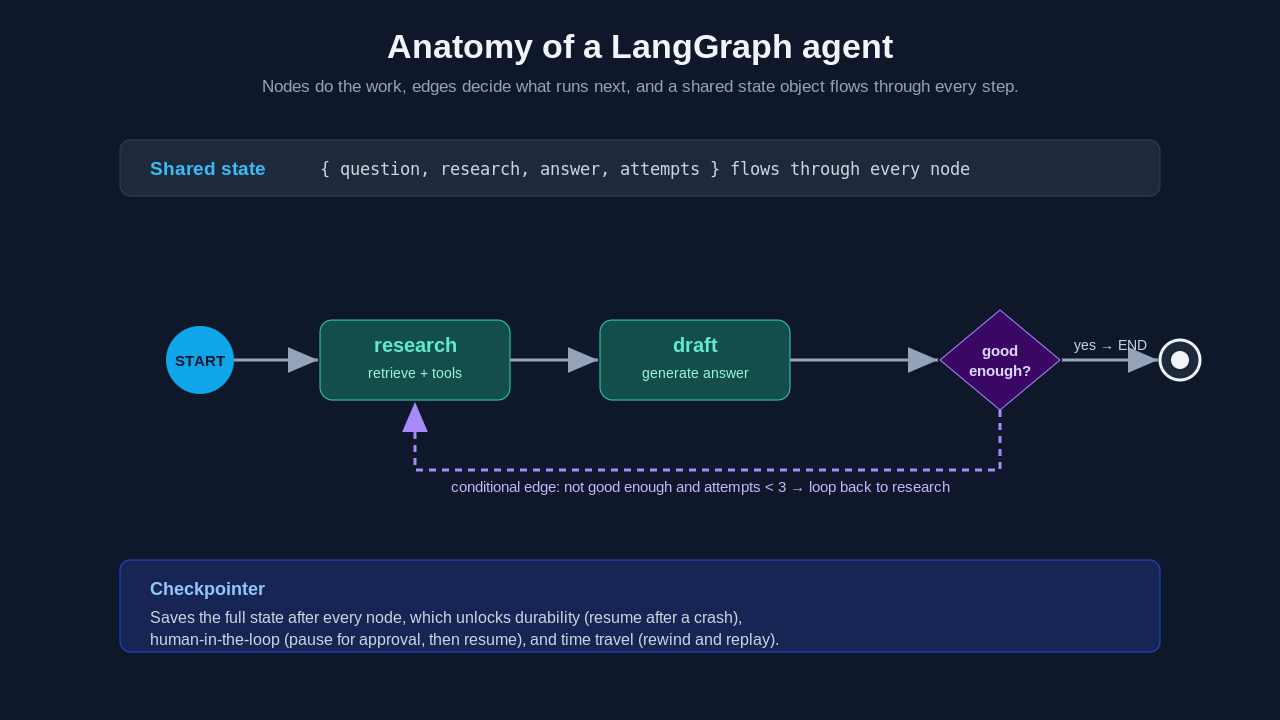
If conditional edges are what made me understand LangGraph, checkpointing is what made me trust it for production. When you compile a graph with a checkpointer, LangGraph saves the full state after every node. That single feature unlocks three things that are painful to build by hand.
First, durability. If the process crashes, you can resume from the last checkpoint instead of starting over. For a long agent run that has already spent real money on model calls, that is not a nicety, it is the difference between viable and not.
Second, human in the loop. Because state is persisted, you can pause the graph at a node, wait for a human to approve or edit something, then resume exactly where you left off. The agent does not need to stay running in memory the whole time. It can wait hours for a person. This is also where error handling gets easier: if a node fails, you can catch it, route to a recovery node, or surface the problem to a human instead of crashing the entire run.
Third, time travel. You can rewind to an earlier checkpoint and replay from there, optionally changing the state first. When you are debugging why an agent went off the rails on step seven, being able to jump back to step six and inspect the exact state is the kind of thing you do not realize you needed until you have it.
from langgraph.checkpoint.memory import MemorySaver

memory = MemorySaver()
app = graph.compile(checkpointer=memory, interrupt_before=["answer"])

config = {"configurable": {"thread_id": "user-123"}}
app.invoke({"question": "Approve the refund?"}, config)
# graph pauses before "answer"; a human reviews, then:
app.invoke(None, config)  # resumes from the saved checkpoint
The thread_id is how LangGraph keeps separate conversations separate. Each thread has its own checkpoint history, so the same compiled graph can serve many users with isolated state.
Why graph-based orchestration took over in 2026
A year ago choosing an agent framework felt like betting on a startup. The LangGraph AI agent framework won the production conversation for reasons that have nothing to do with hype and everything to do with what operations teams need.
The graph model maps cleanly to things you cannot skip in production: audit trails, because every state transition is recorded; rollback points, because checkpoints are just saved states; and real approval gates, because the graph can pause and resume. When the question is "what will still be running and debuggable in eighteen months," explicitness wins, and LangGraph is the most explicit of the mainstream options. It also has the largest production deployment footprint of the compared frameworks, with reported use at companies like Klarna, Cisco, and Vizient.
The cost is honest to name. LangGraph has the steepest learning curve of the popular frameworks. You have to think in graphs, manage your state shape, and write more boilerplate than a role-based tool asks for. For a weekend prototype that is overkill. For a system that has to survive an on-call rotation, that explicitness is exactly what you want. If you are weighing it against the alternatives, the best AI agent frameworks 2026 comparison puts LangGraph, CrewAI, AutoGen, and LlamaIndex side by side so you can match the tool to your bottleneck.
A complete walkthrough
Let me put the pieces together into something closer to a real agent: a researcher that retrieves, drafts an answer, grades its own draft, and loops back if the draft is weak.
from langgraph.graph import StateGraph, END
from typing import TypedDict

class State(TypedDict):
    question: str
    research: str
    answer: str
    attempts: int

def research(state: State) -> State:
    state["research"] = run_retrieval(state["question"])
    state["attempts"] = state.get("attempts", 0) + 1
    return state

def draft(state: State) -> State:
    state["answer"] = generate(state["question"], state["research"])
    return state

def route(state: State) -> str:
    if is_good_enough(state["answer"]) or state["attempts"] >= 3:
        return "done"
    return "retry"

graph = StateGraph(State)
graph.add_node("research", research)
graph.add_node("draft", draft)
graph.set_entry_point("research")
graph.add_edge("research", "draft")
graph.add_conditional_edges("draft", route, {"retry": "research", "done": END})

app = graph.compile()
print(app.invoke({"question": "How does checkpointing work?", "attempts": 0}))
Read the graph out loud and it matches the English description exactly. Research, draft, check, loop or finish. The attempts field in the state is what stops an infinite loop, and it lives in the state object where I can see it, not hidden in a counter variable somewhere. That readability is the whole point.
Common mistakes I made
I mutated state in ways that surprised me. Early on I returned a brand new dictionary from a node and wiped fields other nodes had set. The fix was to update the fields I changed and return the state, not to rebuild it from scratch. Treat the state as something you patch, not something you replace.
I forgot the loop guard. My first self-correcting agent had no attempt counter, so a flaky grader sent it looping forever and burned through API calls. Any cycle in your graph needs an explicit exit condition in the state. The graph will happily loop until you tell it not to.
I reached for LangGraph too early. For a single linear chain with no branching, no loops, and no human step, the graph adds ceremony you do not need. The framework earns its keep when control flow gets complicated. If your agent is a straight line today, that is fine, but know that the moment you add a "go back and retry" you will be glad the structure is there.
When not to use it
LangGraph is not the right default for everything, and being honest about that is part of choosing well among agent frameworks. If your problem is fast role-based prototyping, a lighter framework will get you to a demo faster. If your hard problem is retrieval over private data, a retrieval-first framework fits better and can sit underneath LangGraph as a layer. And if you genuinely have a simple, linear, one-shot task, a plain function call beats any framework. Pick LangGraph when orchestration complexity, durable state, error handling across complex workflows, or human approval is the thing making your life hard. That is the bottleneck where building AI agents on an explicit graph pays for its learning curve, and where predictable agent behavior matters more than speed of the first draft.
What to build next
Start small and add one hard thing at a time. Build a two-node linear graph first so the state-node-edge model sinks in. Then add a conditional edge and make the agent loop. Then add a checkpointer and a thread_id and watch it survive a restart. Then add an interrupt_before and wire up a human approval step. By the time you have done those four, you will have touched every concept that makes the LangGraph AI agent framework worth the learning curve.
For more on shipping agentic systems end to end, the Levelop blog has the rest of this series, and the AI agent frameworks developer's guide is the place to start if you want the wider map before going deeper on any one tool.
References
LangGraph documentation, LangChain.
LangGraph conceptual guide on persistence and checkpoints, langchain-ai.github.io.
LangChain blog on graph-based agent orchestration, blog.langchain.dev.
Frequently Asked Questions
What is the LangGraph AI agent framework?
LangGraph is a framework for building stateful AI agents as directed graphs. You define nodes (units of work) and edges (transitions), and a shared state object flows through them. The graph model gives you explicit control over the agent's memory and control flow, plus durable checkpoints, loops, and human-in-the-loop steps that are hard to build cleanly with a plain loop.
How is LangGraph different from LangChain?
LangChain is a broad library of components for working with language models, like prompts, chains, and tool wrappers. LangGraph is a lower-level orchestration layer focused specifically on stateful, multi-step agents expressed as graphs. They are complementary: many LangGraph agents use LangChain components inside their nodes, but LangGraph owns the control flow and state.
What is checkpointing in LangGraph and why does it matter?
A checkpointer saves the full agent state after every node. That gives you durability (resume after a crash), human-in-the-loop (pause for approval, then resume), and time travel (rewind to an earlier state and replay). It is the feature that makes LangGraph practical for long-running production agents rather than just demos.
Is LangGraph hard to learn?
It has the steepest learning curve of the mainstream agent frameworks because you have to think in graphs and manage an explicit state shape. The payoff is control and debuggability. For a simple linear task it can feel like overkill, but for agents with branching, loops, retries, or approval gates, the structure saves you from control-flow spaghetti.
When should I choose LangGraph over other agent frameworks?
Choose LangGraph when orchestration complexity is your bottleneck: cycles, conditional branching, retries, durable state, or a real human approval step. If you mainly need fast prototyping or retrieval over private data, a different framework may fit better, and you can often combine them by putting a retrieval layer underneath a LangGraph orchestration layer.