

What Is Vibe Coding? A Developer's Guide to AI-First Development
I've been breaking down concepts that seemed obvious until I actually tried to explain them. Vibe coding is one of those. Everyone's talking about it, half the dev world claims to be doing it, and yet when I asked three senior engineers on my team what it actually means, I got three different answers.
So I spent two weeks going deep. I used every major vibe coding tool, read every paper I could find, and built a real project (not a todo app) using nothing but natural language prompts. Here's what I learned.
Where the Term Came From
Andrej Karpathy, co-founder of OpenAI and former AI lead at Tesla, coined "vibe coding" in a post on X on February 2, 2025. His exact description: you "fully give in to the vibes, embrace exponentials, and forget that the code even exists."
That's a provocative way to put it. What he meant was simpler than it sounds. Instead of writing code line by line, you describe what you want in plain English, and an AI model generates the code for you. You run it, see if it works, and if it doesn't, you describe the fix. You never actually read most of the generated code.
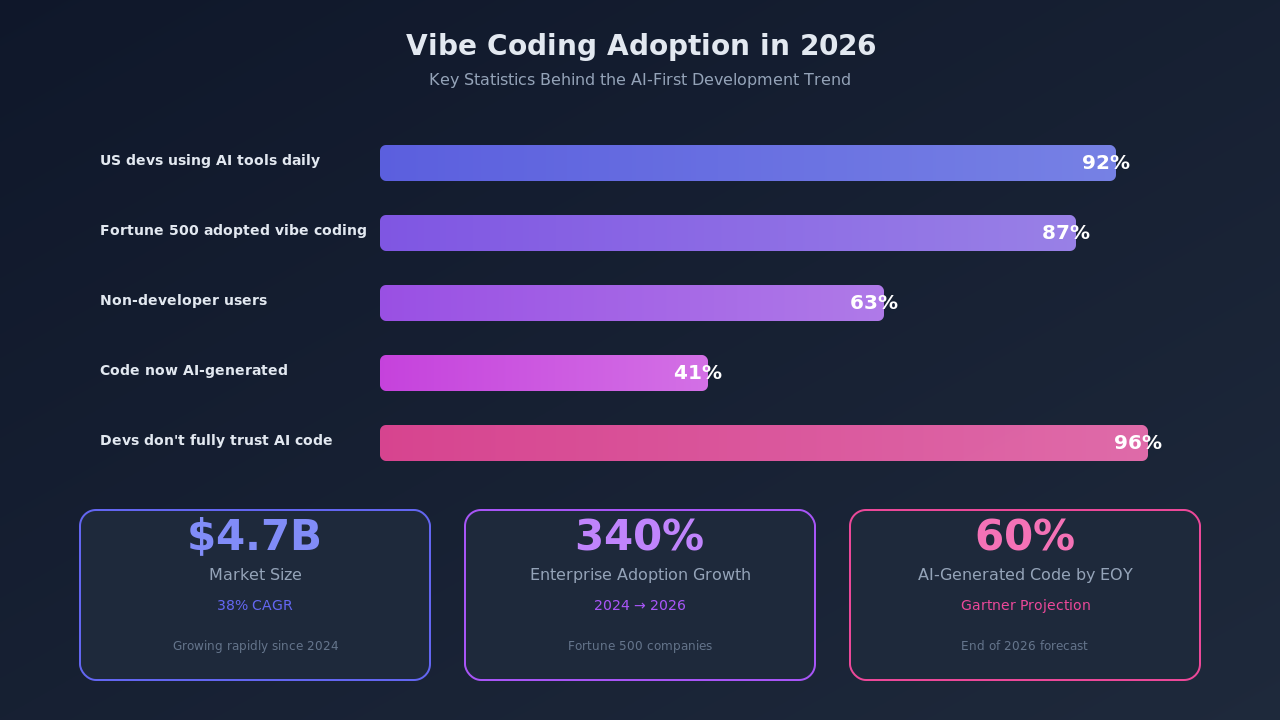
The term spread fast. Merriam-Webster added it as a "slang and trending" term by March 2025. Collins English Dictionary named it their Word of the Year for 2025. By early 2026, it had become a $4.7 billion category with a 38% compound annual growth rate.
What Vibe Coding Actually Is (and What It Isn't)
Vibe coding is a software development approach where you describe your intent in natural language and let an AI generate the implementation. You guide the process through prompts rather than writing syntax directly.
Here's what separates it from just "using Copilot":
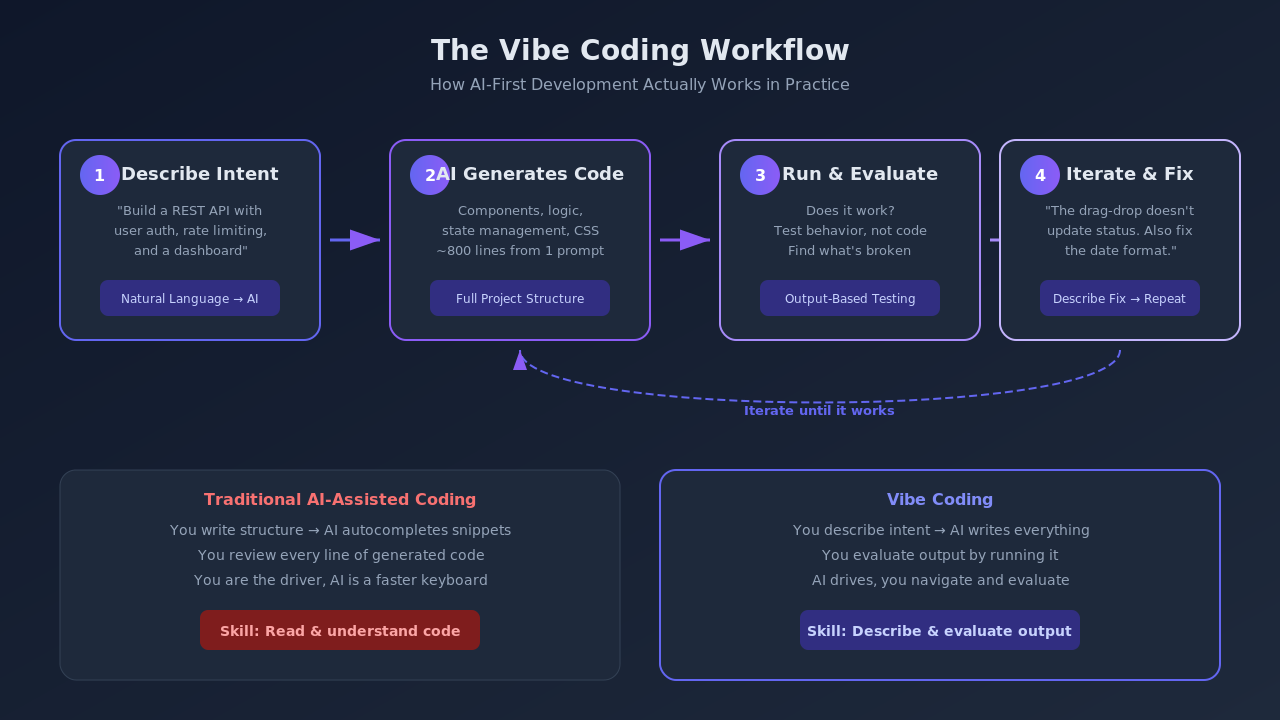
Traditional AI-assisted coding means you write the structure, the AI autocompletes snippets, and you review every line. You're still the driver. The AI is a faster keyboard.
Vibe coding means the AI drives. You describe the destination ("build me a REST API with user authentication and rate limiting"), the AI writes the code, and you evaluate the output by running it. If the login endpoint returns a 500 error, you tell the AI "the login endpoint is returning a 500, fix it" rather than debugging the code yourself.
The distinction matters because the skills involved are different. Traditional coding requires you to read and understand the generated code. Vibe coding requires you to clearly describe what you want and effectively evaluate whether the output meets your requirements.
How Vibe Coding Works in Practice
I built a project management dashboard using vibe coding to understand the workflow. Here's the actual process I followed.
Step 1: Describe the Goal
I started with a high-level prompt: "Build a React dashboard that shows project tasks in a kanban board, with drag-and-drop between columns, task assignment to team members, and a deadline tracker."
The AI generated an entire project structure: components, state management, drag-and-drop logic, even CSS. About 800 lines of code from one prompt.
Step 2: Run and Evaluate
I ran the generated code. The kanban board rendered, but dragging tasks was broken and the deadline tracker showed dates in the wrong format.
Step 3: Iterate with Feedback
Instead of opening the drag-and-drop handler and debugging it, I told the AI: "Dragging tasks between columns doesn't update the task's status. Also, dates should show as 'May 24, 2026' not '2026-05-24'."
The AI regenerated the relevant components. Three iterations later, the dashboard worked.
Step 4: Verify the Critical Paths
This is where I broke from pure vibe coding. I manually inspected the authentication logic, the API calls, and the data persistence layer. More on why in a moment.
The Numbers Behind the Trend
The adoption data is hard to ignore:
- 92% of US developers now use AI coding tools daily, according to a 2026 GitHub survey.
- 41% of all code is now AI-generated across the industry. For Java developers using GitHub Copilot, that number hits 61%.
- 63% of people using vibe coding platforms identify as non-developers. They're product managers, designers, and entrepreneurs.
- 87% of Fortune 500 companies have adopted at least one vibe coding platform. Enterprise adoption grew 340% between 2024 and early 2026.
- Gartner projects that 60% of all new code written globally will be AI-generated by the end of 2026.
The Tools Powering Vibe Coding
Several platforms have emerged as the primary tools for vibe coding. Each takes a slightly different approach.
Cursor operates as a fork of VS Code with deep AI integration. You write prompts in the editor, and it generates code in context. It's the most popular choice for developers who want to stay in an IDE environment. Claude Code runs in the terminal and takes an agentic approach. You describe a task, and it reads your codebase, plans the changes, and implements them across multiple files.
Bolt.new and Lovable target the no-code end of the spectrum. You describe an app in plain language, and they generate a fully deployed web application. These platforms are where the "63% non-developer" stat comes from.
Replit Agent and GitHub Copilot Workspace sit somewhere in between. They let you describe features at a high level and generate multi-file implementations, but they expect you to have some technical context.
The right tool depends on what you're building and how much control you want to retain. For a deeper comparison, see our Claude Code vs Cursor comparison. For production systems, Cursor and Claude Code give you enough oversight. For prototypes and internal tools, the fully automated platforms can be remarkably effective.
Where Vibe Coding Breaks Down
Here's what two weeks of hands-on experimentation taught me about the limits.
Security Is the Biggest Gap
45% of AI-generated code samples contain vulnerabilities from the OWASP Top 10. That stat comes from multiple independent audits, and it matches my experience. The authentication flow in my dashboard project had a session token stored in localStorage (an XSS vulnerability) and no CSRF protection. The AI generated code that worked but wasn't secure.
Code Quality Degrades Over Time
AI co-authored code contains 1.7x more major issues than human-written code, according to a GitClear analysis. The problems compound. Each iteration adds code without removing the dead paths from previous attempts. After ten iterations of my dashboard, the codebase had three different state management approaches coexisting because each prompt generated its own solution rather than refactoring the existing one.
96% of Developers Don't Fully Trust It
The surveys are clear: developers use vibe coding but don't trust it. 96% report not fully trusting that AI-generated code is functionally correct. And yet 52% don't always review the code before committing it. That gap between trust and behavior is where production bugs live.
Context Windows Have Hard Limits
Current AI models can hold roughly 100K-200K tokens of context. A medium-sized codebase easily exceeds that. When the model can't see your entire project, it generates code that conflicts with existing patterns, duplicates utility functions, or breaks assumptions made elsewhere in the codebase.
A Practical Framework for Using Vibe Coding
After building several projects this way, I settled on a framework that captures the speed benefits without the quality risks.
Use vibe coding for scaffolding and prototypes
The first 80% of a feature — the boilerplate, the UI components, the basic CRUD operations — is where vibe coding shines. Let the AI generate the structure, then review and refine.
Always manually review security-critical code
Authentication, authorization, payment processing, data encryption, API key handling. Read every line. Better yet, have a security-focused teammate review it too.
Treat each prompt as a code review checkpoint
Don't chain ten prompts together without reviewing. After each generation, read the diff, run the tests, and verify the behavior before prompting the next change.
Keep a human-maintained architecture document
The AI doesn't understand your system's architectural decisions unless you tell it. Maintain a document that describes your patterns, conventions, and constraints. Feed it to the AI as context.
Write tests before vibe coding the implementation
This flips the traditional TDD workflow. Write the test cases yourself (you know what the code should do), then let the AI generate the implementation that passes them. This gives you a safety net that catches the silent quality issues.
What Vibe Coding Means for Your Career
If you're a developer reading this, the honest answer is: vibe coding changes what's valuable about your skills, but it doesn't make you obsolete. For a deeper look at how AI is reshaping engineering careers, see our guide on the AI-augmented engineer.
The ability to write a for loop or implement a sorting algorithm becomes less important when an AI can generate those in milliseconds. What becomes more important: system design thinking, security expertise, the ability to evaluate and debug code you didn't write, and the skill of translating ambiguous business requirements into precise technical descriptions.
The developers I've seen thrive with vibe coding are the ones who already understood systems deeply. They use AI to move faster on implementation while spending more time on architecture, testing, and code review. To build the fundamentals that make vibe coding effective, explore Levelop's pattern-based learning approach.
Frequently asked questions
What is vibe coding and how does it work?
Vibe coding is a development approach where you describe what you want in natural language and let an AI model generate the code. You guide the process through iterative prompts rather than writing code directly. The term was coined by Andrej Karpathy in February 2025.
Is vibe coding the future of software development?
Vibe coding is becoming a significant part of how software gets built, but it's not replacing traditional development entirely. The most effective approach combines AI-generated code for scaffolding and boilerplate with human expertise for architecture, security, and quality assurance.
Can non-developers use vibe coding to build real applications?
Yes. 63% of vibe coding platform users identify as non-developers. Platforms like Bolt.new and Lovable let non-technical users build functional web applications through natural language descriptions. However, production-grade applications still benefit from developer oversight.
What are the security risks of vibe coding?
Research shows that 45% of AI-generated code contains OWASP Top 10 vulnerabilities. Common issues include insecure session handling, missing CSRF protection, and improper input validation. Security-critical code should always be manually reviewed regardless of how it was generated.
Which vibe coding tool should I start with?
For developers, Cursor or Claude Code offer the best balance of AI assistance and control. For non-developers building prototypes, Bolt.new or Lovable provide a more guided experience. The right choice depends on your technical background and what you're building.