
What Is AI Agent Workflow Automation? A 2026 Guide
Back with another one in the series where I break down the parts of agent engineering that took me a while to actually understand. This time it is the phrase everyone keeps using without defining: agent workflows. I kept seeing "AI agent workflow automation" in launch posts and job descriptions, nodded along, and then realized I could not have explained the difference between it and a plain cron job if you put me on the spot.
So I sat down and worked it out. Here is what I found.
What Is AI Agent Workflow Automation?
What is AI agent workflow automation, in plain terms? It is the practice of letting one or more LLM-driven agents carry a task from start to finish across multiple steps, deciding what to do next at each step instead of following a fixed script. A normal automation runs the same sequence every time. An agent workflow reads the current state, picks the next action, calls a tool, checks the result, and loops until the goal is met or a stop condition fires.
The word that matters is decides. A Zapier zap moves data from A to B on a trigger. It never chooses B. An agent workflow might read an incoming support ticket, decide it needs a refund lookup, call the billing API, notice the charge is disputed, and route to a human instead. Same trigger, different path, because the agent evaluated the situation.
That is the whole idea. Everything else is plumbing around that loop.
Why the distinction tripped me up
Here is what confused me for longer than I want to admit. Plenty of "agent" demos are not agentic at all. They are a single LLM call dressed up with a system prompt. You send text, you get text back, done. No decisions, no tools, no loop.
Real agent workflow automation has three things a plain prompt does not:
- State that persists across steps. The agent remembers what it already tried.
- Tools it can call. Search, code execution, database queries, API calls.
- A control loop that decides whether to keep going. This is the part people skip when they say "agent."
Once I saw those three pieces, the demos started sorting themselves into two piles. The ones that were really just a fancy prompt, and the ones that actually ran a loop. If you want the deeper architecture behind that loop, I wrote about it in the AI agent orchestration frameworks guide, which is the pillar this post hangs off.
The building blocks
Let me break down the pieces, because each one clicked for me separately.
The agent loop
At its core, agentic ai workflow automation is a while loop. The agent looks at the goal and the current state, produces an action, runs it, observes the result, and repeats. People dress this up with names like ReAct or plan-and-execute, but the skeleton is the same.
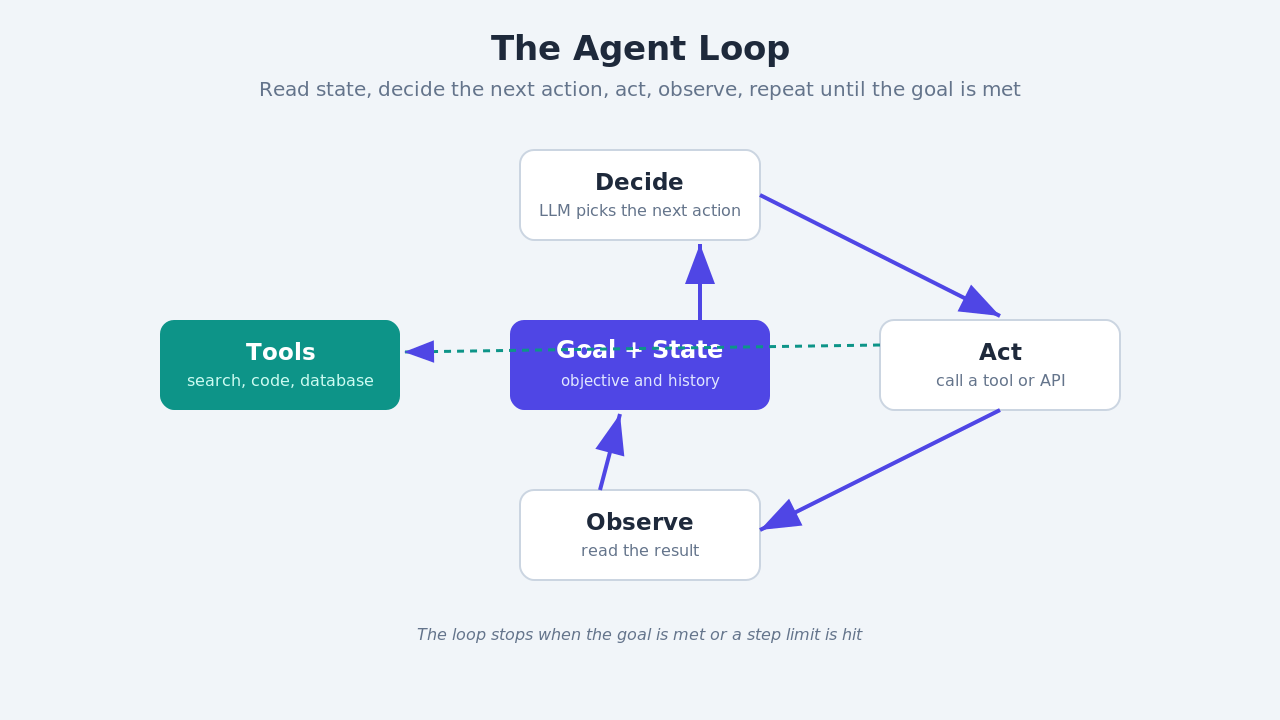
def agent_loop(goal, tools, max_steps=10):
    state = {"goal": goal, "history": []}
    for step in range(max_steps):
        decision = llm_decide(state, tools)   # pick next action
        if decision.type == "finish":
            return decision.answer
        result = run_tool(decision.tool, decision.args)
        state["history"].append((decision, result))
    return "stopped: hit step limit"
The max_steps guard matters more than it looks. Without it, a confused agent will happily call the same broken tool forever. Every production loop I have seen has a hard ceiling on iterations, a budget on tokens, or both.
Tools are the actual work
The LLM does not do anything on its own. It decides. Tools do the work. A tool is just a function with a description the model can read, plus a schema for its arguments.
tools = {
    "search_docs": {
        "description": "Search internal docs by keyword",
        "run": lambda q: vector_store.query(q, k=5),
    },
    "run_sql": {
        "description": "Execute a read-only SQL query",
        "run": lambda sql: db.execute_readonly(sql),
    },
}
The quality of the descriptions decides how well the agent picks tools. This surprised me. I spent an afternoon debugging why an agent kept using the wrong tool, and the fix was rewriting one sentence in a tool description. The model reads those descriptions the way a new hire reads a wiki. Vague wiki, bad decisions.
State and memory
The loop needs to remember. Short-term memory is the running history inside the loop. Long-term memory is anything that survives across runs, usually a vector store or a database. For a lot of workflows, short-term is enough. The agent only needs to know what it did five steps ago, not five days ago.
The mistake I made early was stuffing the entire history back into the prompt on every step. That blows up your token count fast and the model starts losing track of what matters. Summarize old steps, keep recent ones verbatim. That single change cut my token usage by more than half on a research agent.
Single agent or many
Once the single loop made sense, the next question was when you need more than one agent. The honest answer is: less often than the marketing suggests.
A single agent with good tools handles most workflows. You reach for multiple agents when the task splits into genuinely different jobs that benefit from separate context and separate instructions. A researcher agent that gathers sources and a writer agent that drafts from them. A supervisor that routes work to specialists.
The tradeoff is real. More agents means more coordination, more places for things to go wrong, and more tokens spent on agents talking to each other. I only add an agent when a single one is clearly straining. If you are weighing this, the guide to building multi-agent systems walks through when the split actually pays off.
Orchestration patterns
When you do go multi-agent, the agents connect in a few standard shapes. These are the workflow orchestration patterns worth knowing.
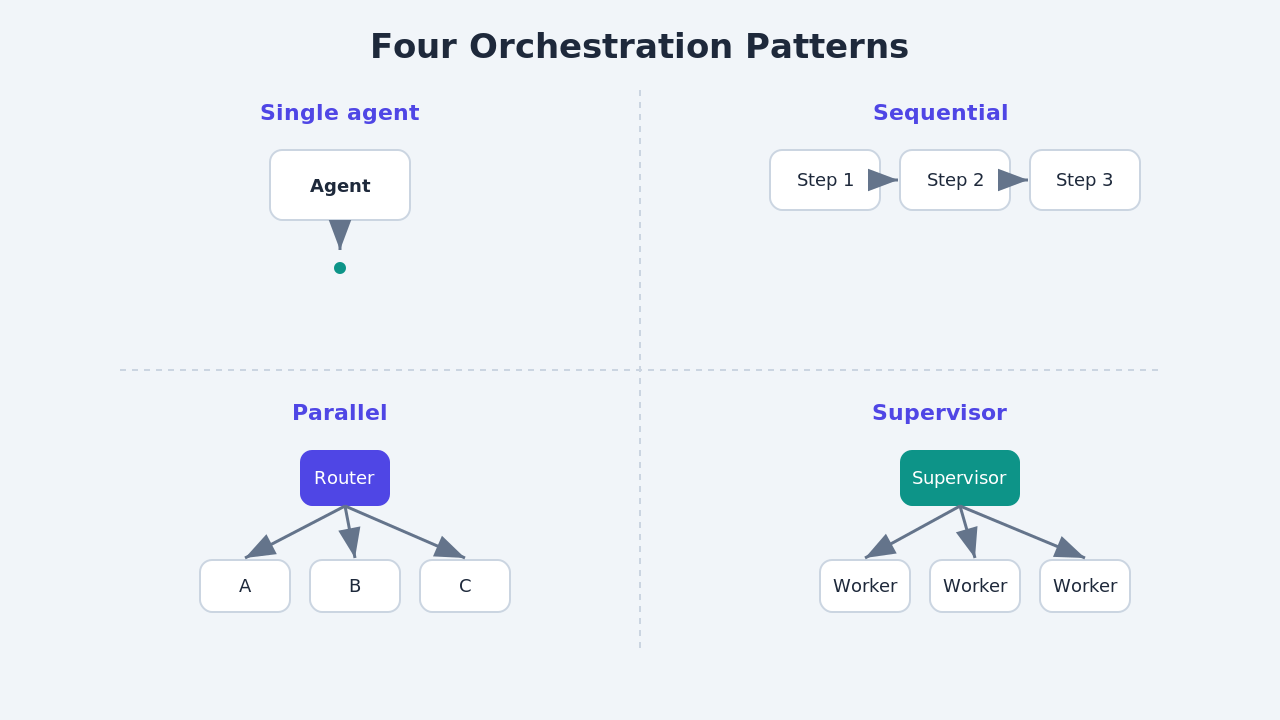
- Sequential. Agent A finishes, hands to agent B, then C. Simple, predictable, easy to debug. A good default.
- Parallel. Several agents work at once on independent subtasks, then a step merges the results. Faster, but you need to handle partial failures.
- Hierarchical. A supervisor agent decides which specialist handles each piece and coordinates them. Flexible, but the supervisor becomes a single point of failure and a token sink.
Most real systems mix these. A supervisor that fans work out in parallel and then runs a sequential cleanup pass is common. Pick the simplest shape that fits the task. I have never regretted starting sequential and adding parallelism only where a bottleneck proved it was needed.
The part nobody demos: failure
Here is the section that separates a toy from something you would run on real traffic. Autonomous agents fail in ways a normal script does not. A script throws an exception and stops. An agent can quietly go off the rails, call a tool with garbage arguments, misread a result, and keep going with confidence.
You need guards:
- Retries with backoff on flaky tool calls, but a cap so it does not loop forever.
- Validation on tool outputs before the agent acts on them. If a query returns nothing, that is a signal, not a step to ignore.
- A budget on steps and tokens. When it is hit, stop and escalate.
- A human handoff path for anything irreversible. Refunds, deletes, sends.
I learned this the boring way, by watching an agent burn through an API quota because a downstream service returned 200 with an empty body and the agent treated empty as "try again." The full treatment of this is in the post on fault-tolerant AI agent pipelines, which goes deep on error recovery. It is the post I wish I had read first.
AI agent workflow automation for software development
The place this all clicked hardest for me was my own work. AI agent workflow automation for software development is not hypothetical anymore. Coding agents read a ticket, search the repo, write a change, run the tests, read the failures, and fix them. That is an agent loop with tools that happen to be read_file, write_file, and run_tests.
What makes coding a good fit is the tight feedback loop. Tests give the agent a clear signal. Pass or fail, no ambiguity. Workflows with crisp verification like that are where agents earn their keep. Workflows with fuzzy success criteria, like "write a good marketing email," are much harder because the agent cannot tell when it is done.
That became my rule of thumb. Before I automate a workflow with an agent, I ask whether the agent can check its own work. If yes, it is a strong candidate. If no, I either add a verification step or keep a human in the loop.
Tools and frameworks in 2026
You do not have to build the loop from scratch, though writing one once is the best way to understand the rest. The common frameworks give you the loop, tool calling, and state handling out of the box. LangGraph models the workflow as an explicit graph of nodes, which makes the control flow easy to reason about. Microsoft's AutoGen leans into multi-agent conversations. CrewAI packages the supervisor-and-specialists pattern.
They differ in style more than in what is possible. I would not agonize over the choice. Pick one, build a real workflow end to end, and you will learn what you actually need from a framework. That experience is worth more than any comparison table.
A mistake worth sharing
The biggest one: I automated a workflow that did not need an agent. It was a fixed five-step process with no branching. I wrapped it in an agent loop because agents were the exciting thing, and I ended up with something slower, more expensive, and less reliable than the plain script it replaced.
Agents earn their cost when the path is not fixed. When the next step depends on what just happened. If you can draw the whole flow as a flowchart with no "it depends" boxes, you probably want a normal automation, not an agent. Save the loop for the problems that actually branch.
What to explore next
If you want to go deeper, here is the order that worked for me. Start with a single-agent loop and two or three tools. Build it yourself before reaching for a framework. Then read the orchestration frameworks guide to see how the pieces map onto real tooling. After that, add a second agent only when one is straining, using the multi-agent systems walkthrough. Finally, before you point any of it at real traffic, work through fault-tolerant pipeline design so the thing fails safely.
You can find all of these on the Levelop blog, where I have been documenting the agent engineering track piece by piece.
Frequently asked questions
What is AI agent workflow automation in simple terms?
It is using LLM-driven agents to carry a task through multiple steps, where the agent decides the next action at each step instead of following a fixed script. The agent reads the current state, picks an action, calls a tool, checks the result, and loops until the goal is met.
How is agent workflow automation different from tools like Zapier or Make?
Traditional automation runs the same fixed sequence on every trigger. It never chooses a different path. Agent workflow automation evaluates the situation at each step and can branch, retry, or escalate based on what it observes. The difference is decision-making, not just triggering.
Do I need multiple agents for workflow automation?
Usually not. A single agent with good tools handles most workflows. You add more agents only when the task splits into genuinely different jobs that benefit from separate context, like a researcher and a writer. More agents means more coordination cost and more failure points.
What are the main agent orchestration patterns?
The three core patterns are sequential (agents hand off in order), parallel (agents work at once on independent subtasks then merge), and hierarchical (a supervisor routes work to specialists). Most production systems mix them. Start with sequential and add complexity only where a bottleneck proves it is needed.
Where does agent workflow automation work best?
It works best on workflows with clear verification, where the agent can check its own work. Software development is a strong example because tests give an unambiguous pass or fail signal. Workflows with fuzzy success criteria are harder and often need a human in the loop.
What is the most common mistake with agent workflows?
Automating a fixed process that has no branching. If you can draw the whole flow as a flowchart with no "it depends" boxes, a plain script is cheaper and more reliable than an agent loop. Agents earn their cost only when the next step depends on what just happened.