
LangGraph Tutorial: Build a Multi-Agent System in Python
The first time I tried to build a multi-agent system, I wired three LLM calls together with if-statements and a while loop, and it collapsed within ten minutes when one agent returned something the next did not expect, state leaked everywhere, and no single step revealed where it broke. That mess is exactly the problem LangGraph solves, so this LangGraph tutorial is the practical guide I wish I had that week. We are going to build a real multi agent system in Python: a small research team where a supervisor agent routes work to specialist agents that share one clean state object. If you want the wider framing of where this sits next to plain LangChain, our LangChain vs LangGraph guide is the companion read.
What LangGraph is, and why use it
LangGraph is a library for stateful, multi-step LLM applications, and instead of chaining calls in a straight line you model the app as a graph whose nodes are units of work, whose edges decide what runs next, and whose shared state flows through every node. That graph model is the entire point, because when you build an AI agent in Python by hand the control flow hides inside scattered conditionals, whereas LangGraph promotes loops, branches, retries, and human approval steps into explicit edges you can see and debug. The official LangGraph documentation calls these graphs, and for how the orchestration engine works internally we went deeper in the LangGraph framework breakdown.
Setup
You need Python 3.10 or newer and an API key for your model provider. I use OpenAI here, but the same graph runs on Anthropic, Google, or a local model with one line changed.
python -m venv venv
source venv/bin/activate
pip install langgraph langchain-openai
export OPENAI_API_KEY="sk-your-key-here"
The four ideas that make LangGraph click
State is a single typed dictionary every node can read and update, defined once, holding the user input, the notes agents gather, and the final answer. The Annotated[list, add] reducer is the part that tripped me up: it tells LangGraph to merge updates to a field instead of overwriting, so two agents appending notes accumulate rather than clobber each other, which is the habit that keeps a multi agent system from silently losing data.
from typing import Annotated, TypedDict
from operator import add

class TeamState(TypedDict):
    question: str
    notes: Annotated[list[str], add]  # each node appends, nothing overwrites
    answer: str
    next_agent: str
A node is just a function that takes the current state and returns a dictionary of updates, nothing more, and it returns only the field it changed so LangGraph merges that through the reducer while you never mutate state directly. Edges connect nodes: a normal edge says run B after A, while a conditional edge inspects state and decides where to go, and those conditional edges are what let a supervisor route work and turn a linear chain into a real graph. You add nodes and edges, set an entry point, then compile into a runnable with the same invoke interface as a model, which means a compiled graph can itself become a node in a larger graph later.
from langchain_openai import ChatOpenAI

llm = ChatOpenAI(model="gpt-4o-mini", temperature=0)

def researcher(state: TeamState) -> dict:
    prompt = f"Research this question and list 3 key facts: {state['question']}"
    result = llm.invoke(prompt)  # one llm call per node
    return {"notes": [f"Researcher: {result.content}"]}
The supervisor pattern for a multi-agent system
There are several ways to arrange agents, and the one I reach for first is the supervisor pattern because it is easy to reason about: one coordinating agent does no real work, reads shared state, and decides which specialized agents should act next or whether the job is done, while the specialists never talk to each other and communicate only through state. This is the same coordination idea we covered in the CrewAI vs LangGraph comparison, built here by hand so every moving part is visible.
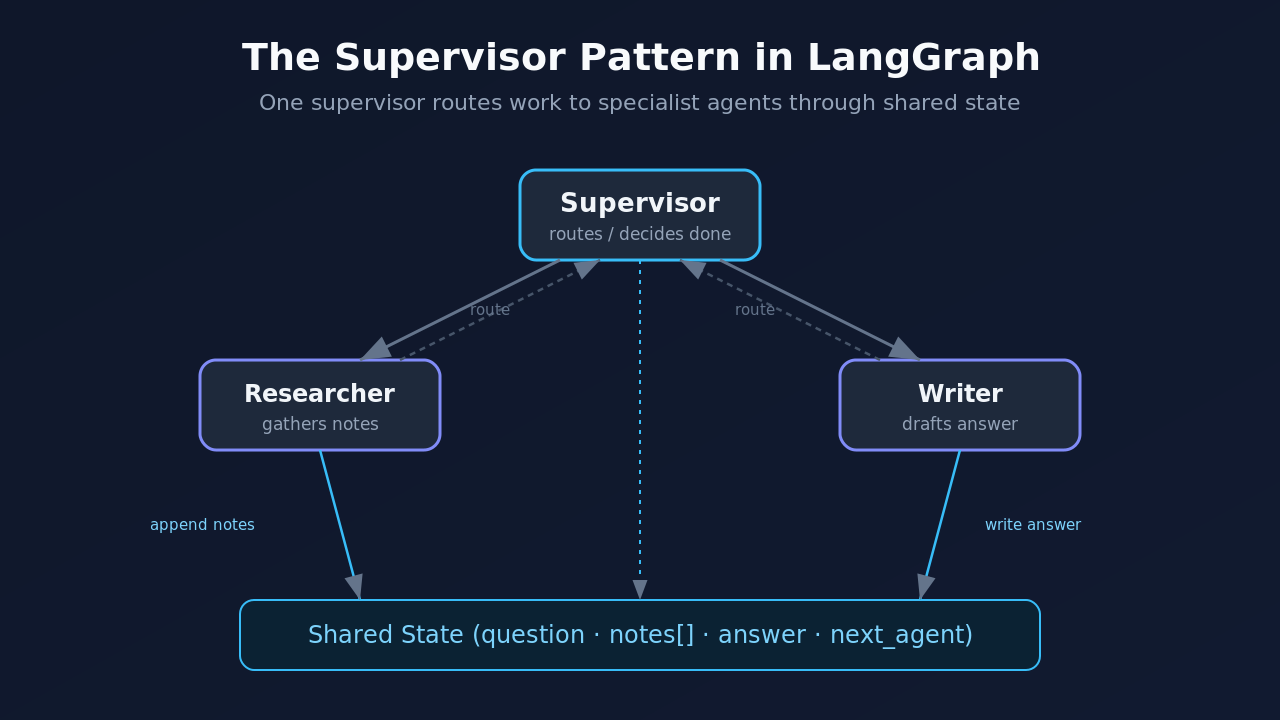
The langgraph supervisor reads the notes so far and returns which agent goes next: no research yet sends work to the researcher, research but no draft sends it to the writer, otherwise it finishes. I keep this rule based on purpose, because a deterministic router makes the graph easy to trace while you learn, and you can swap in an LLM call that decides routing from context once the wiring is proven.
def supervisor(state: TeamState) -> dict:
    notes = state["notes"]
    has_research = any(n.startswith("Researcher") for n in notes)
    has_draft = any(n.startswith("Writer") for n in notes)
    if not has_research:
        return {"next_agent": "researcher"}
    if not has_draft:
        return {"next_agent": "writer"}
    return {"next_agent": "done"}
The writer turns research notes into a final answer and writes to the answer field, and once it exists we wire the graph by adding every node, pointing the entry at the supervisor, and using a conditional edge to route from the supervisor to whichever agent it picked, with each worker returning to the supervisor so it can decide the next move.
from langgraph.graph import StateGraph, END

def writer(state: TeamState) -> dict:
    research = "\n".join(state["notes"])
    prompt = f"Using these notes, answer '{state['question']}':\n{research}"
    return {"notes": ["Writer: draft complete"], "answer": llm.invoke(prompt).content}

def route(state: TeamState) -> str:
    return state["next_agent"]

graph = StateGraph(TeamState)
graph.add_node("supervisor", supervisor)
graph.add_node("researcher", researcher)
graph.add_node("writer", writer)
graph.set_entry_point("supervisor")
graph.add_conditional_edges("supervisor", route,
    {"researcher": "researcher", "writer": "writer", "done": END})
graph.add_edge("researcher", "supervisor")
graph.add_edge("writer", "supervisor")
app = graph.compile()
Read those edges out loud: start at the supervisor, route to researcher, writer, or the end, and send each worker back to the supervisor, because that loop from supervisor to worker and back is the beating heart of a supervisor-style multi agent system. Since the graph compiles to a runnable, you invoke it exactly like a model, passing an initial state with the question and empty collections, and the updated state carries the answer out.
result = app.invoke({"question": "Why do agents need shared state?",
                     "notes": [], "answer": "", "next_agent": ""})
print(result["answer"])
Adding tools, memory, and a human checkpoint
The toy version proves the pattern, and real work needs three additions that each stay incremental. Tools let an agent make tool calls to search, query a database, or run a calculator, so you bind tools to the model, add a tool node, and let a conditional edge send the graph to that node and back. Memory, or persistence, lets a run pause and resume: pass a checkpointer at compile time and LangGraph saves state after every step, which keeps long-running agents alive across restarts and preserves conversation history for later turns.
from langgraph.checkpoint.memory import MemorySaver

app = graph.compile(checkpointer=MemorySaver())
config = {"configurable": {"thread_id": "team-1"}}  # required to save and resume
result = app.invoke(initial_state, config)
Human-in-the-loop builds directly on that checkpointer, because persisted state lets you interrupt before a sensitive node, show a person the pending action, and resume only after approval, which is not optional for any step that spends money or writes to production.
Debugging when an agent misbehaves
My early runs broke in three boring, fixable ways. Forgetting a reducer on a list field let the second write overwrite the first, so research vanished before the writer saw it, and the Annotated[list, add] reducer fixes that permanently. An infinite loop appeared when the supervisor never returned "done" because it checked the wrong prefix, and the LangGraph recursion_limit stops runaway graphs, though hitting it signals a routing gap rather than a reason to raise the limit. Reading an uninitialized field like the answer before anything set it threw a KeyError mid-run, so initialize every field in the first invoke call, even to empty strings and lists.
Where to take this next
Once the supervisor pattern feels natural, try these in order: swap the rule-based router for an LLM that reads context and picks the next agent, give the researcher a real search tool, add a critic that reviews the writer and can send a complex task back for another pass to turn your linear flow into a genuine loop, then move to a database-backed checkpointer so runs survive across sessions. Each is a small edit to the graph you already built, which is the quiet strength of building multi agent systems on LangGraph: the architecture holds steady while the pieces get smarter. For when a graph beats a simpler chain and when it does not, the LangChain vs LangGraph breakdown lays out the trade-offs, and the rest of our agent engineering writing lives on the Levelop blog.
Frequently Asked Questions
Is LangGraph better than LangChain for agents?
They solve different problems. LangChain supplies components like models, prompts, and tools, while LangGraph orchestrates them into stateful, multi-step flows with branching and loops. A single linear chain needs only plain LangChain, but a multi agent system with routing, retries, or human approval is a better fit for LangGraph, and most real projects use both together.
Do I need graph theory to use LangGraph?
No. If you understand functions and dictionaries you have enough, since nodes are functions, edges are what runs next, and state is a dictionary that flows through, so you never write graph algorithms yourself. The graph is simply a clearer way to express control flow you would otherwise bury in conditionals.
What is the supervisor pattern in a multi-agent system?
It is an arrangement where one coordinating agent routes work to specialized agents instead of the specialists calling each other, reading shared state, deciding who acts next, and ending the run when the goal is met. Keeping coordination in one place makes a langgraph multi agent build far easier to debug than peer-to-peer messaging.
Can I build an AI agent in Python with LangGraph without OpenAI?
Yes, because LangGraph is model-agnostic. Swap ChatOpenAI for Anthropic, Google, Mistral, or a local model through Ollama and the graph stays identical, since only the line that creates the model client changes and LangGraph cares about structure, not which model sits inside a node.
How do multi-agent systems keep agents from overwriting each other?
Through reducers on shared state fields, so annotating a field with a reducer like add makes LangGraph merge concurrent updates into the updated state instead of replacing them, which is why appended notes accumulate. Getting reducers right is the single most important habit for a reliable multi agent system langgraph build.
Final thoughts
The jump from a few LLM calls in a loop to a real multi agent system is mostly a mindset shift: stop thinking in control flow and start thinking in graphs, with nodes that do work, edges that decide direction, and one shared state everyone respects. LangGraph gives you that structure without much ceremony, and this LangGraph tutorial is only the entry point, so build the research team, break it on purpose, watch the trace, and the pattern sticks. To keep going, the graph orchestration deep dive picks up where this leaves off.