

Claude Prompt Caching: How It Works and What It Saves
Every call to a large language model pays for the same tokens twice. You send a long system prompt, a set of tool definitions, maybe a few thousand tokens of documentation, and then one short user question. The model reads all of it from scratch, every single time. On a busy production app, that repeated context is often 80 to 95 percent of your input tokens, and you are billed full price for it on every request.
Prompt caching fixes exactly this. It lets the provider store the processed form of a large, stable chunk of your prompt and reuse it across requests, so you pay a fraction of the cost for the repeated part and only full price for the new tokens. For teams running LLM features at scale, it is one of the highest-leverage cost levers available, and it usually takes an afternoon to wire in.
This guide explains what prompt caching is, how Claude prompt caching works under the hood, what it actually saves, and the practical patterns that decide whether you see a 90 percent discount or almost nothing. It is a support piece for our broader guide to AI cost optimization, so if inference spend is your real problem, start there and come back for the caching details.
What Is Prompt Caching?
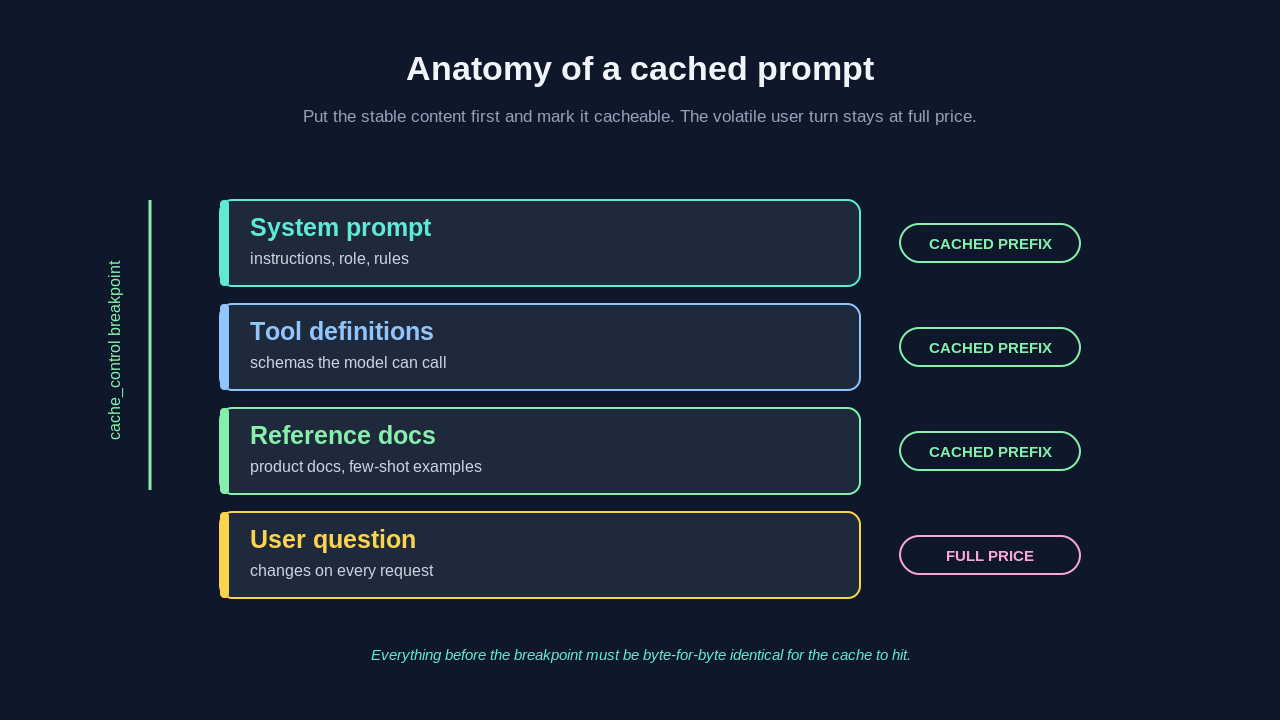
Prompt caching is a mechanism where an LLM provider saves the internal computation for a portion of your prompt and reuses it on later requests that begin with the same content. When a model processes tokens, it builds an internal representation (the key-value attention state) for each token. That work is deterministic for a fixed sequence of tokens. If the next request starts with the exact same prefix, the provider can load the stored state instead of recomputing it.
The important word is prefix. Caching works from the start of the prompt forward, up to a marked point. Everything before the cache breakpoint has to be byte-for-byte identical for the cache to hit. Change one character near the top and the cache misses from that character onward.
This maps cleanly to how real applications are built. Your system prompt, tool schemas, few-shot examples, and reference documents rarely change between requests. The user's question changes every time. Put the stable material first, mark it as cacheable, and put the volatile user input last. The provider caches the big stable block and only processes the small changing tail at full cost.
How Claude Prompt Caching Works
Anthropic prompt caching is explicit, which means you control exactly what gets cached rather than relying on the provider to guess. You add a cache_control marker to the content blocks you want stored. Claude then caches everything from the beginning of the prompt up to and including that block.
Here is a minimal example using the Messages API. The large system content carries the cache marker, and the user turn stays uncached because it changes on every call.
import anthropic

client = anthropic.Anthropic()

response = client.messages.create(
    model="claude-sonnet-4-5",
    max_tokens=1024,
    system=[
        {
            "type": "text",
            "text": LONG_STYLE_GUIDE_AND_DOCS,  # stable, ~8000 tokens
            "cache_control": {"type": "ephemeral"},
        }
    ],
    messages=[
        {"role": "user", "content": "Summarize section 4 for a new hire."}
    ],
)

print(response.usage)
On the first call, Claude processes the whole system block and writes it to the cache. The response usage reports cache_creation_input_tokens for that block. On the next call within the cache lifetime, if the system block is identical, Claude reports cache_read_input_tokens instead, and you are billed the much lower read rate for those tokens.
The cache is ephemeral with a default five-minute lifetime that refreshes every time the cache is read. In practice, a cache entry stays warm as long as requests keep arriving inside that window, so a steadily used endpoint keeps its cache alive indefinitely. Anthropic also offers a longer one-hour cache option for workloads with slower request cadence.
The Numbers That Actually Matter
Claude prompt caching has two prices you need to hold in your head. Writing to the cache costs more than a normal input token, and reading from the cache costs far less.
For Claude models, cache writes are billed at roughly 1.25 times the base input token price, and cache reads at roughly 0.1 times the base price. That asymmetry is the whole game. You pay a small premium once to store the context, then pay a 90 percent discount on every subsequent read.
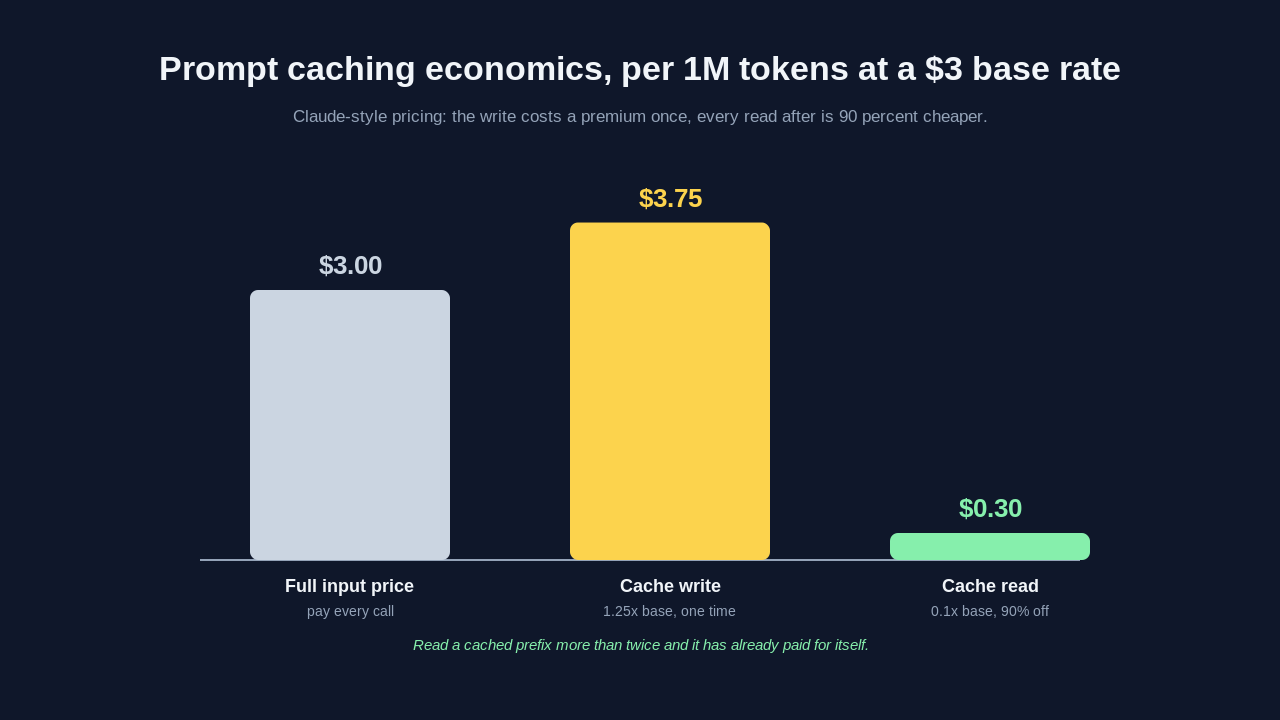
The break-even is simple. If a cached prefix is read even twice, you are already ahead. Read it a hundred times, which any production endpoint does in minutes, and the write premium disappears into rounding error while your effective input cost on that block drops by about 90 percent.
What Prompt Caching Actually Saves
The savings depend entirely on your ratio of stable tokens to fresh tokens. Consider a support agent with a 10,000 token system prompt (instructions, tool definitions, product docs) answering questions where the user turn averages 200 tokens.
Without caching, every request pays full input price for all 10,200 tokens. With caching, the first request pays the write premium on 10,000 tokens plus full price on 200. Every request after that pays a 90 percent-discounted read on 10,000 tokens plus full price on 200. Across a thousand requests, the cached version costs a small fraction of the uncached one on input, because the expensive 10,000 token block is nearly free after the first call.
Two things move the needle most. The first is the size of the stable prefix relative to the volatile tail. A 10,000 token cached prefix with a 200 token tail is close to ideal. A 500 token prefix with a 3,000 token tail barely helps. The second is hit rate. A cache that is written and never re-read before it expires costs you the write premium for nothing, which is a real anti-pattern in low-traffic or highly personalized workloads.
Latency is the underrated second benefit. Because the model skips recomputing the cached prefix, time to first token on a large-context request drops substantially, often by half or more for prompts dominated by cached content. For user-facing chat, that is the difference between a snappy reply and a visible pause.
Prompt Caching Across Providers
The concept is not unique to one vendor, though the mechanics differ. Understanding the differences helps you avoid assumptions that quietly break your cache.
Anthropic uses explicit cache_control markers and supports up to four cache breakpoints in a single prompt, which lets you cache several stable segments independently. Bedrock prompt caching exposes the same Claude models through AWS with its own cache checkpoint API, so if you run Claude on Bedrock you get comparable savings with slightly different request syntax. OpenAI takes an automatic approach: prompts over a token threshold are cached without any markup, and cache reads are discounted, but you have less manual control over breakpoints. Google's Gemini offers both implicit caching and an explicit context caching API with its own storage-based pricing.
The portable lesson across all of them is identical. Structure prompts so the stable content sits at the front and the variable content sits at the back, keep the stable content byte-for-byte constant, and route repeated traffic through the same prompt shape so the cache stays warm.
Patterns That Make or Break Your Cache
Caching looks trivial in a demo and gets subtle in production. A handful of patterns separate teams that see real savings from teams that turn it on and see nothing change on their bill.
Put stable content first, always. The single most common mistake is interleaving a changing value (a timestamp, a session ID, a user name) near the top of the system prompt. Anything before the cache breakpoint must be constant, so one dynamic token at position five invalidates the entire cache behind it. Move all volatile fields to the end of the prompt or into the user turn.
Watch out for silent prompt drift. If you build your system prompt by concatenating strings, a stray trailing space, a reordered tool list, or a library version that renders JSON differently will change the bytes and miss the cache. Log cache_read_input_tokens versus cache_creation_input_tokens in production and alert if your read ratio drops. This is where good LLM observability tooling earns its keep, because a cache that silently stops hitting looks fine in your code and expensive on your invoice.
Respect the minimum cacheable length. Providers only cache prefixes above a certain token count because caching a tiny block is not worth it. For Claude, the minimum is around 1,024 tokens for the larger models. If your stable prefix is below the threshold, caching does nothing, so either add more stable context worth caching or accept that this prompt is not a caching candidate.
Design your prompt architecture around the cache. Teams that get the most out of caching treat the stable prefix as a first-class asset. They keep a single canonical system prompt, version it deliberately, and avoid per-request personalization in the cached region. If you need per-user context, put it after the cached block so the shared prefix still hits for everyone. This is really an extension of good context engineering: the same discipline that makes prompts effective also makes them cacheable.
When Prompt Caching Is Not the Answer
Caching is not free money in every scenario. If your prompts are short, if every request has a unique large context (for example, a fresh uploaded document per call with no reuse), or if your traffic is so sparse that caches expire before the next read, the write premium can cost more than it saves. In those cases, other levers matter more: routing simpler requests to cheaper models, trimming context, or batching. The AI cost optimization guide covers when each lever wins.
Measure before and after. Turn on caching, log the cache read and write token counts, and compute your real blended input cost for a day of traffic. If the read-to-write ratio is healthy and above one, you are winning. If writes dominate, your prompt structure or traffic pattern is fighting the cache, and the fix is upstream in how you assemble prompts, not in the caching feature itself.
Frequently Asked Questions
What is prompt caching in simple terms?
Prompt caching stores the processed form of a repeated chunk of your prompt so the model does not recompute it on every request. You pay a small premium to write the cache once, then a large discount (around 90 percent for Claude) on every read. It works on the stable prefix of your prompt, which for most apps is the system prompt, tool definitions, and reference documents.
How much does Claude prompt caching save?
For Claude, cache reads cost roughly 90 percent less than normal input tokens, while cache writes cost about 25 percent more. If your prompt has a large stable prefix that is read more than once, your effective input cost on that prefix drops by close to 90 percent. Apps with a big fixed system prompt and short user turns see the biggest wins.
What is the difference between Anthropic, Bedrock, and OpenAI prompt caching?
Anthropic prompt caching is explicit: you mark cache breakpoints with cache_control and can set up to four of them. Bedrock prompt caching runs the same Claude models on AWS with its own checkpoint syntax and comparable savings. OpenAI caches long prompts automatically with no markup and a read discount, but gives you less manual control over where the cache boundary sits.
Why is my prompt cache not hitting?
The most common causes are dynamic content near the top of the prompt (a timestamp or session ID before the cache breakpoint), a stable prefix below the minimum cacheable length, subtle byte-level drift from string concatenation, or traffic too sparse for the cache to stay warm before it expires. Log cache_read_input_tokens in production to catch a failing cache before it shows up on your bill.
Does prompt caching change the model's output?
No. Caching only reuses the internal computation for identical input tokens, so the model produces the same output it would without caching. It is purely a cost and latency optimization, not a change to behavior or quality.
Wrapping Up
Prompt caching is one of the rare optimizations that lowers cost and latency at the same time with almost no downside when applied correctly. The recipe is short: identify the large stable part of your prompt, move it to the front, mark it cacheable, keep it byte-for-byte constant, and route repeated traffic through it so the cache stays warm. For Claude, that turns 80 to 95 percent of your input tokens from a full-price expense into a near-free read.
If you are working through inference spend systematically, treat caching as one tool in a set. Pair it with model routing, context trimming, and good observability, and read the full AI cost optimization playbook to see where it fits. For more engineering deep dives, the Levelop blog covers the systems and AI patterns behind production LLM apps.
References
- Anthropic, Prompt caching, docs.anthropic.com/en/docs/build-with-claude/prompt-caching.
- AWS, Prompt caching for Amazon Bedrock, docs.aws.amazon.com/bedrock/latest/userguide/prompt-caching.html.
- OpenAI, Prompt caching, platform.openai.com/docs/guides/prompt-caching.
- Google, Context caching with the Gemini API, ai.google.dev/gemini-api/docs/caching.