

Bloom Filters Explained: When "Probably Yes" Is Good Enough and Saves 99% of Memory
I've been breaking down system design concepts that seem intimidating until you actually sit with them. Bloom filters were one of those things I kept seeing in architecture diagrams but never fully understood. So I dug in.
The Memory Problem Nobody Warns You About
I was sketching out a system that needed to check whether a username had already been taken. Sounds simple. Just throw all existing usernames into a HashSet and check membership in O(1). Done.
Then the numbers showed up. 500 million usernames. Each username averages 15 characters. A HashSet in Java stores objects with pointers and overhead. Rough napkin math put the memory at somewhere around 10-12 GB just for membership checks.
That's a lot of RAM for a yes/no question.
I started looking for alternatives. Every search led me to the same answer: bloom filters. A data structure that uses about 1.2 GB for the same job, with one small tradeoff. It might occasionally say "yes, this username exists" when it doesn't. But it will never say "no" when the username actually does exist.
For a username availability check, that tradeoff is perfectly fine. A false positive just means the system tells a user "this name is taken" when it technically isn't. Mildly annoying. A false negative would let two users register the same name. That's a real bug.
What Is a Bloom Filter?
A bloom filter is a probabilistic data structure that answers set membership queries. You can ask it "is this element in the set?" and it gives you one of two answers: "definitely not" or "probably yes."
It's built from two components: a bit array (a long sequence of 0s and 1s) and a set of hash functions. The bit array starts as all zeros. When you add an element, you hash it with each function, and each hash points to a position in the bit array. You flip those positions to 1.
That's it. No pointers, no stored values, no linked lists. Just bits.
The reason it's so memory efficient is that you're not storing the elements at all. You're storing the fingerprint of their presence. Multiple elements can share the same bit positions, which is what makes false positives possible but also what makes the whole thing fit in a fraction of the memory.
How a Bloom Filter Works, Step by Step
Adding an Element
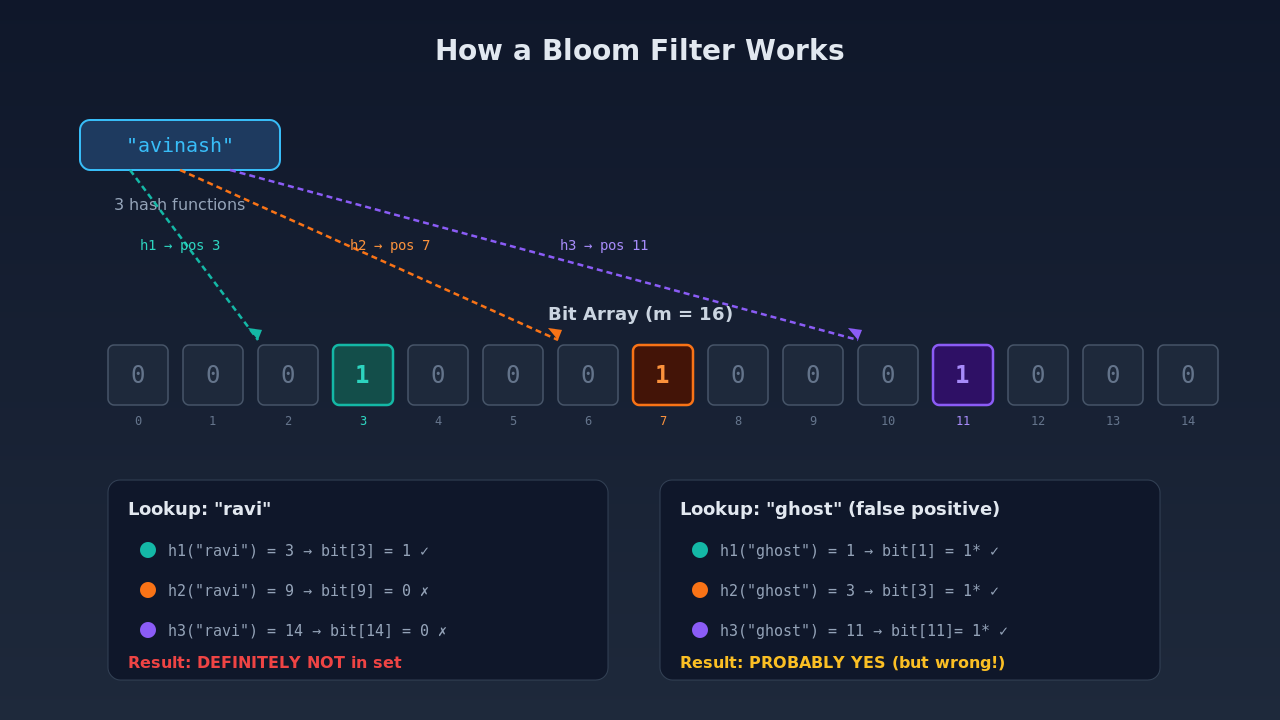
Let's walk through a concrete example. Say we have a bit array of size 16 (positions 0 through 15) and three hash functions: h1, h2, and h3.
We want to add the username "avinash."
h1("avinash") = 3
h2("avinash") = 7
h3("avinash") = 11
We set positions 3, 7, and 11 to 1. Now let's add "kumar":
h1("kumar") = 1
h2("kumar") = 7
h3("kumar") = 14
Position 7 is already set to 1 from "avinash." That's fine. We just leave it at 1 and set the other positions.
Checking Membership
To check if "avinash" is in the set, we compute the same three hashes and check positions 3, 7, and 11. All are 1. The bloom filter says: "probably yes."
To check if "ravi" is in the set: h1("ravi") = 3, h2("ravi") = 9, h3("ravi") = 14. Position 3 is 1 (set by "avinash"). Position 14 is 1 (set by "kumar"). But position 9 is 0. Since at least one bit is 0, the bloom filter says: "definitely not."
Why False Positives Happen (But False Negatives Don't)
Here's the subtle part. Check if "ghost" is in the set: h1("ghost") = 1, h2("ghost") = 3, h3("ghost") = 11. Positions 1, 3, and 11 are all set to 1. But we never added "ghost." Those bits were set by "avinash" and "kumar" independently. The bloom filter says "probably yes" even though the answer is no.
This is a false positive. It happens because different elements can coincidentally map to the same bit positions. The more elements you add, the more bits get set to 1, and the higher the false positive rate climbs.
But a false negative can never happen. If you added an element, its hash positions were set to 1, and bits in a bloom filter are never flipped back to 0. So when you check for that element, all its positions will always be 1.
The Math Behind the Magic
The false positive probability for a bloom filter is approximately:
P(false positive) ≈ (1 - e^(-kn/m))^k

Where:
  m = size of the bit array
  n = number of elements inserted
  k = number of hash functions

Optimal hash functions: k = (m/n) × ln(2) ≈ 0.693 × (m/n)
Let's plug in real numbers. For 500 million usernames with a target false positive rate of 1%: bits per element is about 9.6 (roughly 10 bits per element for 1% FP rate). Total bits: 500,000,000 × 10 = 5 billion bits = 625 MB. Optimal hash functions: 7.
For stricter requirements, 0.1% false positive rate needs about 14.4 bits per element (900 MB). Still dramatically smaller than storing actual data.
Where Bloom Filters Show Up in Real Systems
Once I understood how bloom filters work, I started noticing them everywhere.
Cassandra and LSM-Tree Storage Engines
Databases like Apache Cassandra and LevelDB use Log-Structured Merge trees (LSM trees) as their storage engine. Data lives across multiple sorted files called SSTables on disk.
When a read query comes in, the database might need to check several SSTables to find the right key. Each disk read is expensive. Bloom filters sit in front of each SSTable. Before doing a disk read, the database checks the bloom filter: "could this key be in this SSTable?" If the bloom filter says "definitely not," the database skips that file entirely.
This turns what could be 10+ disk reads into 1 or 2. In a database handling millions of queries per second, that's the difference between acceptable latency and timeouts.
Redis
Redis has native bloom filter support through its BF.ADD and BF.EXISTS commands. Common use cases include deduplicating event streams, checking if a user session exists at the edge before hitting the database, and rate limiting by tracking which IPs have been seen recently.
The beauty of Redis bloom filters is that they work at in-memory speed. A BF.EXISTS check takes microseconds.
Chrome's Safe Browsing
Google Chrome checks every URL you visit against a list of known malicious sites. That list contains millions of URLs. Instead of sending every URL to Google's servers (a privacy and latency nightmare), Chrome stores a bloom filter locally.
When you navigate to a URL, Chrome checks the local bloom filter first. If the bloom filter says "definitely not malicious," Chrome loads the page immediately. If the bloom filter says "probably malicious," Chrome makes a network request to verify. This keeps browsing fast while maintaining security.
Content Delivery Networks
CDNs use bloom filters for cache routing decisions. When a request arrives at an edge server, the server needs to know whether the content is cached at another nearby edge node. A bloom filter for each node's cache contents allows near-instant "definitely not cached here" decisions, reducing unnecessary inter-node traffic.
Building a Bloom Filter in Python
Here's a minimal implementation to solidify the concept:
import hashlib

class BloomFilter:
    def __init__(self, size=1000, num_hashes=3):
        self.size = size
        self.num_hashes = num_hashes
        self.bit_array = [0] * size

    def _hashes(self, item):
        positions = []
        for i in range(self.num_hashes):
            digest = hashlib.sha256(
                f"{item}_{i}".encode()
            ).hexdigest()
            positions.append(int(digest, 16) % self.size)
        return positions

    def add(self, item):
        for pos in self._hashes(item):
            self.bit_array[pos] = 1

    def check(self, item):
        return all(
            self.bit_array[pos] == 1
            for pos in self._hashes(item)
        )

# Usage
bf = BloomFilter(size=10000, num_hashes=7)
bf.add("avinash")
bf.add("kumar")

print(bf.check("avinash"))  # True (definitely added)
print(bf.check("ravi"))     # False (definitely not added)
print(bf.check("ghost"))    # Might be True (false positive)
This is the stripped-down version. Production implementations use mmh3 (MurmurHash3) instead of SHA-256 because it's faster, and they use bit manipulation instead of a Python list for the bit array. But the logic is identical.
When Not to Use a Bloom Filter
Bloom filters aren't a universal solution. They break down in a few situations.
- When you need to remove elements. Standard bloom filters don't support deletion because flipping a bit back to 0 might affect other elements that share that position. If you need deletions, look into counting bloom filters, which store counters instead of single bits.
- When false positives are unacceptable. If your application can't tolerate any wrong "yes" answers (think financial transactions or access control), a bloom filter is the wrong tool. Use a proper hash set or database lookup.
- When the set is small. If you're checking membership in a set of 10,000 items, a regular HashSet uses maybe 500 KB. The engineering complexity of a bloom filter isn't worth the memory savings at that scale.
- When you need to enumerate elements. Bloom filters can tell you whether something is (probably) in the set, but they can't tell you what's in the set. If you need to list or iterate over elements, you need a different data structure.
Connecting It Back to System Design
Bloom filters are one of those building blocks that keep showing up once you know what to look for. They sit alongside consistent hashing and sorted set leaderboards as fundamental concepts that distributed systems rely on daily.
The core insight is simple: in many real systems, "probably yes" with 99% confidence is just as useful as "definitely yes," and it costs a fraction of the memory. Knowing when that tradeoff is acceptable is what separates a textbook answer from a practical system design.
Frequently asked questions
What is a bloom filter and how does it work?
A bloom filter is a space-efficient probabilistic data structure that tests whether an element is a member of a set. It uses a bit array and multiple hash functions. When adding an element, you hash it with each function and set the resulting bit positions to 1. To check membership, you hash the query the same way and verify all positions are 1. It can produce false positives (saying something is present when it isn't) but never false negatives (it will never miss an element that was actually added).
What is the false positive rate of a bloom filter?
The false positive rate depends on three factors: the size of the bit array (m), the number of elements inserted (n), and the number of hash functions (k). The formula is approximately (1 - e^(-kn/m))^k. For practical use, allocating about 10 bits per element gives roughly a 1% false positive rate, and 15 bits per element gives about 0.1%.
Where are bloom filters used in production?
Bloom filters are used extensively in databases (Cassandra, HBase, LevelDB) to skip unnecessary disk reads, in Redis for deduplication and rate limiting, in Chrome's Safe Browsing to check URLs against malicious site lists, in CDNs for cache routing, in network routers for packet filtering, and in spell checkers. Any system that needs fast membership checks against large datasets is a candidate.
Can you delete elements from a bloom filter?
Standard bloom filters do not support deletion because setting a bit back to 0 could affect other elements that share that bit position. Counting bloom filters solve this by replacing each bit with a counter. When you add an element, you increment the counters. When you remove it, you decrement them. This allows deletion at the cost of using more memory (typically 3 to 4 times more than a standard bloom filter).
How is a bloom filter different from a hash set?
A hash set stores actual elements and provides exact membership checks with no false positives. A bloom filter stores only a fingerprint (bit positions) and provides approximate membership checks. The tradeoff is memory: a bloom filter typically uses 10 to 15 bits per element regardless of element size, while a hash set stores the full element plus overhead. For a set of 1 billion strings, a hash set might need 20 GB while a bloom filter needs under 2 GB.
I've been working through system design building blocks on Levelop and bloom filters are one of those concepts that clicked hard once I saw where they're used in real infrastructure.