
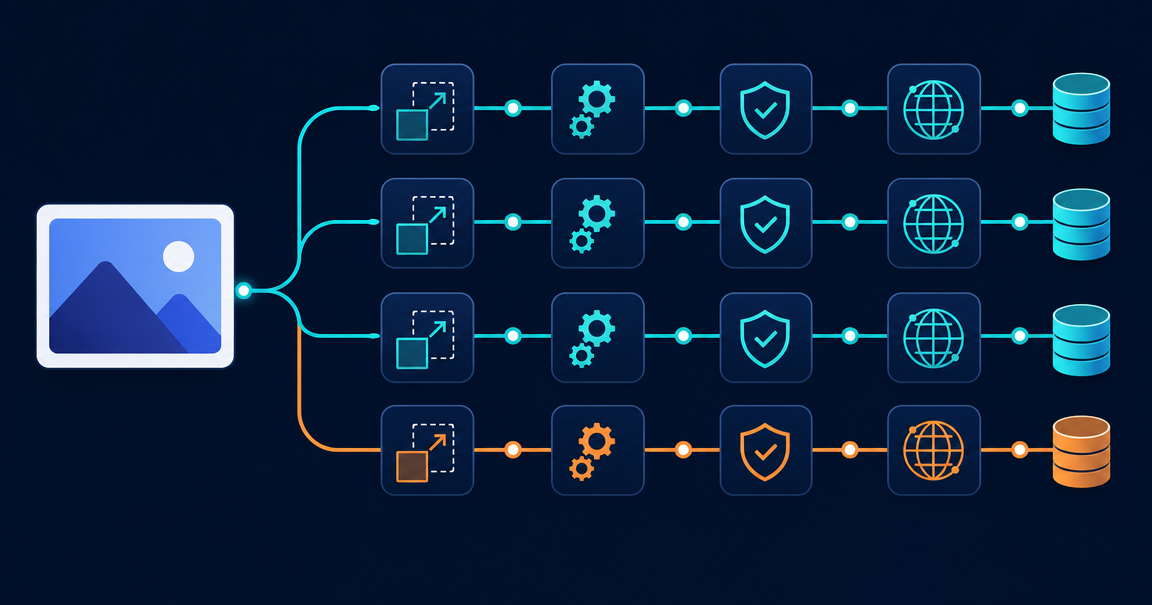
Design a Media Processing Pipeline: System Design Guide
I've been breaking down system design concepts that tripped me up during interview prep. This one is a favorite because most candidates draw one arrow from "user" to "server" and stop there.
The problem: one upload, eight operations
A user uploads a profile photo. What happens next?
Most people say "save it to S3 and serve it." That describes a homework project. In production, that single upload starts a chain of eight operations in an image processing pipeline.
The system validates the file type, strips EXIF metadata, and resizes the image into six dimensions. It compresses each version and runs content moderation.
It also generates a blurhash placeholder, pushes all versions to a CDN, and updates the database. That is eight downstream operations from one HTTP request.
The user stares at a loading spinner the whole time. The real question is not where to store the image.
How do you run eight operations that finish without the user waiting 30 seconds? These operations take different amounts of time and can fail on their own.
Why synchronous image processing breaks at scale
The simple approach handles everything in the upload endpoint. The request comes in. You resize, compress, moderate, push to CDN, update the database, and return a 200.
This breaks for three reasons.
First, latency adds up. Image resizing takes 200 to 500ms per variant. Multiply by six sizes and add moderation, which calls an external ML service.
You reach 3 to 5 seconds of processing for one profile photo. Users leave the page. Image optimization should not block the upload response.
Second, failures spread. If content moderation goes down, every upload fails. You already validated and resized the image. You coupled operations that do not depend on each other.
Third, you cannot scale parts on their own. Resizing needs CPU. Moderation needs I/O for API calls. CDN push needs network.
They all run on the same server. You cannot give moderation more resources without also scaling the resize workers.
The async media upload pipeline architecture
The fix is to separate the upload from the processing. The user request does two things: accept the file and return a response. Everything else runs in the background through an image processing pipeline.
Upload service: the thin entry point
The upload service handles the HTTP request. It validates the file by checking size, type, and magic bytes. It stores the raw file in object storage like S3 or GCS.
Then it publishes an event to a message queue called image.uploaded. The user gets a 202 Accepted response with a tracking ID in under 500ms.
The upload service does not know about resizing, moderation, or CDN distribution. It accepts the file and announces the upload.
async def handle_upload(request):
    file = await request.file('image')

    # Validate
    if file.size > MAX_SIZE or file.content_type not in ALLOWED_TYPES:
        return Response(status=400, body="Invalid file")

    # Store raw file
    object_key = f"raw/{uuid4()}/{file.filename}"
    await storage.upload(object_key, file.stream)

    # Publish event
    await queue.publish("image.uploaded", {
        "object_key": object_key,
        "user_id": request.user_id,
        "upload_id": str(uuid4()),
    })

    return Response(status=202, body={"upload_id": upload_id})
Message queue: the backbone of async image processing
A message broker like Kafka, RabbitMQ, or SQS sits between the upload service and every downstream processor. Each processor subscribes to the events it cares about.
The queue provides three benefits. First, buffering. If 10,000 users upload photos at the same time, the queue absorbs the burst.
Second, retry logic. If a processor fails, the message stays in the queue. The system retries it. You lose no data.
Third, fan-out. One image.uploaded event triggers multiple consumers at the same time. The resizer, moderator, and metadata extractor all start working.
The eight downstream operations
Each operation runs as its own service or worker. Workers consume events from the queue and produce new events when done.
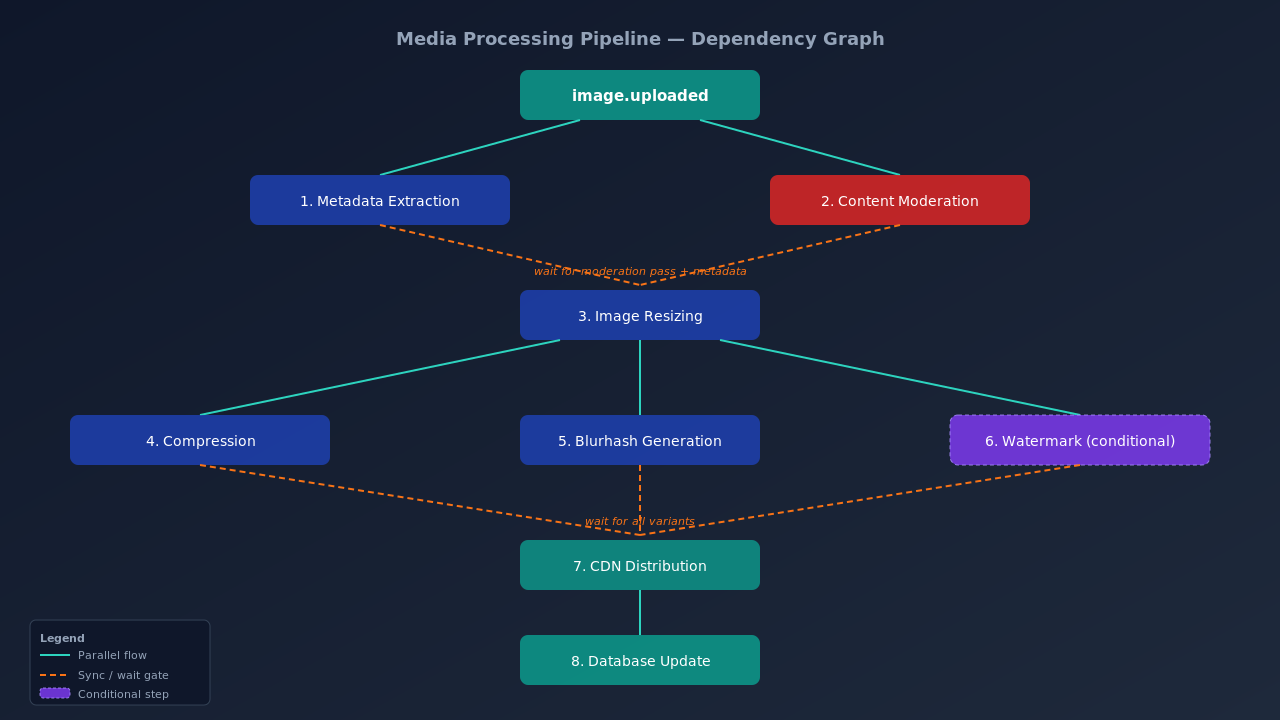
- Metadata extraction: reads EXIF data, finds dimensions, detects orientation, and strips location data for privacy.
- Content moderation: sends the image to an ML service like AWS Rekognition or Google Cloud Vision. If the image fails moderation, the pipeline stops.
- Image resizing: creates variants at thumbnail (150x150), small (320px), medium (640px), large (1080px), retina (2160px), and compressed original.
- Image compression: applies JPEG quality tuning, WebP conversion, and AVIF generation to cut file sizes and reduce load times.
- Blurhash generation: creates a tiny placeholder hash for client-side rendering. This is what makes image loading feel instant.
- Watermarking (conditional): only runs for certain content types like marketplace product images.
- CDN distribution: pushes all compressed variants to edge locations and clears cached versions of the same asset.
- Database update: records all variant URLs, dimensions, blurhash, moderation result, and CDN locations.
Orchestration vs event-based coordination
These eight operations do not run in a straight line. Some run in parallel. Some depend on others.
Metadata extraction and content moderation start right after upload. Resizing waits for moderation to pass. Compression waits for resizing. CDN distribution waits for everything.
In event-based coordination, each service listens for events and decides what to do. No central coordinator exists. This works for simple pipelines but gets messy with conditional steps.
In orchestration, a central coordinator like AWS Step Functions or Temporal manages the workflow. It knows the full dependency graph and triggers each step.
For a media processing pipeline, orchestration works better. The conditional logic gets complex enough that a workflow engine pays for itself.
Failure handling in distributed image processing
Every operation in this image processing pipeline can fail on its own. The moderation API might time out. The resizer might run out of memory on a 50MB photo.
For transient failures like network timeouts, use retry with exponential backoff. Set a max retry count of 3 to 5 attempts with increasing delays.
For poison messages like corrupt files, move them to a dead letter queue after max retries. Alert the ops team.
For partial failures, make each operation idempotent. Say the resizer already created the thumbnail variant. A retry skips it and only creates the missing ones.
For moderation rejections, notify the user, clean up partial artifacts, and mark the upload as rejected.
async def resize_worker(event):
    object_key = event["object_key"]
    upload_id = event["upload_id"]

    for variant in RESIZE_VARIANTS:
        variant_key = f"processed/{upload_id}/{variant.name}"

        # Skip if variant already exists (idempotent)
        if await storage.exists(variant_key):
            continue

        raw_image = await storage.download(object_key)
        resized = resize(raw_image, variant.width, variant.height)
        await storage.upload(variant_key, resized)

    await queue.publish("image.resized", {
        "upload_id": upload_id,
        "variants": [v.name for v in RESIZE_VARIANTS]
    })
Capacity estimation for a media upload system
Say you design this for a social media app with 10 million daily active users. About 5% upload images daily. That gives 500,000 uploads per day, or about 6 per second.
Each upload creates 8 downstream operations. That is 96 operations per second at peak. You need about 48 worker instances running at the same time.
For storage: each upload uses about 6MB total (3MB raw plus six variants at 500KB each). At 500K uploads per day, you add 3TB daily.
After 30 days, that is 90TB. S3 costs $0.023 per GB, so storage runs about $2,070 per month.
For CDN bandwidth: each user views 50 images per session at 200KB average. With 10M daily users, that is 100TB of CDN egress per day. CDN costs beat storage costs at scale. For a deeper walkthrough of capacity math, see DAU, QPS, storage, cache, bandwidth: 5 worked examples.
Real-world media processing pipeline examples
Instagram processes hundreds of millions of image uploads each day. Users see a placeholder right away. The system swaps in the processed image once ready.
Uber Eats built a content-addressable storage system for restaurant menu photos. It detects duplicate uploads by hashing the image content. If a restaurant uploads the same photo twice, the system skips reprocessing.
The pattern is the same everywhere. Use a thin upload endpoint. Process files through a message queue with separate workers. Add a status tracker for the client to poll.
What system design interviewers test with this question
When an interviewer asks you to design a media upload system, they test four things.
Can you break down a problem? The upload is simple. Seeing that it triggers a cascade is the real test.
Do you understand async vs sync tradeoffs? Can you explain why synchronous processing fails at scale?
Can you handle failures? Every distributed system fails. Your design should degrade gracefully.
Do you think about cost? Storage, compute, and CDN bandwidth add up. The CDN layer is worth discussing on its own. For more on edge caching and cache clearing strategies, see how edge caching delivers responses in 40ms.
Frequently asked questions
What is a media processing pipeline in system design?
It is an async system that handles operations triggered by a user upload. The system accepts the file, stores it, and publishes an event. Workers then handle resizing, compression, moderation, CDN distribution, and database updates based on dependencies.
Why use async image processing for media uploads?
Synchronous processing makes the user wait 3 to 5 seconds or more. It couples unrelated operations together. Async processing returns a response right away. Operations run in parallel. Each component fails and retries on its own.
How do you handle failures in a media upload pipeline?
Use message queues with retry and exponential backoff for transient failures. Move corrupt files to a dead letter queue. Make every operation idempotent so retries do not create duplicates. For moderation rejections, notify the user and clean up partial artifacts.
What message queue works best for an image processing pipeline?
Kafka works for high throughput and event replay. RabbitMQ handles complex routing. SQS is the simplest choice on AWS. For most media pipelines, any of these work. Pick based on your current infrastructure.
How do you estimate storage costs for an image upload system?
Multiply daily uploads by total size per upload, then multiply by 30 days. For 500K daily uploads at 6MB each, that is 90TB per month. At S3 pricing, storage runs about $2,070 per month. CDN egress usually costs more than storage.
I have been working through system design problems on Levelop's system design track. This media pipeline question comes up often. It tests async processing, event-driven design, failure handling, and cost estimation.