

Claude Code vs GitHub Copilot in 2026: An Honest Comparison
Every few weeks someone on my team asks the same question in a slightly different way. Should we standardize on Claude Code, or is GitHub Copilot enough? It is a fair question, and the honest answer in 2026 is that these two tools stopped being competitors in the narrow sense a long time ago. They are both agentic, they both run in your terminal, they both speak MCP, and they both bill you in ways that are hard to predict. The differences that matter now are structural, not feature by feature.
This post is the comparison I wish someone had handed me before we spent three months and a non-trivial amount of money finding out. If you want the wider field rather than a head to head, our ranking of the best AI coding agents in 2026 covers ten tools with the same lens.
The short version
If you already live inside GitHub and you want AI that shows up in code review, in issues, and in CI without anyone changing their habits, GitHub Copilot wins on distribution. If you want an agent that can hold a long, messy refactor in its head across dozens of files and dozens of minutes, Claude Code wins on depth. Most teams I talk to end up paying for both, which is annoying but rational, because they are solving different halves of the same problem.
The rest of this post explains why, with the pricing math, the architectural differences, and the specific failure modes each one has.
What each tool actually is in 2026
The naming has drifted enough that it is worth being precise.
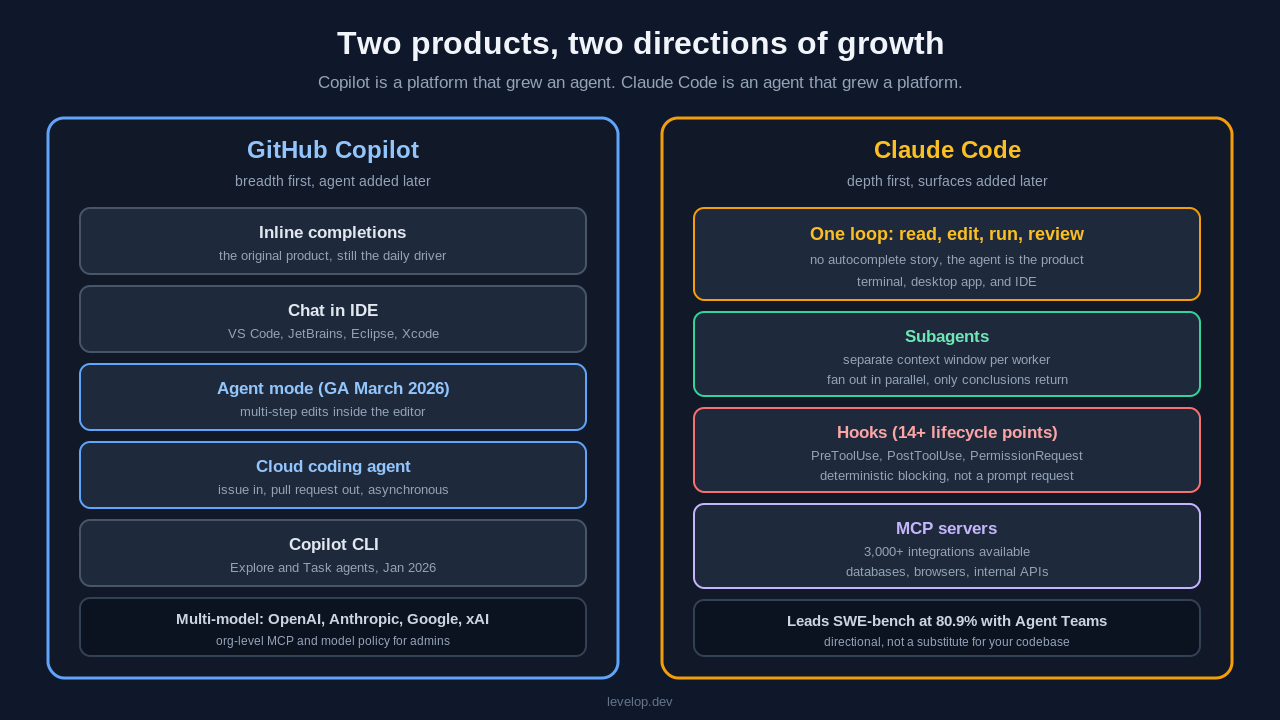
GitHub Copilot is no longer the inline autocomplete product that launched in 2021. It is a family: inline completions, chat, agent mode inside VS Code and JetBrains, a coding agent that turns issues into pull requests on GitHub itself, and Copilot CLI in the terminal. Agent mode went generally available across VS Code and JetBrains in March 2026, and Copilot now routes to models from OpenAI, Anthropic, Google, and xAI rather than exclusively to OpenAI. GPT-5.2, GPT-5.3 Codex, Claude Sonnet 4.6, Claude Opus 4.6, Gemini 3 Pro, and Grok Code Fast 1 are all selectable, and Auto model selection picks for you at a discount on the multiplier.
Claude Code is Anthropic's agentic coding tool. It started as a terminal program and now also runs in the desktop app and inside IDEs. It has no autocomplete story worth mentioning. The entire product is built around one loop: give it a goal, let it read the repository, let it edit files and run commands, and review what it did. Subagents, hooks, and MCP servers are the extension points.
That asymmetry is the whole comparison. Copilot is a platform that has grown an agent. Claude Code is an agent that has grown a platform. When people search for github copilot vs claude code they are usually trying to resolve exactly this, and the answer depends on which direction your team is growing from.
Pricing: the part nobody explains well
Both vendors moved to consumption billing in 2026, and both did it in ways that produce surprise invoices.
GitHub Copilot plans
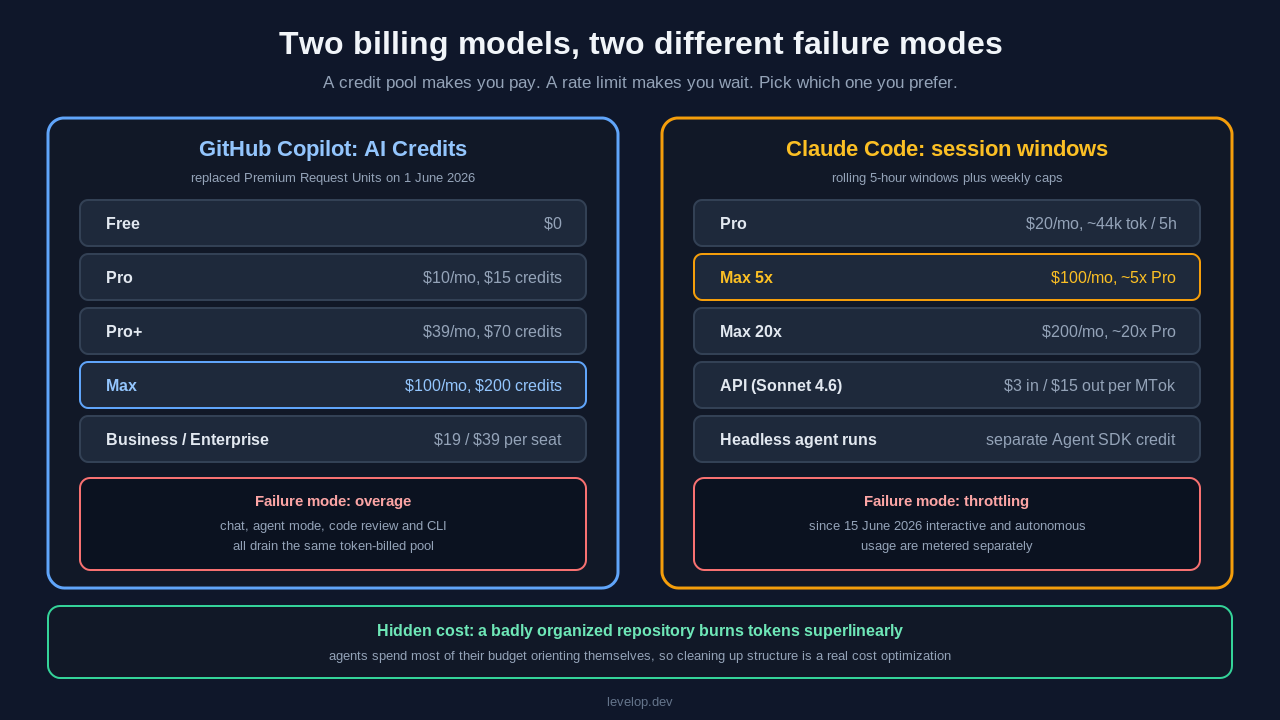
The individual and team ladder as of mid-2026 runs from Free at zero cost, to Pro at $10 per month with $15 in AI Credits, Pro+ at $39 per month with $70 in credits, and Max at $100 per month with $200 in credits. For organizations, Business is $19 per seat per month and Enterprise is $39 per seat per month, both with organization policy controls.
The important change: on 1 June 2026, GitHub retired Premium Request Units and replaced them with GitHub AI Credits, which bill on token usage rather than counting requests, as described in the GitHub Copilot billing documentation. Chat, agent mode, code review, and Copilot CLI all draw from the same credit pool. This is better for light users and considerably worse for anyone running long agent sessions, because a single multi-step agent task can burn through what used to be a whole day of requests.
Claude Code plans
Claude Code is $20 per month on Pro, which gives roughly 44,000 tokens per five hour window. Max 5x at $100 per month is roughly five times that, and Max 20x at $200 per month is effectively unmetered for a full working day. If you would rather pay per token, the Anthropic API bills Sonnet 4.6 from $3 per million input tokens and $15 per million output tokens.
Claude Code runs on rolling five hour session windows with weekly caps layered on top. Since 15 June 2026, Anthropic separates human-in-the-loop usage from autonomous usage: interactive sessions draw on the session and weekly limits, while headless agent runs draw on a separate Agent SDK credit. If you were planning to run Claude Code unattended in CI on a Max plan, read that sentence twice.
The honest math
For a developer who uses AI as an assistant a few times an hour, Copilot Pro at $10 is the cheaper seat and it is not close. For a developer who hands over whole tasks and walks away, Claude Code Max 5x at $100 is more predictable than Copilot Max at $100, because the ceiling is a rate limit rather than a credit balance that converts into an overage line item. Rate limits make you wait, credit pools make you pay, so pick the failure mode you prefer.
Architecture: where the real difference lives
Context and long tasks
Claude Code's subagents are the feature that changed how I work. A subagent is a separate instance with its own context window, so verbose work like reading forty test files to find which ones touch the auth module happens somewhere else and only the conclusion comes back. With subagents generally available you can fan out parallel workers from a single task, which means a large refactor does not degrade into the agent forgetting what it decided twenty minutes ago.
Copilot's answer is the cloud coding agent: you assign an issue, it works in the background on GitHub's infrastructure, and it opens a pull request. That is a genuinely different shape. It is asynchronous and it produces a reviewable artifact, which fits how most teams already work. It is also less interactive, so if the agent misunderstands the task you find out at pull request time rather than at minute three.
If you are comparing github copilot agent vs claude code specifically, that is the split: Copilot's agent optimizes for handoff, while Claude Code's optimizes for collaboration.
Hooks and determinism
Claude Code exposes fourteen or more lifecycle trigger points, including SessionStart, PreToolUse, PostToolUse, PermissionRequest, SubagentStart, and Stop. PreToolUse is the one that matters for safety, because it fires before any tool runs, so you can block a command deterministically rather than hoping the model chooses not to run it. We use it to refuse anything that touches production credentials, and it has caught real mistakes.
Copilot has custom agents and organization-level MCP policy, which give admins a coarser but centrally enforceable control surface, and Microsoft documents the custom agent model for Visual Studio. If you are an enterprise that needs to prove to an auditor that nobody can wire an arbitrary MCP server into the IDE, Copilot's policy model is easier to defend. If you are a team that wants a scriptable guardrail on your own machine, Claude Code's hooks are more precise.
MCP and the tool ecosystem
Both support the Model Context Protocol, which by now is the assumed integration layer rather than a differentiator. Copilot has MCP generally available in VS Code, JetBrains, Eclipse, and Xcode. Claude Code has the deeper server ecosystem, with three thousand or more integrations available. We keep a running list of the ones worth installing in our guide to the best MCP servers for Claude Code and Cursor, and if you are hardening an MCP deployment our notes on MCP server authentication cover the production side.
Benchmarks, with the usual caveat
Claude Code leads SWE-bench at 80.9% when using Agent Teams, and Claude Opus 4.8 leads SWE-bench Pro at 69.2% against GPT-5.5 at 58.6%. Treat these as directional. SWE-bench measures the ability to fix a well-specified issue in a well-known open source repository, which is a genuinely useful signal and also nothing like the ambiguous, half-documented, three-services-deep tickets in your actual backlog. Benchmarks tell you which tool has a higher ceiling, but they do not tell you which one will be better on your code.
The terminal question
A lot of the claude code vs github copilot debate now happens at the CLI level, because that is where both products are investing.
Copilot CLI shipped enhanced agents and better context management in January 2026, per the GitHub changelog, and it includes specialized custom agents like Explore for fast codebase analysis and Task for running commands such as tests and builds. It is a real terminal agent, not a wrapper.
Claude Code has been terminal-native from day one, and it shows in the small things: how it handles interrupted commands, how it streams reasoning while it works, and how easily you can drop back to a plain shell and pick up where you left off.
For anyone evaluating github copilot cli vs claude code as a pure terminal comparison, my read is that Copilot CLI is now good enough that the claim about Claude Code being the only serious terminal agent is no longer true, but Claude Code still has the better ergonomics for long sessions.
Where each one breaks
No comparison is useful without failure modes, so here are the ones we have hit.
GitHub Copilot breaks when the task needs sustained reasoning across a large surface. Agent mode is excellent at bounded changes such as adding a field, wiring it through, and updating the tests. On a refactor that touches thirty files with implicit coupling, it tends to produce a plausible partial result and declare victory, and the cloud agent's pull request then costs a human forty minutes of review to discover the missing half.
Claude Code breaks when the repository is unfamiliar and undocumented. Without a CLAUDE.md file or a sane structure, it spends an enormous amount of context orienting itself, and on Pro you hit the five hour window before it has done anything useful. It also gives you far less help in the moment you are typing, so developers who like autocomplete find the switch genuinely uncomfortable for the first week.
Both break in code review. Neither tool reliably catches the class of bug that comes from a mistaken assumption about a system it cannot see. We wrote about this in more detail in AI code review vs human code review, and the conclusion has not changed: they are good at mechanical correctness and bad at judgment.
A decision framework
Rather than a winner, here is how we actually route the decision.
- Your code lives on GitHub and your team resists new tools, so choose Copilot, because the distribution advantage is real and adoption friction is the largest hidden cost in this category.
- You need compliance controls your security team can point at, so choose Copilot Business or Enterprise for the organization-level MCP and model policy.
- Your hardest problems are large refactors and legacy archaeology, so choose Claude Code on Max 5x at minimum, with subagents configured.
- You want deterministic guardrails on agent behavior, so choose Claude Code for its hooks.
- You are one person shipping a side project on a budget, so choose Copilot Pro at $10 and revisit when you feel the ceiling.
- You have budget for one seat and your work is genuinely agentic, so choose Claude Code Max 5x, because the token ceiling is more predictable than a credit balance.
If you are also weighing editors rather than agents, our Claude Code vs Cursor comparison covers that axis, what AI coding agents actually are is the primer if this is all new, and how agentic coding tools work under the hood explains the loop both products are built on.
Setting a sane guardrail
If you do adopt Claude Code, the single highest-value thing you can configure on day one is a PreToolUse hook that refuses destructive shell commands. You register it in your settings file against the Bash matcher, pointing at a small script in your repository.
{
  "hooks": {
    "PreToolUse": [
      {
        "matcher": "Bash",
        "hooks": [
          { "type": "command", "command": "python3 .claude/guard.py" }
        ]
      }
    ]
  }
}
The guard itself reads the proposed tool call on standard input and exits with a non-zero status to block it. Because the check is a plain script rather than a prompt instruction, it holds regardless of what the model decides to try.
import json, re, sys

BLOCKED = [
    r"rm\s+-rf\s+/",
    r"DROP\s+DATABASE",
    r"git\s+push\s+--force\s+origin\s+(main|master)",
    r"kubectl\s+delete\s+ns\s+prod",
]

payload = json.load(sys.stdin)
command = payload.get("tool_input", {}).get("command", "")

for pattern in BLOCKED:
    if re.search(pattern, command, re.IGNORECASE):
        print("Blocked by policy: " + pattern, file=sys.stderr)
        sys.exit(2)

sys.exit(0)
Copilot's equivalent is organization policy rather than a local script, configured by an admin in the enterprise settings rather than in your repository. It is less flexible and easier to enforce across a hundred developers.
What I would tell a team lead
Buy Copilot for the team and Claude Code for the three or four people doing the hardest work. That is not a cop-out, it is the allocation that matches the tools to the shape of the work. Copilot's value is that everyone gets meaningfully faster at ordinary tasks with zero process change, while Claude Code's value is that a small number of hard problems become tractable. Those are different budgets and they should be defended differently.
Re-evaluate in six months, because both products are shipping fast enough that any comparison, including this one, has a shelf life measured in quarters. We keep our tooling coverage current on the Levelop blog, and you can see what we are building at levelop.dev.
Frequently asked questions
Is Claude Code better than GitHub Copilot?
Neither is strictly better. Claude Code is stronger on long, multi-file agentic tasks and leads SWE-bench at 80.9% with Agent Teams, while GitHub Copilot is stronger on distribution, inline completions, and integration with issues, pull requests, and CI. Teams doing heavy refactoring tend to prefer Claude Code, and teams optimizing for broad adoption tend to prefer Copilot.
How much does each one cost in 2026?
GitHub Copilot runs from free through Pro at $10 per month, Pro+ at $39, and Max at $100, with Business at $19 per seat and Enterprise at $39 per seat, and since June 2026 usage is billed through GitHub AI Credits based on tokens. Claude Code is $20 per month on Pro, $100 on Max 5x, and $200 on Max 20x, or pay-per-token through the Anthropic API starting at $3 per million input tokens for Sonnet 4.6.
Can GitHub Copilot use Claude models?
Yes. Copilot supports Claude Sonnet 4.6 and Claude Opus 4.6 alongside models from OpenAI, Google, and xAI. Choosing a Claude model inside Copilot does not give you Claude Code's agent architecture, subagents, or hooks, so the comparison is about the harness rather than the underlying model.
Which is better for terminal work, Copilot CLI or Claude Code?
Copilot CLI became competitive in January 2026 with enhanced agents and specialized Explore and Task agents, but Claude Code still has better ergonomics for long uninterrupted sessions and richer hook support. If your terminal work is short and command-oriented, Copilot CLI is sufficient, and if it is exploratory and long-running, Claude Code is the better fit.
Do I need both?
Many teams end up with both, and it is a defensible choice. A common pattern is Copilot seats for the whole team to accelerate everyday work, plus a small number of Claude Code Max seats for the engineers handling the hardest refactors and migrations.
Does either tool replace code review?
No. Both are reliable on mechanical correctness and unreliable on judgment about systems they cannot observe. Treat agent output as a draft that still needs a human reviewer who understands the surrounding architecture.