

Best MCP Servers for Claude Code and Cursor in 2026
Every developer who installs their first MCP server has the same reaction: the agent stops guessing. Instead of hallucinating a function signature or asking you to paste a file, it just reads the repo, queries the database, or drives a browser and checks its own work. That shift is why the Model Context Protocol went from a niche Anthropic spec to an ecosystem with over 3,000 registered servers in about eighteen months.
The problem is that the ecosystem grew faster than the guidance did. Search for the best mcp servers for claude code and you get lists of forty tools, most of which you will install once, never use, and quietly pay for in token overhead on every single request. Most roundups of the best mcp servers 2026 has produced are inventory lists. This guide takes the opposite approach. We looked at which servers actually survive on a working developer's machine after a month, why they survive, and what the real cost of adding one more is.
If you are new to the protocol itself, start with our developer guide to Model Context Protocol and come back. This post assumes you know what a server is and want to know which ones to run.
What an MCP server actually adds to your editor
An MCP server is a small process that exposes tools, resources, and prompts to an AI client over a standard protocol. Every mcp tool it registers becomes something your agent can actually invoke. Claude Code, Cursor, VS Code, Windsurf, and Codex, the ai coding assistants most teams have standardised on, all speak it, which is the entire point: you configure a server once and every compatible client can use it.
The practical effect is that your agent gains verbs. Without servers, an agent can read what you paste and write text back. With the right servers it can open a pull request, run a query against staging, take a screenshot of the page it just changed, or look up the current API surface of a library that shipped a breaking change last week. Those verbs are what turn a chat assistant into something that closes tickets.
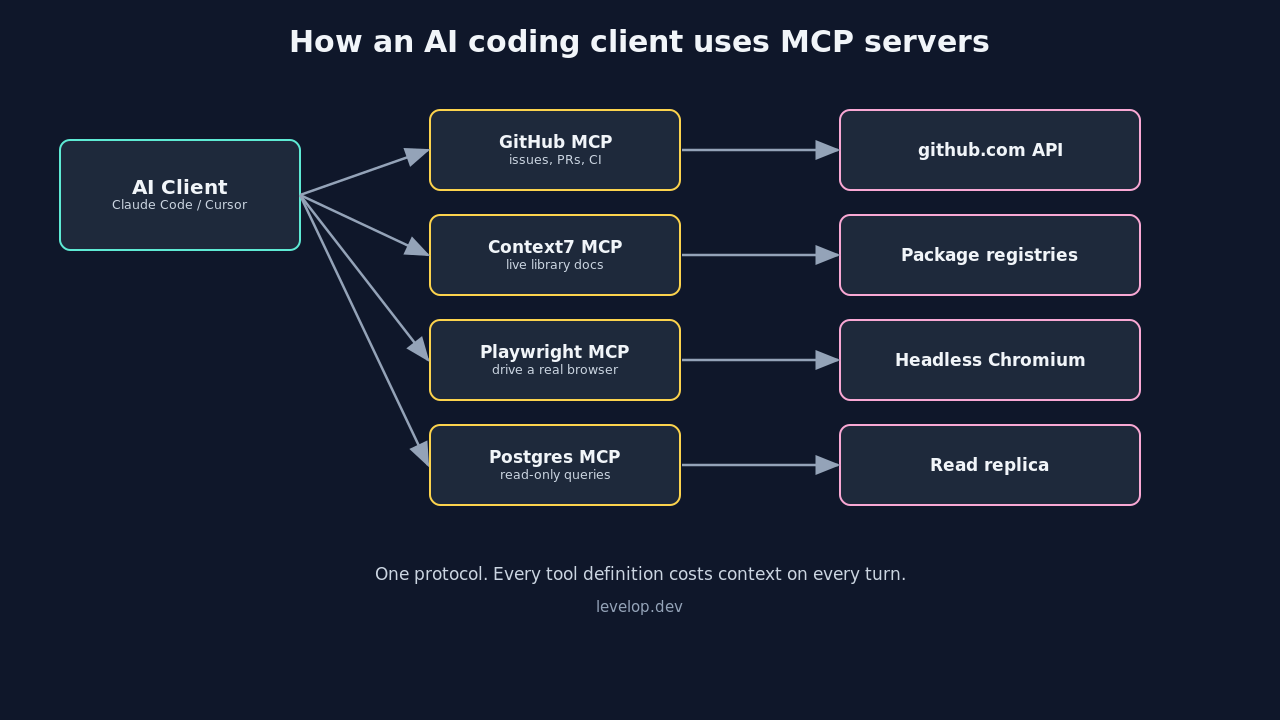
The catch is that every tool a server exposes gets injected into the model's context on each turn. Ten servers exposing eight tools apiece is eighty tool definitions the model reads before it reads your question. That is the tension running through this entire list, and it is why the answer to "which are the best mcp servers for developers" is almost never "all of them."
How we picked the best MCP servers for developers
Three filters, applied in order.
Does it get used weekly? A server that solves a problem you hit twice a year is a browser bookmark, not an install. Retention over novelty.
Is it maintained by the vendor or a serious team? Security researchers filed more than thirty CVEs against popular MCP servers in January and February 2026, and a remote code execution bug landed in a server with over 150 million downloads that April. Systematic scans have found security findings in roughly two thirds of popular servers. Provenance is not a nice-to-have here.
Is the tool count reasonable? A server exposing thirty tools has to earn a lot of context budget. Most of the servers below expose fewer than ten.
The best MCP servers for Claude Code and Cursor in 2026
GitHub
If you install exactly one server, install this one. The github mcp server is shipped officially by GitHub with a hosted remote endpoint, so there is no local process to babysit and no personal access token sitting in a config file if you use OAuth.
What changes day to day: the agent can read issues, open and review pull requests, search across repositories you actually have access to, and check CI status. The workflow that sells it is asking for a fix and getting a branch, a commit, and a PR description that references the original issue, without you leaving the editor.
Context7
Context7 solves one narrow problem extremely well: models are trained on a snapshot of the world, and library APIs move. Context7 pulls current, version-specific documentation for whatever package you are working against and injects it into context on demand.
It exposes two tools. That is the whole surface area. In exchange, wrong-API-signature errors on unfamiliar or fast-moving libraries drop noticeably. Best cost-to-value ratio on this list, and the easiest one to justify keeping when you are trimming.
Playwright
For anything with a user interface, Playwright is the server that lets the agent verify its own work instead of asserting that the change probably worked. It drives a real browser: navigate, click, fill forms, screenshot, read console errors.
The behavioural change is significant. An agent that can see a rendering bug will fix the rendering bug. An agent that cannot will confidently tell you the CSS is correct. If you do frontend work, this is not optional, and it is the single strongest entry among the best mcp servers for cursor users doing UI work.
Filesystem
The reference filesystem server gives scoped read and write access to directories you nominate. Claude Code has native file access, so the value here is mostly in Cursor and other clients, and in the scoping itself: you point it at specific paths rather than handing over your home directory.
Configure the allowed directories narrowly. This is the server most likely to be pointed at more of your disk than it needs.
PostgreSQL
A database server turns questions into answers instead of into code you then have to run. "How many users signed up last week?" gets a number. "Why is this query slow?" gets an actual execution plan.
Connect it to a read replica or a staging database with a read-only role. The temptation to wire it into production with write credentials is real and you should not do it. The agent does not need DELETE.
Sequential Thinking
This one is unusual because it adds no external capability. It gives the model a structured scratchpad for breaking a problem into steps, revising earlier steps, and branching when an approach fails.
Whether it helps depends heavily on the model and the task. On long refactors and multi-file debugging it earns its slot. On short tasks it is overhead. Try it for a week and be honest about whether output improved.
Linear
If your team runs on Linear, this closes the loop between finding a bug and tracking it. Create an issue mid-session, update status when the fix merges, query what is assigned to you this cycle. Jira, Notion, and Asana all have equivalents, and the same logic applies: install the one your team actually lives in, not all four.
The tool budget nobody warns you about
Cursor has a soft ceiling of roughly forty active tools across all servers combined. Cross it and you get a warning, and then the agent silently loses access to some tools. Silently is the word that costs people an afternoon.
Claude Code does not enforce a hard cap, but the underlying economics are identical. Every tool definition is tokens in your context window on every turn, and a bloated tool list measurably degrades selection accuracy: the model has more near-duplicate options to choose between, so it chooses worse.
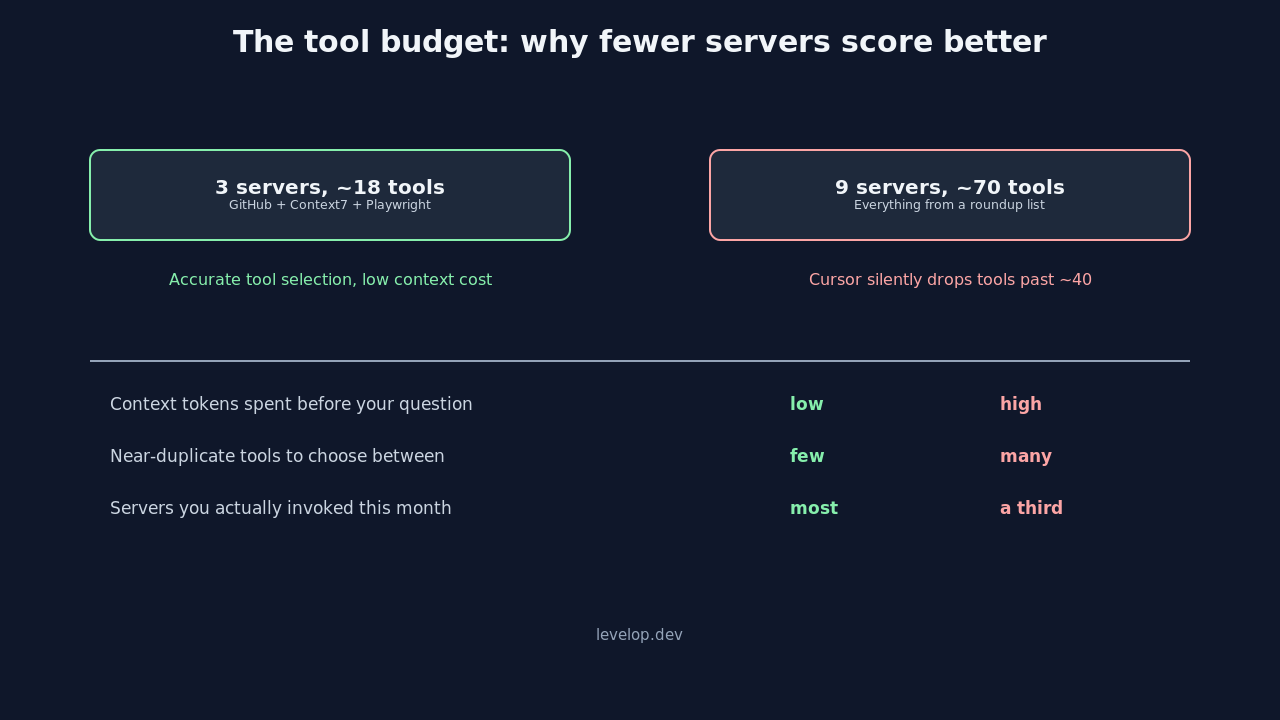
Practical guidance from people running these setups daily: three servers is the sweet spot, five is the ceiling before overhead starts hurting. The best configuration is the smallest one that covers your actual weekly workflow. If you are not sure which of your installed servers is dead weight, disable half for a week and notice what you miss.
Security: vet before you install
The security picture deserves its own section because the ecosystem's growth curve outran its review capacity. The headline numbers again: 30+ CVEs filed against popular servers in early 2026, an RCE in a server with 150M+ downloads, and security findings in roughly 66% of popular servers under systematic scanning.
An MCP server is a process running on your machine, or a remote endpoint holding your OAuth tokens, with permission to read files and call APIs as you. Treat installing one like adding a dependency with shell access, because functionally that is what it is.
- Prefer vendor-maintained servers. GitHub's own server over a fork with fifty stars.
- Pin versions. Do not auto-update a process with filesystem access.
- Scope tokens minimally. Read-only where read-only will do, and separate credentials per server.
- Check the registry namespace. The official registry uses reverse DNS names tied to verified GitHub accounts or domains.
- Read the tool list before enabling. If a documentation server wants shell execution, that is your answer.
We covered the attack surface in more depth in our breakdown of MCP security risks every developer needs to know, including prompt injection through tool descriptions and the confused deputy problem with chained servers.
A starter configuration that works
For a full-stack developer, the shortest useful list is GitHub, Context7, and Playwright. Repository operations, current documentation, and the ability to verify UI changes. Three servers, well under any tool ceiling, and it covers most of what a coding agent is asked to do.
{
  "mcpServers": {
    "github": {
      "type": "http",
      "url": "https://api.githubcopilot.com/mcp/"
    },
    "context7": {
      "command": "npx",
      "args": ["-y", "@upstash/context7-mcp@1.0.14"]
    },
    "playwright": {
      "command": "npx",
      "args": ["-y", "@playwright/mcp@0.0.41"]
    }
  }
}
Note the pinned versions. Auto-updating a process that can read your filesystem is exactly the risk described above, and pinning costs you nothing but a periodic bump.
Add PostgreSQL if you spend real time in data. Add your issue tracker if your team's workflow lives there. Stop.
Backend-only work swaps Playwright for the database server. Frontend-heavy work keeps Playwright and drops the database. Neither configuration needs more than four servers, and if yours has grown past six it is worth asking which ones you have actually invoked this month.
Common mistakes
Installing from a list instead of from a need. Including this one. Read it, pick the two that map to problems you hit weekly, and ignore the rest until a problem shows up.
Giving production write access. Read replicas exist. Use them.
Leaving servers enabled globally when they are project-specific. Most clients support per-project configuration. A database server has no business being loaded when you are editing a static site.
Assuming remote endpoints are safer. Hosted removes the local process risk and adds a token-custody risk. Different tradeoff, not a strictly better one.
Skipping the spec. The protocol is still moving, and the servers that track the specification closely are the ones that keep working after client updates.
Where this is going
Three thousand registered servers is not an equilibrium. Most of them will not be maintained a year from now, and the ones that survive will be the vendor-backed servers for tools people already pay for, plus a small number of genuinely useful primitives like Context7.
The interesting change is not more servers. It is better selection: clients that load tools on demand rather than injecting every definition upfront, and registries that surface maintenance signals rather than star counts. Until that lands, the tool budget is your problem to manage, and a short deliberate list beats a long aspirational one every time.
If you want to go a level deeper, our step-by-step tutorial on building an MCP server is the fastest way to understand why these tradeoffs exist, and our comparison of MCP versus REST APIs covers when a server is the wrong abstraction entirely. More engineering write-ups are on the Levelop blog.
Frequently asked questions
What are the best MCP servers for Claude Code in 2026?
For most developers the highest-value set is GitHub, Context7, and Playwright. GitHub covers repository and pull request operations, Context7 supplies current version-specific library documentation, and Playwright lets the agent drive a real browser to verify its own UI changes. Add a PostgreSQL server if you work with data regularly and your team's issue tracker if that is where the workflow lives.
How many MCP servers should I install?
Three is the practical sweet spot and five is roughly the ceiling. Every tool a server exposes is injected into the model's context on each turn, so a long list costs tokens on every request and makes tool selection less accurate because the model has more near-duplicate options to choose between. Cursor also has a soft ceiling of about forty active tools, past which it silently drops access to some of them.
Are MCP servers safe to install?
Not automatically. Researchers filed more than thirty CVEs against popular MCP servers in early 2026, a remote code execution bug was disclosed in a server with over 150 million downloads, and systematic scans found security findings in roughly two thirds of popular servers. Treat a server like a dependency with shell access: prefer vendor-maintained ones, pin versions, scope tokens to the minimum, and read the tool list before enabling it.
Do the same MCP servers work in Claude Code and Cursor?
Yes. That is the core benefit of a shared protocol. Claude Code, Cursor, VS Code, Windsurf, and Codex all speak MCP, so a server you configure once works across compatible clients. The configuration file location and format differ slightly per client, and the tool ceilings differ, but the servers themselves are portable.
What is the difference between a local and a remote MCP server?
A local server runs as a process on your machine and typically communicates over stdio, which means it can touch your filesystem directly. A remote server is a hosted HTTP endpoint that holds your OAuth tokens instead. Remote removes the local process risk and adds a token-custody risk, so it is a different tradeoff rather than a strictly safer one.
How do I find trustworthy MCP servers?
Start with the official MCP registry, which uses reverse DNS naming tied to verified GitHub accounts or domains, so a name like io.github.owner/server proves that owner actually published it. Beyond that, prefer servers maintained by the vendor whose product they wrap, check commit recency rather than star count, and read the exposed tool list for anything broader than the server's stated purpose.