
Claude Context Window Size: Limits and How to Manage It
Back with another one in the series where I break down things that confused me until they clicked. This time it is the Claude context window size, and specifically why a bigger window did not fix the problems I thought it would.
I used to treat the context window like free storage. More tokens meant I could paste more, so I pasted more. Then a production agent I was running started giving worse answers as I gave it more context, not better ones. That made no sense to me until I understood what the context window actually is, how the numbers on Claude's models translate into real limits, and why the discipline of context engineering matters more than the raw size.
What a context window actually is
A context window is the total amount of text a model can look at in a single request. It covers everything: the system prompt, the conversation history, any documents or search results you paste in, the user's latest message, and the space reserved for the model's reply. When people ask about the Claude context window size, they are really asking how much of all of that can fit before something has to be dropped. The same limit applies to any llm context window, not just Claude's. Think of it as the model's working memory for one request.
The unit is tokens, not words. A token is a chunk of text, roughly four characters of English on average, so about three quarters of a word. "Context engineering" is three or four tokens depending on how it splits. This is the first thing that tripped me up. I would estimate my prompt in words, multiply by some number in my head, and get it wrong every time. The only reliable way is to count tokens with a real tokenizer, which I will show below.
Claude context window sizes in 2026
Here is where the numbers land as of 2026. Treat exact figures as something to confirm in Anthropic's documentation, because model specs move faster than any blog post can keep up with.
- Claude Sonnet (current): 200K token standard window, with a long-context tier up to 1M tokens in beta for eligible workloads.
- Claude Opus: 200K tokens, highest reasoning quality, same base window.
- Claude Haiku: 200K tokens, fastest and cheapest, same base window.
Two hundred thousand tokens is a lot. It is somewhere around 150,000 words of English, or several hundred pages. The 1M token tier on newer Sonnet models pushes that to roughly 750,000 words in a single request. If your instinct is "great, I never have to think about limits again," that was my instinct too, and it was wrong.
If you search for context window claude specs, you will see these numbers cited everywhere. Tools also surface usage live: Claude Code, for example, shows the claude code context window filling as you work, and you may still see smaller tiers advertised. So if you are wondering what is a 64k context window, it simply means the model can hold 64,000 tokens at once.
Why a bigger window is not a free lunch
The window being large does not mean the model uses all of it equally well. Three things bite you.
The first is attention degradation, often called the "lost in the middle" effect. Research from Stanford and others showed that models retrieve facts placed at the very start or very end of a long context far more reliably than facts buried in the middle. The paper Lost in the Middle by Liu and colleagues documented this clearly, and while models have improved, the pattern has not disappeared. Longer contexts make this worse, not better. If you dump 180,000 tokens of documents and the answer sits at token 90,000, do not be surprised when the model glosses over it.
The second is cost. You pay per input token. A request that fills a 200K window costs roughly forty times more than one that uses 5K tokens for the same output. When I was pasting entire codebases into every request, my bill was not reflecting value, it was reflecting laziness.
The third is latency. More input tokens mean more time to first token and a slower overall response. An agent that reads 150K tokens on every step feels sluggish in a way users notice immediately.
Context engineering: making the window work for you
Context engineering is the practice of deciding what goes into the window, in what order, and in what form. It is the discipline that sits one level above prompt engineering. If you want the full mental model, I wrote about it in what is context engineering, and the pillar piece on agentic context engineering covers how self-improving agents manage their own context over long runs. Here I want to focus on the three levers that made the biggest difference for me.
Retrieve, do not stuff
The first change was to stop pasting whole documents and start retrieving only the relevant chunks. Instead of loading a 40,000 token manual, I embed it, split it into passages, and pull the three or four passages that actually match the question. The window goes from mostly noise to mostly signal. Accuracy went up and cost went down at the same time, which almost never happens together.
Compact the history
For long conversations and agents, the history grows without bound. Rather than carrying every turn verbatim, I summarize older turns into a compact running note and keep only the last few messages in full. This is sometimes called compaction. The model keeps the thread of the conversation without paying for every word of it.
Order for recency and primacy
Because of the lost-in-the-middle effect, I now put the most important material at the very top of the context and the user's actual question at the very bottom, closest to where the model starts generating. Filler and lower-priority context go in the middle where a little degradation does not matter.
Counting tokens so you stop guessing
You cannot budget what you cannot measure. Anthropic exposes a token counting endpoint so you can check the size of a request before you send it. Here is the pattern I use to guard against blowing past a target budget.
import anthropic

client = anthropic.Anthropic()

def count_tokens(system: str, messages: list) -> int:
    # Ask the API how many input tokens this request will use,
    # without actually running the model.
    result = client.messages.count_tokens(
        model="claude-sonnet-4-5",
        system=system,
        messages=messages,
    )
    return result.input_tokens

def fits_budget(system, messages, budget=20000):
    used = count_tokens(system, messages)
    return used <= budget, used
Twenty thousand tokens as a working budget on a 200K window sounds absurdly conservative. That is the point. On most production tasks, a tight, well-chosen 20K context beats a sloppy 150K one on quality, cost, and speed all at once.
A practical token budget
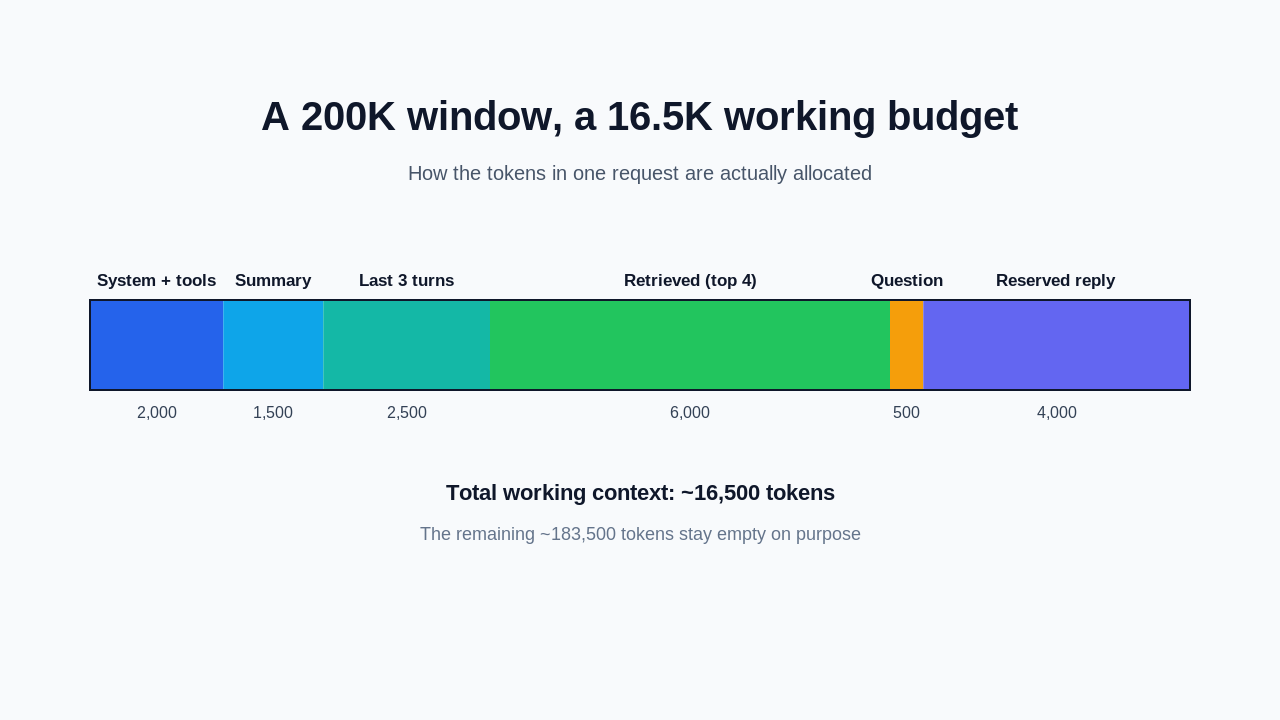
Here is how I actually allocate a request for a retrieval-augmented agent. The numbers are a starting point, not a law.
System prompt and tools      ~2,000 tokens
Running conversation summary ~1,500 tokens
Last 3 message turns         ~2,500 tokens
Retrieved passages (top 4)   ~6,000 tokens
User's current question        ~500 tokens
Reserved for the response    ~4,000 tokens
--------------------------------------------
Total working context       ~16,500 tokens
Everything has a home and a ceiling. When retrieval wants to return eight passages instead of four, I do not just let it grow. I rerank and keep the best four, because a smaller relevant context outperforms a larger padded one. If you want more patterns like this, the context engineering best practices piece goes deeper on the techniques, and LangChain context engineering shows how this maps onto a real framework.
Mistakes I made so you do not have to
I want to be specific here because these cost me real time.
I assumed words equaled tokens. My budgets were off by a third until I started counting properly. Code, JSON, and non-English text tokenize very differently from prose, so estimating by eye is a trap.
I confused a large window with good recall. I put critical instructions in the middle of a long context and could not understand why the model ignored them. Moving them to the top fixed it instantly. The window held the tokens fine. The attention did not weight them.
I let agent history grow unbounded. A long-running agent slowly filled its own context with its own chatter until every step was slow and expensive. Compaction was not an optimization I added later, it turned out to be a requirement for anything that runs more than a handful of steps.
I treated the 1M token tier as a solution. It is a capability, not a strategy. If your retrieval and compaction are bad at 200K, they are bad at 1M, you just pay more to be wrong more slowly.
What to do next
If you want to build the habit, here is the order I would follow. Start by adding token counting to one real request so you can see where your tokens actually go. Then replace one document paste with retrieval and compare the answers. After that, add compaction to any conversation or agent that runs long. Finally, reorder your context so the important material sits at the edges, not the middle.
Each step is small and each one is measurable, which is the whole reason context engineering beats guessing.
Frequently asked questions
What is the Claude context window size?
As of 2026, Claude's Sonnet, Opus, and Haiku models share a standard 200K token context window, which is roughly 150,000 words. Newer Sonnet models offer a long-context tier up to 1M tokens in beta for eligible workloads. Always confirm the current numbers in Anthropic's documentation, since model specs change often.
How many words is 200K tokens?
A token averages about three quarters of an English word, so 200K tokens is roughly 150,000 words, or several hundred pages of text. Code and non-English text tokenize differently, so use a real tokenizer rather than a word estimate when it matters.
Does using the full context window make Claude smarter?
No. Filling the window often makes answers worse because of attention degradation, higher cost, and higher latency. Models retrieve information near the start and end of the context far better than material buried in the middle, so a smaller, well-ordered context usually beats a large padded one.
What is the difference between the context window and context engineering?
The context window is the fixed token capacity of a single request. Context engineering is the practice of deciding what to put into that window, in what order, and in what form. The window is the container, and context engineering is how you pack it well.
How do I count tokens before sending a request to Claude?
Anthropic provides a token counting endpoint, accessible in the SDK through client.messages.count_tokens, which returns the input token count without running the model. Use it to check a request against a budget before you send it, so you never blow past the window or forget to reserve room for the reply.
Wrapping up
The Claude context window size is generous, but the size was never the real lever. Treating the window as a budget you engineer deliberately, rather than storage you fill, is what turned my flaky agents into reliable ones. Start with token counting, retrieve instead of stuffing, compact your history, and order for the edges.
This one came out of problems I hit while building on Levelop, and it sits alongside the rest of the context engineering series on the blog. If your model is ignoring what you feed it, the fix is almost never a bigger window.