
LangChain Context Engineering for AI Agents
Most agents do not fail because the model is weak. They fail because the model was handed the wrong context at the wrong time. A brilliant reasoning engine with a cluttered, stale, or incomplete window will still hallucinate, loop, or lose the thread halfway through a task. This is exactly the problem that context engineering sets out to solve, and LangChain has quietly become one of the most practical places to do it.
LangChain context engineering is the discipline of deciding what information enters the model's context window on every single step of an agent's run, and how that information is stored, retrieved, trimmed, and formatted along the way. It is less about clever wording and more about plumbing: what you write down, what you pull back, what you throw away, and what you deliberately keep out. In this guide we will walk through the core moves, show them in real LangChain and LangGraph code, and point out the mistakes that quietly wreck production agents.
If you are new to the topic, start with our context engineering developer guide for the conceptual foundation, then come back here for the LangChain-specific implementation.
What context engineering actually means
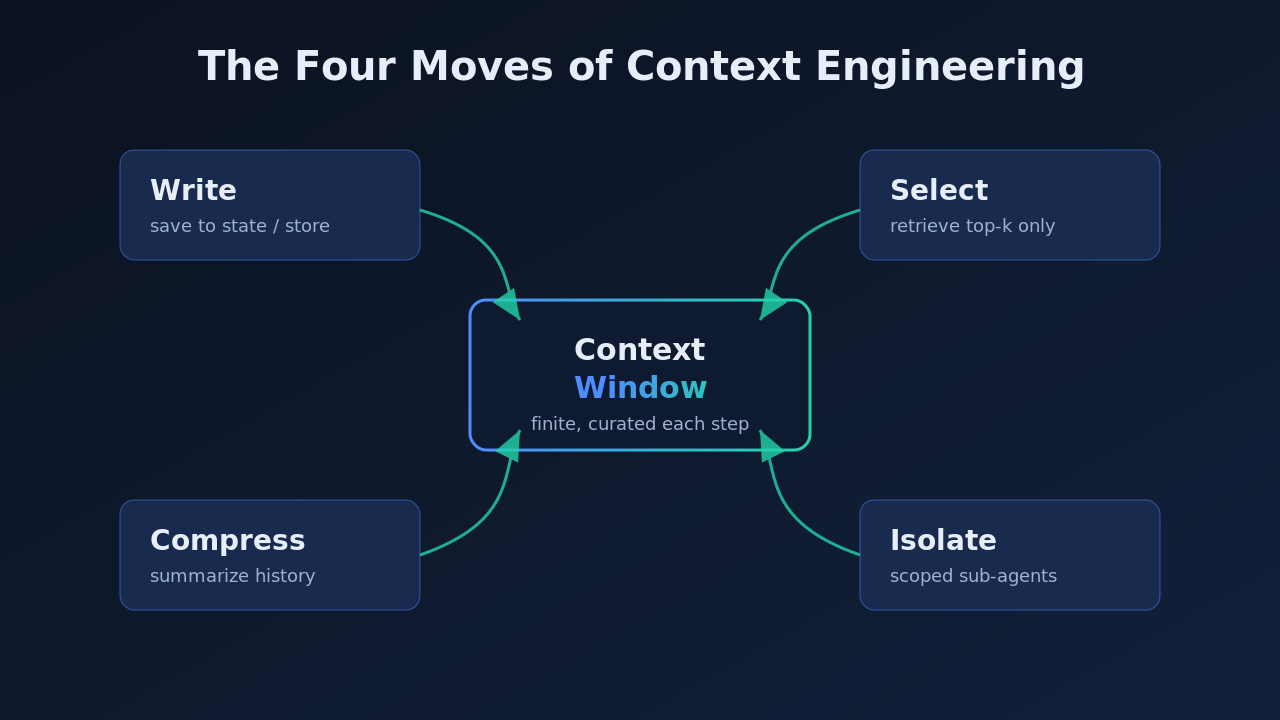
The context window is the model's entire working memory for a given call. It holds the system prompt, the conversation so far, tool outputs, retrieved documents, and whatever scratchpad the agent has built up. The window is finite, and everything you put in it competes for the model's attention. Context engineering is the practice of managing that scarce space on purpose instead of letting it fill up by accident.
A useful way to think about it: prompt engineering is how you phrase a single instruction, while context engineering is how you assemble the full information payload around that instruction across a multi-step run. The two are related but not the same, and we broke down the distinction in context engineering vs prompt engineering. For agents that call tools, remember earlier steps, and pull in external data, context engineering is the larger lever by far.
LangChain matters here because it gives you named, composable building blocks for each part of that payload. Messages, memory, retrievers, document loaders, and the LangGraph state object are all points where you get to decide what the model sees. Once you view LangChain through that lens, its abstractions stop feeling like boilerplate and start feeling like a control panel for the context window.
Why context is the bottleneck for AI agents
Single-shot chatbots rarely stress the context window. Agents do. An agent might run twenty steps, call six tools, and read four documents before it produces a final answer. Each of those steps appends more text, and without discipline the window bloats until three predictable failures show up.
The first is context poisoning, where an early hallucination or a bad tool result stays in the history and keeps steering later steps wrong. The second is context distraction, where so much accumulated text piles up that the model loses focus on the actual goal. The third is simple overflow, where you blow past the token limit and the framework silently truncates the messages that mattered most. Anthropic's own engineering team has written about how context is a finite resource with diminishing marginal returns, which is a polite way of saying more tokens is not the same as more intelligence.
This is why teams building serious agents treat the context window like a budget. You can see the same pressure in multi-agent systems, where each agent needs a clean, scoped slice of context rather than the whole shared history. Our writeup on context engineering best practices goes deeper on the failure modes; here the goal is to fix them with LangChain.
The four moves of LangChain context engineering
LangChain's own framing, popularized across its documentation and the LangGraph ecosystem, groups context work into four repeatable moves: write, select, compress, and isolate. Almost every technique you will use fits into one of these buckets, so they are worth learning as a mental checklist.
Write context
Writing context means saving information outside the window so you can bring it back later instead of carrying it in every message. The classic example is a scratchpad. When an agent plans a task, you write that plan to state or to an external store, then reference it rather than repeating it verbatim on each turn.
In LangGraph this is as simple as putting a field on your state object and updating it as the run progresses.
from typing import TypedDict, Annotated
from langgraph.graph import StateGraph
import operator

class AgentState(TypedDict):
    messages: Annotated[list, operator.add]
    plan: str            # written once, referenced later
    scratchpad: Annotated[list, operator.add]

def planner(state: AgentState):
    plan = make_plan(state["messages"])
    # write the plan to state instead of stuffing it into every prompt
    return {"plan": plan}
The plan now lives in state. Later nodes read the plan field when they need it, which keeps the message history lean.
Select context
Selecting context means pulling only the relevant pieces back into the window when a step actually needs them. This is where retrieval lives. Rather than dumping an entire knowledge base into the prompt, you query a vector store, a context engine, or a memory layer and select the top few results.
from langchain_community.vectorstores import FAISS
from langchain_openai import OpenAIEmbeddings

store = FAISS.load_local("kb_index", OpenAIEmbeddings())
retriever = store.as_retriever(search_kwargs={"k": 4})

def select_docs(state: AgentState):
    query = state["messages"][-1].content
    docs = retriever.invoke(query)          # select only what's relevant
    snippet = "\n\n".join(d.page_content for d in docs)
    return {"scratchpad": [f"Relevant context:\n{snippet}"]}
Selection is the most common place teams over-fetch. Pulling twenty documents feels safer but usually drowns the model. Start small and raise the number only if answers are missing information.
Compress context
Compressing context means shrinking what you keep so it fits without losing meaning. Summarizing an old conversation, collapsing verbose tool output into a few lines, or replacing raw JSON with a short digest are all compression moves. LangGraph pairs naturally with a summarization node that runs whenever history grows past a threshold.
def compress_history(state: AgentState):
    if len(state["messages"]) < 12:
        return {}
    summary = llm.invoke(
        "Summarize the conversation so far in 5 bullet points, "
        "preserving decisions and open questions:\n"
        + render(state["messages"])
    )
    # replace long history with a compact summary
    return {"messages": [SystemMessage(content=summary.content)]}
Isolate context
Isolating context means splitting work so each part of the system sees only its own slice. Sub-agents are the main tool here. In a multi-agent setup, a research sub-agent gets research context, a coding sub-agent gets code context, and neither pollutes the other. LangGraph subgraphs and the Command primitive make this routing explicit, which is why so many people building multi-agent systems with LangGraph lean on isolation to keep each agent sharp.
Context engineering with LangGraph state
The LangGraph state object is the beating heart of context engineering in the LangChain ecosystem. Because state is explicit and typed, you control exactly what carries forward between nodes. That is a huge upgrade over an opaque, ever-growing message list.
A good pattern is to separate durable context from transient context. Durable fields, like the user goal or a confirmed plan, persist across the whole run. Transient fields, like the latest tool output, get overwritten each step so they never accumulate. Structuring state this way turns the context window into something you design rather than something that happens to you.
class AgentState(TypedDict):
    goal: str                                # durable, set once
    messages: Annotated[list, operator.add]  # append-only dialog
    last_tool_result: str                    # transient, overwritten each step
    memory_keys: list                        # pointers, not raw content

def call_tool(state: AgentState):
    result = run_tool(state["messages"][-1])
    # overwrite instead of append so tool noise never piles up
    return {"last_tool_result": summarize(result)}
Notice memory_keys holds pointers rather than raw content. This is a subtle but powerful habit: store references to where information lives and hydrate it only when a node needs it. It keeps the base context tiny while giving every step access to everything.
Retrieval, memory, and the context engine
Retrieval is where LangChain context engineering meets classic RAG. A context engine, meaning the retrieval layer that decides which stored knowledge is relevant right now, sits at the center of most production agents. LangChain's retriever interface abstracts the vector store behind a single invoke call, so you can swap FAISS for Pinecone or a managed context engine without touching agent logic.
Memory deserves special care. LangChain offers short-term memory that lives in the message history and long-term memory that persists across sessions through a store. The mistake teams make is treating all memory as equal and loading everything on every turn. Better to tag memories, retrieve only what the current step needs, and let the rest stay dormant. This selective approach is the difference between an agent that remembers usefully and one that drowns in its own past.
If your agent pulls data from external systems through tools, the same discipline applies. Tool responses are context too, and raw API payloads are usually the worst offenders for bloat. Summarize or reshape them before they land in the window. For teams wiring agents into external services, our guide on the Model Context Protocol covers how standardized tool interfaces make this cleaner.
Formatting context so the model can use it
Even perfectly selected context underperforms if it is formatted badly. Models pay more attention to structure than most engineers expect. A wall of concatenated documents reads very differently from the same content wrapped in clear headers, labels, and delimiters.
Three formatting habits pay off consistently. Label each block so the model knows what it is looking at, for example User goal, Retrieved docs, or Previous decisions. Put the most important instruction near the end of the prompt, since recency bias means the model weights later tokens heavily. And keep a stable order across turns so the model learns where to find each type of information. These are small changes, but on long agent runs they meaningfully reduce the number of steps where the model gets confused. Good formatting is really an extension of prompt engineering for developers applied to the whole assembled payload.
Common mistakes that wreck agent context
A few anti-patterns show up again and again when teams first build LangChain agents, and each one has a clean fix.
The first is appending every tool result forever. Raw outputs accumulate until the window overflows. Fix it by overwriting transient fields and summarizing verbose results before they enter state. The second is retrieving too much, where a generous top-k value floods the prompt with marginally relevant text. Fix it by tuning retrieval down and measuring answer quality rather than assuming more is safer. The third is carrying full history into every sub-agent, which defeats the whole point of isolation. Fix it by scoping each sub-agent's state to exactly what it needs.
A step by step context management example
To make context management concrete, walk through a real world support agent step by step. The agent answers billing questions, so it needs account data, past tickets, and policy documents, but never all of them at once. Good context engineering for AI agents means loading each piece only at the step that needs it, not stuffing everything into the window up front.
Step one is the durable setup. When the conversation opens, write the user goal and account id into LangGraph state as durable fields. These stay for the whole run, so no later step has to re-derive them. This single move removes a surprising amount of repeated context and gives every node a stable anchor to work from.
Step two is scoped retrieval. When the user asks about a charge, the retrieval node selects the three most relevant policy passages and the two most recent tickets, nothing more. In a real world deployment this is where teams usually over-fetch, and it is the fastest place to cut token waste without hurting answer quality.
Step three is transient tool output. The billing API returns a large JSON blob. Instead of appending it raw, a summarizer compresses it into two lines and writes those to the transient field, which the next step overwrites. Raw payloads never linger, so the window stays lean even after many tool calls.
Step four is compression on the loop. If the conversation runs long, a summarization node collapses older turns into a short recap while preserving decisions. The agent keeps its working memory without paying for every past token on every call, which is the heart of disciplined context management.
Step five is the final answer. By the time the model composes its reply, the window holds only the goal, the scoped policy text, the ticket summaries, and the compressed history. That is context management done deliberately, and it is why the same pattern of context engineering for AI agents scales from a demo to a real world product without falling apart.
It also helps to measure context management the way you measure latency or cost. Log how many tokens each step adds, and watch for the node that quietly balloons. In most real world agents one or two nodes account for the majority of context growth, and fixing just those recovers most of the budget. Treat the numbers as a feedback loop rather than a one-time tuning pass.
The lesson from walking through it step by step is that no single trick carries the load. Reliability comes from applying the four moves together, consistently, at every node of the graph, and revisiting the design each time you add a new tool or data source.
A practical workflow you can copy
Putting the pieces together, a reliable LangChain context engineering workflow looks like this. Start by defining an explicit LangGraph state with durable and transient fields separated. Add a retrieval node that selects a small number of relevant documents per step. Insert a compression node that summarizes history once it crosses a length threshold. Isolate specialized work into sub-agents with scoped state. Finally, format every assembled prompt with clear labels and a stable order.
Build this once as a template and reuse it across projects. The specific tools will change, but the four moves stay constant. That reusability is exactly why context engineering has become a core skill rather than a one-off trick, and why frameworks like LangChain and LangGraph keep investing in making these moves first-class. For a broader look at how self-improving agents extend these ideas, see our piece on agentic context engineering.
Context engineering is not glamorous work. It is budgeting, plumbing, and discipline. But it is the difference between a demo that impresses once and an agent that holds up in production, and LangChain gives you the cleanest set of levers to get it right.
Frequently asked questions
What is LangChain context engineering?
LangChain context engineering is the practice of managing exactly what information enters the model's context window on each step of an agent's run, using LangChain and LangGraph primitives. It covers writing information to state, selecting relevant data through retrieval, compressing long history, and isolating context between sub-agents so the model always works from a clean, relevant payload.
How is context engineering different from prompt engineering?
Prompt engineering focuses on wording a single instruction well. Context engineering focuses on assembling the entire information payload around that instruction across a multi-step run, including memory, tool outputs, and retrieved documents. For agents, context engineering is the larger lever because most failures come from bad context rather than bad phrasing.
Do I need LangGraph to do context engineering in LangChain?
You can do a lot with plain LangChain memory and retrievers, but LangGraph makes context engineering far easier because its explicit state object lets you control precisely what carries between steps. If you are building anything beyond a simple chatbot, LangGraph's typed state is worth adopting for the control it gives you over the window.
What is a context engine in this setup?
A context engine is the retrieval layer that decides which stored knowledge is relevant to the current step and pulls it into the window. In LangChain it is typically a vector store behind the retriever interface, though it can be a managed service. Its job is selection: bringing back only the few pieces the model needs right now.
How do I stop my agent's context window from overflowing?
Overwrite transient fields instead of appending them, summarize long conversation history once it crosses a threshold, retrieve a small number of documents rather than many, and isolate sub-agents so they only see their own scoped context. Treat the window as a fixed budget and spend it deliberately rather than upgrading to a larger model as a first resort.
Further reading
For the foundations, read the context engineering developer guide and context engineering best practices. To go deeper on frameworks, see LangChain vs LangGraph and the LangGraph multi-agent tutorial. External references worth your time include the LangChain documentation and Anthropic's engineering notes on effective context. Explore more engineering guides on the Levelop blog.