
LLM Context Window: What Works in Production (2026)
Every team that ships an LLM feature eventually hits the same wall. The demo works beautifully on a short prompt, then falls apart the moment real users feed it long documents, chat history, tool outputs, and retrieved snippets all at once. The model starts ignoring instructions, hallucinating details, and getting slower and more expensive with every turn. The culprit is almost always the same: the LLM context window is being treated as free storage instead of a scarce, carefully managed resource.
This guide is about what actually works when you manage the context window in production, not in a notebook. We will cover how big context windows really are in 2026, why more tokens rarely fixes accuracy, and the concrete patterns teams use to keep agents reliable and cheap at scale. If you want the conceptual foundation first, start with our developer's guide to what context engineering is, then come back here for the production playbook.
What the LLM context window actually is
The LLM context window is the maximum amount of text, measured in tokens, that a model can consider at once. It includes everything: the system prompt, the conversation history, retrieved documents, tool definitions, tool results, and the space the model needs to generate its answer. A token is roughly three quarters of an English word, so a 128,000 token window holds somewhere around 96,000 words of combined input and output.
The important mental shift is that the context window is not a database you fill up. It is a working memory that the model re-reads on every single call. Whatever you put in it, you pay for in latency and dollars, and you dilute the model's attention across everything else that is competing for focus.
Context window sizes across models in 2026
Context windows have grown dramatically. Frontier models now advertise windows from 200,000 tokens up to a million or more, and a few research and preview models push toward ten million. Google's Gemini family popularized the million-token window, and long-context support is now standard across the major providers.
That sounds like the problem is solved. It is not. A large advertised window is a ceiling, not a recommendation. Providers themselves publish guidance on effective context length, which is usually far smaller than the maximum. Treating the full window as usable space is the single most common production mistake, and it is why understanding context engineering matters more than chasing raw window size.
Why a bigger context window is not the answer
Teams reach for a larger LLM context window the way they once reached for more RAM. It feels like the obvious fix. In production it usually makes three problems worse.
The lost in the middle problem
Models do not attend to every token equally. Research on long-context behavior, most notably the widely cited "Lost in the Middle" study from Stanford and collaborators, showed that models retrieve information best when it sits at the very start or very end of the context. Facts buried in the middle of a long window get missed, even when the model technically has them available. Stuffing more into the window can therefore lower accuracy, because the signal you care about drowns in the noise you added.
Cost and latency scale with every token
You pay per input token on almost every API, and you pay again for every token the model generates while reasoning over that input. A conversation that grows unbounded turns a cheap first message into an expensive tenth message. Latency climbs the same way, because time to first token is sensitive to how much context the model has to read before it can respond. In an agent loop that makes dozens of calls, an oversized context window quietly becomes your largest line item.
Attention is a shared budget
Every instruction competes with every other instruction. When your system prompt, your tool schemas, ten retrieved chunks, and a long chat history all live in the same window, the model has to weigh them against each other. Precision degrades. The fix is not a bigger window, it is a smaller and more relevant one.
Context engineering: the discipline of managing the window
Context engineering is the practice of deciding, on every call, exactly what goes into the LLM context window and what stays out. It replaces the older habit of writing one clever static prompt. If you are coming from a prompting background, our breakdown of context engineering versus prompt engineering explains why the shift happened and what changed in 2026.
In production, context engineering means building a pipeline that assembles context dynamically for each request. That pipeline typically does four jobs: it retrieves only what is relevant, it compresses what is verbose, it evicts what is stale, and it structures everything so the model can find it. The rest of this guide walks through each job with patterns that hold up under real traffic.
Production patterns that actually work
Retrieval and just-in-time context
The most reliable way to keep the context window small is to not load context until you need it. Instead of dumping an entire knowledge base or full document into the prompt, retrieve the handful of passages that match the current query and inject only those.
The practical rules that separate a demo from a production system are simple. Rank retrieved chunks and keep only the top few rather than the top fifty. Set a hard token budget for retrieved context and enforce it. Deduplicate near-identical chunks before they reach the model. And prefer fetching context just in time, in response to a specific tool call or question, over preloading everything the agent might conceivably need.
Compression and summarization
Conversations and tool outputs grow. A raw API response can be thousands of tokens of JSON when the model only needs three fields. Compression is how you keep long-running sessions inside the window.
Two techniques cover most cases. First, summarize old turns. Once a conversation passes a threshold, replace the earliest exchanges with a short running summary that preserves decisions and facts while dropping filler. Second, distill tool outputs before they enter the context. Parse the response, extract the fields that matter, and discard the rest.
# context_manager.py
def compress_history(messages, model, max_tokens=6000):
    """Summarize old turns once history exceeds the token budget."""
    if count_tokens(messages) <= max_tokens:
        return messages

    # Keep the system prompt and the most recent exchanges verbatim.
    head = messages[:1]
    recent = messages[-4:]
    stale = messages[1:-4]

    summary = model.summarize(
        stale,
        instruction="Preserve decisions, entities, and open questions. Drop pleasantries."
    )
    summary_msg = {"role": "system", "content": f"Summary of earlier turns: {summary}"}
    return head + [summary_msg] + recent
Eviction and memory management
Not everything belongs in the window at all. Long-term memory, user preferences, and reference material should live in external storage and be pulled in only when relevant. Think of the context window as a CPU cache and your vector store or database as main memory. The agent decides what to promote into the window for the current step and evicts it when the step is done.
A clean pattern is to separate three tiers. Working context is what the model sees right now. Session memory is a compact summary of the current task that survives across turns. Persistent memory is durable knowledge stored outside the model and retrieved on demand. This layering is the backbone of agentic context engineering for self-improving AI agents, where the agent itself manages what to remember and what to forget.
Structured context and prompt caching
How you order and format the context window matters as much as what is in it. Because of the lost in the middle effect, put your most critical instructions at the top and the immediate task at the bottom, with retrieved material in between. Use clear delimiters or lightweight markup so the model can tell a tool result apart from a user message apart from a retrieved document.
Ordering also unlocks a major cost saving: prompt caching. Providers can cache the stable prefix of your context, such as the system prompt and tool definitions, so you only pay full price for it once. The rule is to keep the stable, reusable content at the front and the variable, per-request content at the back.
# prompt_layout.py
def build_context(system_prompt, tools, retrieved, user_query):
    """Stable prefix first (cacheable), volatile content last."""
    return [
        {"role": "system", "content": system_prompt},
        {"role": "system", "content": render_tools(tools)},
        {"role": "system", "content": render_docs(retrieved)},
        {"role": "user", "content": user_query},
]Measuring context quality in production
You cannot manage what you do not measure. The teams that keep their agents reliable track a small set of context metrics on every request. Token count per call, broken down by system prompt, retrieved context, history, and output, tells you where your budget goes. Retrieval precision, the share of retrieved chunks the model actually used, tells you whether your search is helping or just adding noise. Cache hit rate tells you whether your layout is stable. And answer quality, measured with evals against a fixed test set, tells you whether a change to the context pipeline helped or hurt.
Watch the trend, not just the snapshot. A slow creep in average tokens per call is the early warning sign of an unbounded history or a retrieval step that stopped filtering. Catch it before it shows up on the bill. For a fuller checklist, our context engineering best practices post lists ten techniques that keep coding agents accurate.
A reference architecture
A production context pipeline usually looks the same regardless of the use case. A request comes in. A retriever fetches candidate context from a vector store or database. A ranker trims that down to a strict token budget. A compressor summarizes history and distills tool outputs. An assembler orders everything for cache efficiency and puts the critical instructions where the model will actually read them. Only then does the request hit the model. The response, and a compact summary of the turn, feed back into memory for the next step.
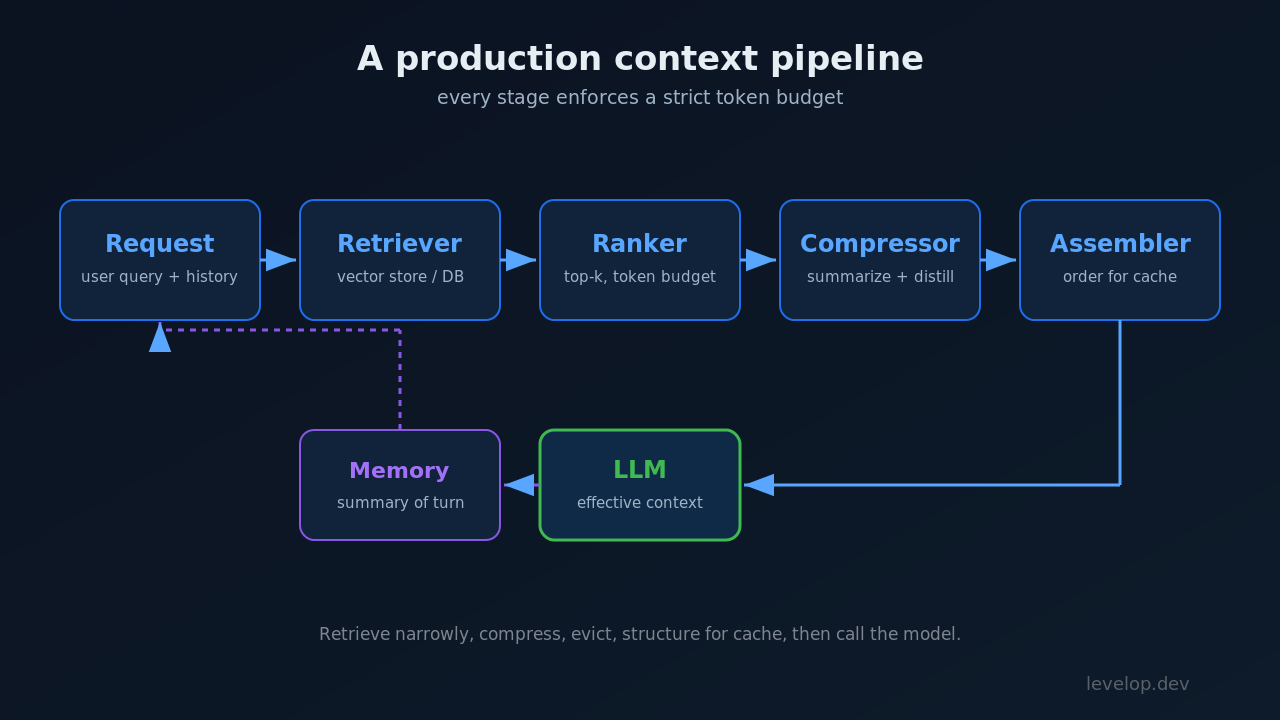
The discipline is in the budgets. Every stage has a token ceiling, and the assembler refuses to exceed the effective context length even when the model's maximum window is far larger. That single constraint, enforced in code rather than left to chance, is what separates a system that stays accurate at scale from one that slowly degrades.
Common mistakes to avoid
The failures repeat across teams. Loading an entire document or knowledge base into the window because the model can technically hold it. Letting conversation history grow without any summarization or eviction. Assuming the advertised maximum window is the usable window. Putting the most important instruction in the middle where it gets ignored. Skipping evals, so nobody notices when a context change quietly drops accuracy. And ignoring cost until the invoice arrives. Every one of these is avoidable with the patterns above.
Putting it into practice
The LLM context window is the single most important resource in any production LLM system, and the teams that treat it that way are the ones whose agents stay accurate as usage grows. Retrieve narrowly, compress aggressively, evict what is stale, structure for cache efficiency, and measure everything. The window size on the spec sheet matters far less than the discipline you apply to what goes inside it.
If you are building agents and want the full picture, explore more engineering guides on the Levelop blog, or learn how we think about developer tooling at Levelop. For the deeper research foundations, the "Lost in the Middle" study and the long-context guidance published by major model providers are the best starting points.
FAQ
What is an LLM context window in simple terms?
It is the model's working memory, measured in tokens, that holds everything the model reads and writes on a single call: the system prompt, chat history, retrieved documents, tool outputs, and the generated answer. Once the combined content exceeds the window, the oldest or least relevant material has to be dropped.
Does a larger context window improve accuracy?
Not on its own. Research on long-context behavior shows models retrieve best from the start and end of the window and often miss information buried in the middle. A larger window also raises cost and latency. Accuracy comes from putting the fewest, most relevant tokens in front of the model, which is the job of context engineering.
How big are LLM context windows in 2026?
Frontier models commonly offer windows from 200,000 tokens to a million or more, with some preview models reaching into the millions. The usable or effective context length that providers recommend is typically much smaller than the advertised maximum, so treat the ceiling as a limit, not a target.
How do I stop my context window from growing out of control?
Enforce a token budget at every stage of your context pipeline. Retrieve only the top few relevant chunks, summarize old conversation turns once they pass a threshold, distill verbose tool outputs down to the fields you need, and store long-term knowledge outside the model so it is pulled in only when relevant.
What is the difference between the context window and RAG?
The context window is the fixed space the model reads on each call. Retrieval augmented generation, or RAG, is one technique for deciding what to put into that space by fetching relevant passages at query time. RAG is a tool for managing the context window, not a replacement for it.