
Internal Developer Portal vs Internal Developer Platform: What Engineers Need to Know
Ask three engineers to define "IDP" and you may get three different answers. One means the internal developer platform, the sprawling system of infrastructure and automation that runs software delivery. Another means the internal developer portal, the friendly dashboard where developers spin up a new service in two clicks. The third just shrugs. The acronym collision is not a trivia problem. It leads teams to buy a portal when they needed a platform, or to build a platform nobody wants to use because it has no front door.
This guide untangles the two. You will learn what an internal developer portal actually is, how it differs from the platform underneath it, why they get confused, and how to decide which one your team needs first. If you want the broader context, start with our guide to platform engineering, the discipline that produced both ideas.
What Is an Internal Developer Portal?
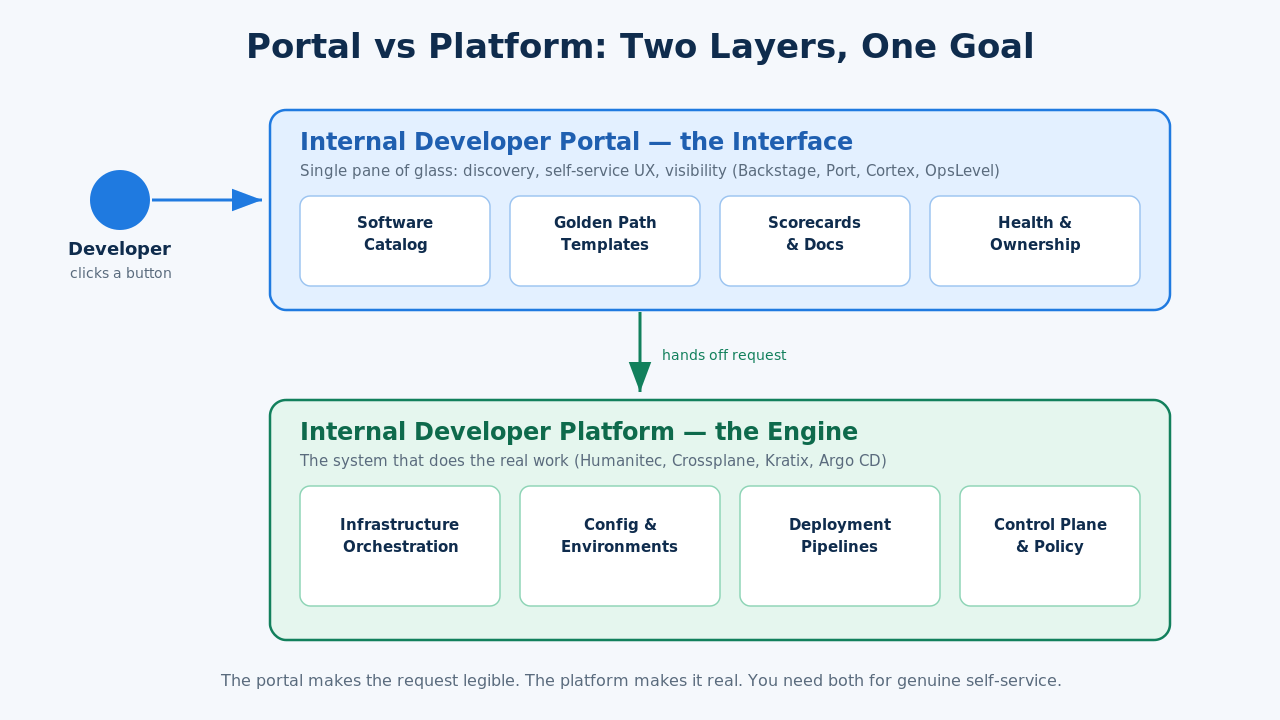
An internal developer portal is the user-facing layer of your platform. It is the single pane of glass where developers discover services, provision resources, read documentation, and check the health of what they own. Gartner describes the portal as the interface through which developers discover and access internal developer platform capabilities. In plain terms, it is the dashboard, not the engine.
A typical portal bundles a few core features. There is a software catalog that lists every service, its owner, and its dependencies. There are scaffolding or "golden path" templates that generate a new microservice from a blueprint. There are scorecards that grade services against production-readiness or security standards. And there is a documentation hub so nobody has to guess where the runbook lives. Backstage, the open-source portal that Spotify created and donated to the Cloud Native Computing Foundation, popularized exactly this bundle.
The point of a portal is cognitive load reduction. Instead of remembering which Terraform module provisions a database, which Slack channel owns the payments service, and which wiki page holds the on-call rotation, a developer opens one place and finds all of it. The portal does not do the provisioning itself. It calls out to the systems that do.
What Is an Internal Developer Platform?
An internal developer platform is the whole machine. It is the sum of the tooling, infrastructure, automation, and workflows that a platform engineering team assembles so that application developers can ship without filing tickets. The community reference site internaldeveloperplatform.org frames it as the collection of self-service capabilities that let developers deploy and manage software with reduced operational overhead.
Under the hood, a platform stitches together several planes. There is infrastructure orchestration that turns a request for "a Postgres database" into real cloud resources. There is a configuration layer that manages environments, secrets, and per-service settings. There is a deployment pipeline that builds, tests, and promotes code. And there is a control plane that ties these together and enforces policy. Tools like Humanitec, Crossplane, and Kratix live in this layer.
The platform is where the hard engineering happens. It handles the messy reality of Kubernetes, cloud accounts, network policy, and cost controls, then exposes a clean, opinionated set of actions. When someone says a company "built a platform," they usually mean this underlying system, not the screen the developer looks at.
The Core Difference in One Sentence
The portal is the interface. The platform is the engine. A developer clicks a button in the portal, and the platform underneath does the real work of provisioning, deploying, and configuring. The New Stack put it neatly: the platform is the complete system, and the portal is the user interface that sits on top of it.
A portal with no platform behind it is a pretty catalog that cannot actually do anything. A platform with no portal still works, but developers interact with it through YAML files and CLI commands, which is harder to adopt. Neither half is optional if your goal is genuine self-service. Think of the portal as the dashboard and the platform as the engine and drivetrain.
Why the Confusion Exists
Both terms shorten to IDP, and both grew out of the same platform engineering wave, so the industry treats them as interchangeable when they are not. It does not help that some vendors market a portal as if it were a full platform, and some platforms ship with a built-in portal so the seam is invisible.
There is also a historical reason. Early platform engineering conversations focused on the invisible plumbing, the platform. Then Backstage made the portal the most visible, most demoable artifact, and attention shifted to the screen. For a while "internal developer portal" and "internal developer platform" were used almost as synonyms in blog posts and conference talks. Gartner and the platform engineering community have since pushed for precision, because buying decisions depend on it.
The practical takeaway: when a vendor or a colleague says "IDP," ask which one they mean. If they are describing a catalog, scorecards, and templates, they mean the portal. If they are describing provisioning, environments, and pipelines, they mean the platform.
How They Work Together
The portal and the platform are not competitors. They are two layers of one product. The cleanest mental model is the golden path: a paved, opinionated route from idea to production that a developer can follow without deep infrastructure knowledge.
Picture a developer creating a new service. They open the portal and pick the "Node.js microservice" template. The portal collects a name, a team owner, and a few options, then hands the request to the platform. The platform scaffolds the repository, provisions a database, wires up CI, sets up staging, and registers the service. Minutes later the portal shows the new service in the catalog with a green health badge. The developer never touched Terraform, never opened a ticket, and never learned the cloud account layout.
That flow only works when both layers exist. The portal made the request legible and the platform made it real. If you are planning to build this end to end, our walkthrough on how to build an internal developer platform covers the platform side in depth, and it pairs naturally with a portal on top.
Internal Developer Portal Tools Worth Knowing
If you decide the portal is your gap, a few tools dominate the conversation in 2026.
Backstage is the open-source default. Spotify built it, donated it to the CNCF, and it now sits at the Incubating maturity level with thousands of companies running it. It is a framework more than a product, which means it is endlessly flexible but requires real engineering effort to run and maintain. Choose it when you have a platform team that wants full control and does not mind operating the portal itself.
Port and Cortex represent the managed, software-as-a-service end. They give you a catalog, scorecards, and self-service actions without asking you to host and patch the thing. They trade some flexibility for a much faster path to value. OpsLevel and Roadie occupy similar ground, with Roadie offering a hosted Backstage so you get the ecosystem without the operational burden.
The choice usually comes down to build versus buy. A large organization with a dedicated platform team might run Backstage. A mid-sized team that wants a portal live this quarter often reaches for a managed option. Either way, the portal is only as useful as the platform capabilities it exposes.
When Do You Need a Portal Versus a Platform?
Sequence matters. If developers cannot self-serve infrastructure at all, a portal will not save you, because there is nothing behind the buttons to execute. Build or buy the platform capabilities first, even a thin slice of them, then add the portal to make them discoverable.
A useful signal test: if your developers complain that provisioning is slow, manual, or ticket-driven, that is a platform problem. If they complain that they cannot find services, do not know who owns what, or keep asking where the docs are, that is a portal problem. Most teams have both problems, but the platform gap is usually the one that blocks self-service entirely, so it tends to come first.
There is one honest exception. If you already have decent automation, and your real pain is fragmentation and discoverability, a portal can deliver value fast on top of the tooling you already run. The portal does not require a perfectly finished platform. It requires enough underlying capability to make its buttons meaningful.
Common Mistakes Teams Make
The most common mistake is buying a portal to fix a platform problem. Leadership sees a slick Backstage demo, assumes it will make developers productive, and rolls it out on top of infrastructure that still requires tickets and tribal knowledge. The catalog fills up, but nothing gets faster, because the portal cannot provision what the platform never automated.
The second mistake is the reverse: building a powerful platform with no portal and wondering why adoption is low. Engineers will tolerate YAML and CLIs, but a good portal dramatically lowers the barrier to entry, especially for new hires. Skipping it caps how far self-service can spread.
The third mistake is treating either one as a one-time project. Both the portal and the platform are products with internal customers. They need a roadmap, feedback loops, and an owner. Platform engineering, the discipline that connects platform engineering and DevOps, treats the platform and portal as products precisely so they keep evolving with developer needs rather than rotting after launch.
Frequently Asked Questions
Is an internal developer portal the same as an internal developer platform?
No. The portal is the user-facing interface, the catalog and dashboard developers interact with. The platform is the underlying system of automation and infrastructure that actually executes provisioning and deployment. The portal sits on top of the platform, so it is a subset of it, not a synonym.
Is Backstage a portal or a platform?
Backstage is an internal developer portal, specifically an open-source framework for building one. It provides the catalog, templates, and plugin ecosystem, but it relies on the platform underneath to carry out the actions it exposes. Running Backstage alone does not give you a platform.
Can you have a platform without a portal?
Yes. Many teams run capable internal developer platforms that developers use through CLIs, config files, and pipelines. It works, but developer experience and adoption usually suffer because there is no single discoverable interface, which is exactly the gap a portal fills.
Which should we build first, the portal or the platform?
Usually the platform, or at least a thin slice of platform capability. A portal with nothing behind its buttons cannot deliver self-service. Once you have some automated provisioning and deployment, a portal makes those capabilities discoverable and easy to use.
Why do both terms use the abbreviation IDP?
Both grew out of the platform engineering movement and both literally start with internal developer, so the acronym collides. When someone says IDP, clarify whether they mean the interface (the portal) or the underlying system (the platform), because the two solve different problems.
The Bottom Line
The internal developer portal and the internal developer platform are two layers of the same goal: letting developers ship software without wrestling infrastructure. The portal is the dashboard, focused on discovery and experience. The platform is the engine, focused on provisioning and delivery. If you are mapping out that strategy, our platform engineering guide explains the discipline that ties both together, and the Levelop blog has deeper dives on building the platform itself.