
The Best AI Tools for Developers: My Honest 2026 Review
Back with another one in the series where I write down what I actually learned instead of what sounds good in a conference talk. This time it is not an algorithm or a data structure. It is my toolbox, and specifically the AI tools for developers that survived a full year of daily production work.
I have been using AI tools for developers every single working day for twelve months. Not the demo way, where you paste a clever prompt and screenshot the magic for a thread. The real way, where the tool sits open next to your terminal at 2pm on a Tuesday while a flaky integration test blocks a release and your Slack is filling up. After a year of that pressure, I have firm opinions about which AI tools for developers earn their monthly fee and which ones I quietly uninstalled after the trial.
This is the honest review I wish someone had handed me before I spent money, attention, and trust on all of them at once.
What "using it daily" actually changed
The first thing I got wrong was assuming AI tools were about typing less code. They are not, at least not primarily. The real value appeared somewhere I did not expect: the cost of starting a task collapsed to almost nothing. Staring at an empty file used to consume the first twenty minutes of any feature, the part where you invent structure from scratch. Now I write a rough comment describing intent, let the tool sketch a first pass, and I move straight into editing. Editing an imperfect draft is a far cheaper mental state than inventing from a blank page, and that shift compounds across dozens of small tasks a week.
The second thing I got wrong was trusting the output. That naive phase lasted about two weeks and ended with a confidently incorrect database migration that would have dropped a column in production. Since then I treat every suggestion the way I treat a pull request from a fast but green junior engineer: frequently useful, occasionally brilliant, and never merged without a careful read. That single reframing is what turned these tools from a liability into a genuine multiplier.
So when I rank the best AI tools for developers below, I am grading them on that second, stricter standard. The question is not "can it generate code," because almost all of them can. The question is "does it make me faster without quietly making me sloppier." That is a much harder bar to clear, and it is the one that actually matters over a year.
The stack I actually keep open
I stopped chasing every product launch a long time ago, because novelty is not the same as value. Here is what genuinely survived twelve months on my machine, grouped by the job each tool does rather than by the logo on the landing page. Categories age more slowly than brands, so if you understand the categories you can swap the specific product later without rethinking your whole workflow.
The in-editor coding assistant
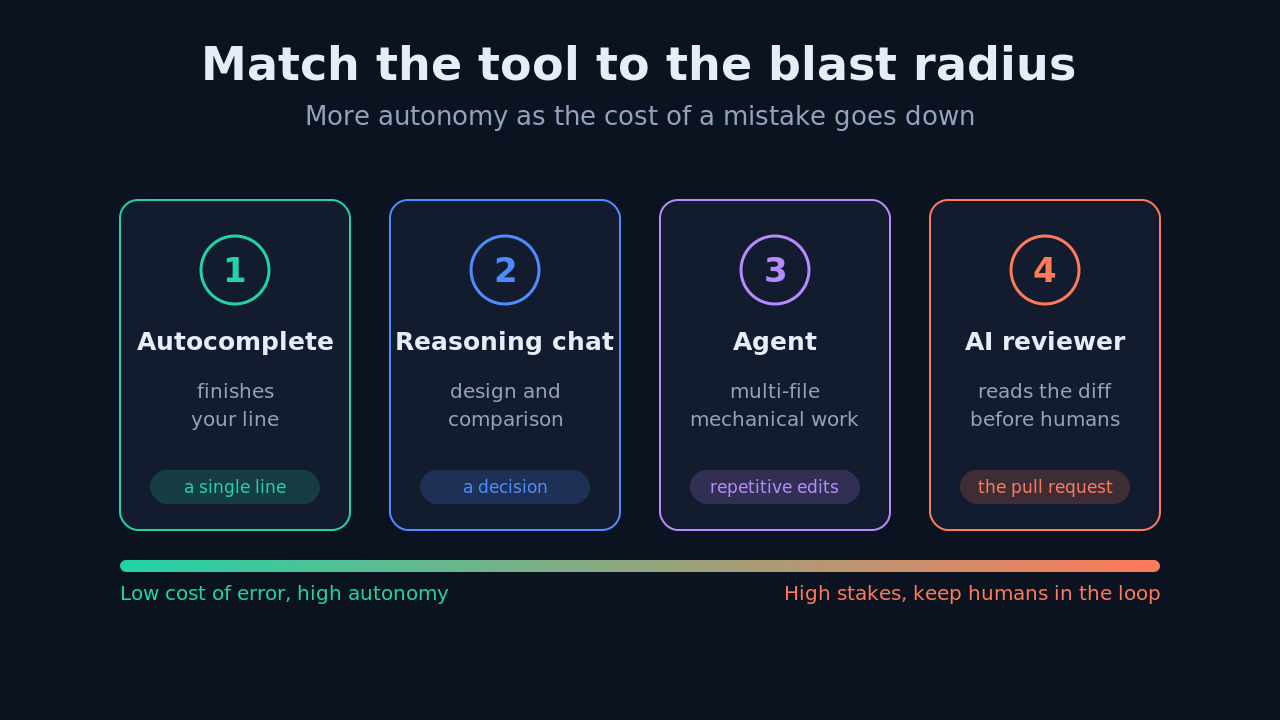
This is the tool that matters most, because it lives inside the flow of writing code. It covers the autocomplete-style suggestion that finishes your line, the "explain this selection" that decodes an unfamiliar function, and the inline chat that can read your currently open files and act on them. I use it constantly, and I would notice its absence within an hour of it disappearing.
What earns trust in this category is context, not raw model horsepower. A tool that only sees the current line writes generic, plausible-looking code that rarely fits. A tool that reads the surrounding files, the imports already in the buffer, the type definitions, and the project's naming conventions writes code that slots into your codebase with minimal editing. The gap between those two experiences is the entire game. It is precisely why I care far more about how a tool gathers and ranks context than about which underlying model happens to sit behind the API this quarter.
A practical test I run before adopting any coding assistant: open a file that depends heavily on a project-specific utility, then ask the tool to add a feature. If it reaches for that existing utility instead of reinventing a worse version inline, the retrieval is good. If it hallucinates a plausible but nonexistent helper, no amount of model quality will save you from the constant cleanup.
The reasoning chat for decisions
Separate from the editor, I keep a conversational model open in a browser tab for the thinking work rather than the typing work. Designing an approach before I commit to it, comparing two libraries on tradeoffs I care about, or rubber-ducking a bug I cannot reliably reproduce. I deliberately keep this out of my editor, because I do not want a tool touching code while I am still deciding what to build. The separation of concerns is the point.
The trick I learned embarrassingly late is to give the model the constraints, not just the goal. A prompt like "write a rate limiter" earns you a textbook answer that ignores your reality. A prompt like "write a rate limiter for a single-process Node service, with no Redis available, that fails open under load and adds no new dependencies" earns you something I can actually ship after a quick review. The constraints do the heavy lifting, because they collapse the space of acceptable answers down to the one that fits your situation.
The autonomous agent for grunt work
This is the newest category, and honestly the one I was most skeptical about going in. An agent can run across multiple files, execute shell commands, read the results, and iterate on its own output without you approving each step. I use it for the genuinely boring, mechanical work: renaming a concept consistently across a large codebase, writing the tenth near-identical test in a suite, or wiring up predictable boilerplate. I do not hand it anything where being subtly wrong is expensive or hard to detect.
If you want a deeper breakdown of how these autonomous systems actually operate under the hood, from planning loops to tool calls, I went down that rabbit hole in a separate post on how AI coding agents actually work. Understanding the mechanism made me much better at predicting when an agent would succeed and when it would wander off.
The AI code review layer
This is the most underrated category on the list. An AI reviewer that reads a diff before any human does will reliably catch the dull, high-frequency mistakes: the unhandled null, the off-by-one in a loop bound, the forgotten error path, and the API key you very nearly committed. It does not replace human review, and anyone selling it that way is overpromising. What it does is clear the runway, so the human review can focus on architecture and intent instead of typos and style nits.
I compared the main contenders in this category in detail, including how they handle large diffs and monorepos, over on the best AI code review tools if you want the specifics. The short version is that the good ones understand the surrounding code well enough to comment on consequences, not just the lines that changed.
The testing and documentation helpers
The last category I keep is less glamorous but quietly valuable: generating unit tests from an implementation, drafting docstrings that actually describe behavior, and turning a messy changelog into readable release notes. None of this is intellectually hard, which is exactly why it tends to get skipped under deadline pressure. Offloading it to a tool means the tests and docs actually get written instead of living forever on a someday list. I still read every generated test to confirm it asserts something meaningful rather than just passing, but the blank-page cost is gone.
A typical day with the stack
To make this concrete, here is how the categories fit together on an ordinary day rather than in a feature list. I start a feature by talking to the reasoning chat about the approach, because ten minutes of design questions there saves an hour of rework later. Once the shape is clear, I drop into the editor, where the in-editor assistant handles the line-by-line writing and I steer. When a change needs to ripple across many files in a mechanical way, I hand that specific slice to the agent and review its diff carefully. Before I open a pull request, the AI reviewer takes a first pass so my human reviewers never waste attention on the obvious stuff. Each tool touches the part of the workflow where it is strongest and stays out of the parts where it is not.
How I actually prompt now
The single biggest jump in output quality came from prompting, not from switching tools or chasing a newer model. Here is a compact pattern I reuse for almost every non-trivial request, saved as an editor snippet so I never have to remember it:
Context: <what the code does, the stack, the one constraint that matters most>
Task: <the specific change, stated in a single sentence>
Rules: <what NOT to do, e.g. no new dependencies, keep the public API stable>
Output: <the format you want, e.g. just the diff, or the function body only>
The "Rules" line is where most developers leave the most value on the table. Telling the model what to avoid narrows its search far more effectively than telling it what to do, because a goal has many valid interpretations while a constraint eliminates whole categories of wrong answers. Once I started writing that line consistently, the number of throwaway suggestions I had to discard dropped sharply, and the first draft became usable far more often.
The other habit worth building is iterating in small steps. Instead of asking for a large feature in one shot, I ask for the smallest reviewable unit, confirm it is correct, then build on it. Large one-shot generations feel impressive in a demo and are miserable to debug when a subtle error is buried in two hundred lines you did not write.
What I dropped, and why
Not everything survived the year, and the deletions taught me as much as the keepers. I stopped paying for a second in-editor assistant, because running two at once meant two competing sets of suggestions fighting over the same keystroke, and I could never tell which one was actually helping. One well-integrated assistant beats two mediocre ones that constantly interrupt each other.
I also dropped the tools that were, underneath the branding, just a chat model wrapped in a thin interface and a markup on the price. If a product's only real feature is "we call the same API you could call yourself," it has to be dramatically better at context, workflow, or safety to justify being a middleman. Most of them were not, and the honest test was simple: when I cancelled, did my workflow actually get worse? For these, it did not.
How to choose your own stack
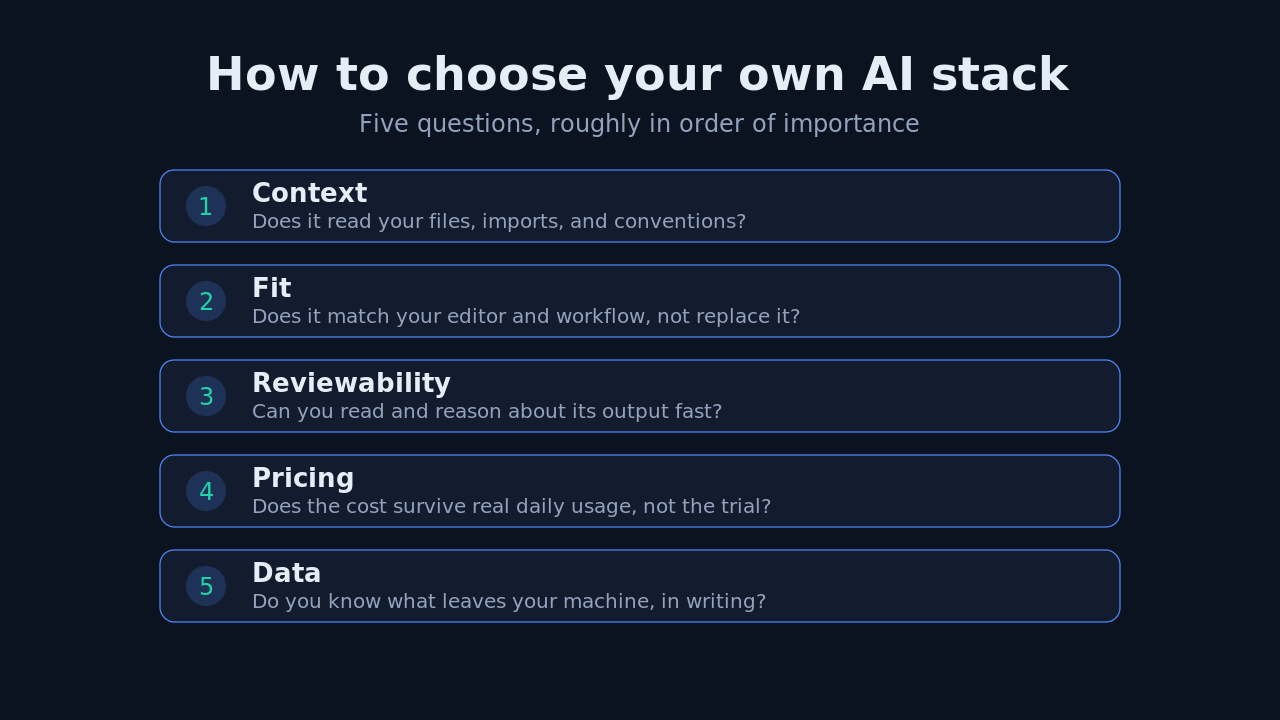
You do not need my exact stack, and copying it blindly would be a mistake. You need a stack that fits how you personally work and what your codebase demands. After a year of adding and removing tools, these are the questions I now ask before adopting any of the best AI tools for developers, in roughly this order of importance.
Does it see enough context to be genuinely useful, or is it guessing from a single line of code? Does it fit the editor and workflow you already have, or does it demand that you rebuild everything around it? Can you review its output quickly and confidently, or does it dump large opaque changes you cannot reason about? Does the pricing survive contact with your actual daily usage, rather than looking cheap only during the free-tier honeymoon? And finally, what does it do with your code and data, and are you comfortable with that answer in writing?
If a tool fails the context question, nothing else on the list can rescue it. That is the one dimension I refuse to compromise on, because a tool without good context is just a faster way to generate code you will have to rewrite anyway.
The broader industry data backs up the shift from novelty to necessity. The most recent Stack Overflow Developer Survey shows that a clear majority of professional developers now use or plan to use AI tools in their workflow, and GitHub's own research has repeatedly pointed to meaningful speedups on well-scoped tasks. Adoption at that scale means this is no longer a competitive edge you can skip. It is closer to the baseline expectation of the job, which makes choosing well more important than choosing early.
The cost and pricing reality
A quick word on money, because the marketing pages rarely tell the whole story. Per-seat subscriptions look cheap in isolation and add up quickly across a team, and usage-based pricing can spike in exactly the busy weeks when you rely on the tool most. Before I commit a team to anything, I estimate realistic monthly usage rather than trusting the sticker price, and I check whether heavy use during a crunch would blow the budget. The best value is rarely the cheapest tool or the most expensive one. It is the one whose pricing model matches how your team actually works across a full quarter, including the bad weeks.
Common mistakes I made so you do not have to
Three mistakes cost me the most time, and all three are easy to avoid once named. First, I trusted generated code that looked right instead of code I had actually read, which is how the bad migration slipped through. Looking correct and being correct are different properties, and only reading closes the gap. Second, I over-automated, handing high-stakes tasks to the agent because the low-stakes ones had gone so smoothly, and then paying for the cleanup. Third, I let tool sprawl accumulate, subscribing to overlapping products until my editor was a noisy committee. Pruning back to one tool per job was the single change that made the whole stack feel calm and fast again.
My verdict after twelve months
The best AI tools for developers in 2026 are not the ones with the flashiest demos or the loudest launch threads. They are the ones that quietly reduce friction without ever asking you to lower your standards. For me that means a context-aware in-editor assistant, a separate reasoning chat for decisions, an autonomous agent kept firmly on a short leash for repetitive work, and an AI reviewer standing guard on every pull request. Testing and documentation helpers round out the edges.
That specific combination made me measurably faster at the parts of the job I dislike, while leaving me fully in control of the parts I actually care about. That is the bar every tool has to clear. Anything that cannot clear it is a browser tab I will close by Friday, no matter how impressive the demo looked on Monday.
If you want to see how these tools fit into a working developer's real day rather than a spec sheet, I keep expanding on this topic over on the Levelop blog, and the full practical ranking of AI coding agents walks through the options tool by tool.
Frequently asked questions
What are the best AI tools for developers in 2026?
The most useful categories are a context-aware in-editor assistant for writing code, a reasoning chat model for design decisions, an autonomous agent for repetitive multi-file changes, and an AI code reviewer for catching mistakes before a human review. Testing and documentation helpers are a valuable addition. The specific product matters less than how well it reads your project's context, so pick by category first and by brand second.
Are AI tools for developers worth paying for?
For most working developers, yes, but only for the one or two tools you genuinely use every day. Running several overlapping assistants tends to add noise rather than speed, and the cost compounds quietly. Pick the tool that fits your editor and workflow, estimate your realistic monthly usage rather than trusting the sticker price, and drop everything else before the trial ends.
Do AI coding tools make developers worse at their jobs?
They can, but only if you merge suggestions without reading them. The developers who benefit treat AI output like a pull request from a fast but junior teammate: useful, sometimes wrong, and always reviewed before it lands. Used that way, the tools free up attention for design and architecture instead of eroding your fundamental skills. The habit of reading everything is what separates the two outcomes.
What is the most important feature when choosing an AI developer tool?
Context, without close competition. A tool that reads your surrounding files, imports, type definitions, and conventions writes code that fits your project and needs little editing. A tool that only sees the current line writes generic code you will end up rewriting. If a tool fails the context test, no other feature makes up for it, so test retrieval quality before you evaluate anything else.
How do I write better prompts for coding tasks?
State the context, the specific task in a single sentence, the rules for what to avoid, and the output format you want. The 'what to avoid' line matters most. Telling the model not to add new dependencies, or not to change the public API, narrows its answer far more than a longer description of the goal. Iterate in small, reviewable steps rather than requesting a large feature in one shot.
How many AI tools should a developer actually use?
In my experience, one tool per job is the right target, not one tool total and not five. That usually lands at an in-editor assistant, a reasoning chat, an occasional agent, and a code reviewer. Beyond that, overlapping tools start competing for the same keystroke and attention, which adds friction rather than removing it. When in doubt, cut back rather than add.
Is it safe to give AI tools access to a private codebase?
It depends entirely on the tool's data policy, and you should read that policy before enabling access rather than after. Check what code leaves your machine, whether it is used for training, where it is stored, and what permissions the tool requests on your terminal. For proprietary or regulated code, confirm your company has approved the specific tool. Treat the data boundary with the same seriousness you treat the code.