
The Best Vibe Coding Tools in 2026: A Practical Comparison for Working Developers
I've been testing every vibe coding tool I could get my hands on for the past few months. Not quick demos where you generate a to-do app from a single prompt and call it a day. Real projects. A SaaS dashboard, an API backend with auth flows, a component library with complex state management. The kind of real world work that separates an AI tool that looks impressive on Twitter from one you'd actually trust with production code.
Here's what I found after using each tool extensively, with honest takes on where each one excels and where it falls short.
What Makes a Vibe Coding Tool Different from a Regular Code Editor
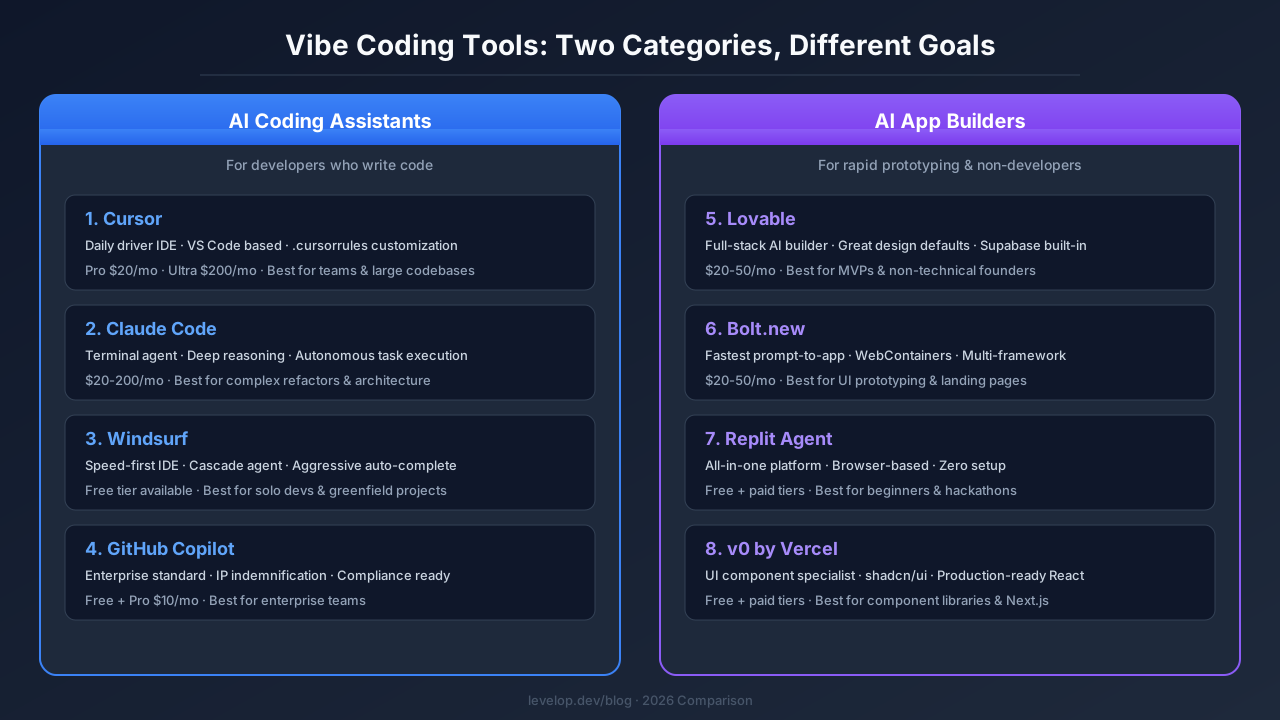
Before ranking anything, it helps to understand what we're actually comparing. Vibe coding tools fall into two distinct categories, and mixing them up leads to bad purchasing decisions.
The first category is AI coding assistants and coding agents. Cursor, Windsurf, Claude Code, and GitHub Copilot live here. These ai powered code editors sit inside (or replace) your development environment and help you write, debug, refactor, and ship code faster. You still need to understand software development. The AI assistant accelerates your developer workflows rather than replacing your skills.
The second category is AI app builders. Lovable, Bolt.new, Replit Agent, and v0 belong here. These generate entire applications from natural language descriptions. You describe what you want, and the tool builds it. The target audience skews toward non-developers or developers who want rapid prototyping without writing boilerplate.
Both categories are valid. But comparing Cursor to Lovable is like comparing a professional kitchen to a meal delivery service. They solve different problems for different people. I'll cover both, but I'll be clear about which category each tool belongs to.
The Best Vibe Coding Tools for Developers
1. Cursor: The Daily Driver Most Developers Settle On
Cursor has become the default AI coding tool for a reason. It's built on VS Code, so the muscle memory transfers instantly. The tab completion is eerily accurate, and the coding agent mode handles multi-file refactors that would take hours to do manually.
What sets Cursor apart is control. You can write .cursorrules files that teach the AI assistant your codebase conventions. Reference specific files in your prompts. Structure your instructions so the AI follows your architecture decisions rather than inventing its own. For teams working on large codebases that care about consistency, this level of control matters.
The composer feature is where Cursor really shines for larger changes. You describe what you want across multiple files, and it generates a diff you can review before applying. It's not magic (you still need to review the generated code carefully), but it turns a 45-minute refactor into a 10-minute review session. The real time feedback loop between writing a prompt and seeing results is tight enough to maintain flow state.
Where Cursor struggles: the pricing tiers create artificial friction. The Pro plan at $20/month gives you enough for moderate use, but heavy users burn through credits fast. The Ultra tier at $200/month removes most limits but feels steep. And when Cursor hits its rate limits mid-flow, the interruption breaks your concentration.
2. Claude Code: The Thinking Person's Coding Agent
Claude Code takes a fundamentally different approach to software engineering. Instead of wrapping around an IDE, it runs in your terminal as an autonomous coding agent. You describe a task, it reasons through the approach out loud, then reads your files, writes code, runs tests, and iterates until the job is done.
I was skeptical at first. Who wants to code in a terminal in 2026? But after using it on a complex authentication refactor, I understood the appeal. Claude Code's architectural decisions are consistently excellent. The code generation quality reads like a senior developer wrote it, not like AI-generated boilerplate. It thinks about edge cases, adds appropriate error handling, and structures modules in ways that make future maintenance easier.
The reasoning transparency is Claude Code's killer feature. Before it touches a file, it shows you its plan. You can redirect it, add constraints, or ask it to consider alternatives. This back-and-forth feels more like pair programming with a senior colleague than using an AI tool.
The tradeoff is speed. Claude Code is slower than Cursor for quick edits. If you just need to rename a variable across 20 files, Cursor does that in seconds. Claude Code will reason about whether the rename makes semantic sense, check for side effects across large codebases, and then do it. That thoroughness is valuable for complex tasks but overkill for simple ones.
3. Windsurf: The Speed-First Alternative
Windsurf (formerly Codeium) positioned itself as the faster, more affordable Cursor alternative. And in pure speed, it delivers. The Cascade agent mode generates code quickly, and the auto-completions feel snappier than Cursor's in my testing.
Where Windsurf earns its spot among the best ai coding tools is the flow-state experience. It's aggressive about anticipating what you need next. Finish writing a function signature, and this AI assistant will suggest the implementation, the test, and the import statement before you ask. For greenfield software development where you're building fast and iterating, this feels great.
The pricing is more approachable too. The free tier is genuinely usable (not just a trial), and the Pro plan undercuts Cursor. For individual developers or small teams watching their budget, this matters.
The downside is precision on complex codebases. When I pointed Windsurf at a monorepo with 200+ files and intricate dependency chains, it started making suggestions that ignored existing patterns. Cursor handled the same large codebases better because the .cursorrules system gave me a way to teach it the conventions. Windsurf doesn't have an equivalent mechanism that's as robust.
4. GitHub Copilot: The Enterprise Standard
GitHub Copilot is the vibe coding tool most developers have used, even if they've moved on to other options. It's integrated directly into VS Code and JetBrains IDEs, which means zero setup friction. The code generation completions are good (not great, but consistently good), and the chat feature handles routine questions without leaving your editor.
Copilot's real strength is organizational. It offers enterprise compliance features, IP indemnification, and admin controls that IT departments actually approve. If you work at a company with strict software procurement policies, Copilot might be your only option. That's not a criticism. Enterprise readiness is a legitimate feature in software engineering.
But Copilot is showing its age in the agentic era. While Cursor and Claude Code operate as autonomous coding agents that can plan and execute multi-step tasks, Copilot still feels primarily like an autocomplete tool with a chat window bolted on. The gap is widening, not narrowing. If you want to understand more about what AI coding agents actually are, we covered that in depth recently.
The Best Vibe Coding Tools for Non-Developers and Rapid Prototyping
5. Lovable: The Closest Thing to a Full-Stack AI Developer
Lovable consistently tops "best vibe coding tool" lists, and after spending two weeks building with it, I understand why. You describe what you want in plain English, and Lovable generates a functional web application with surprisingly good design defaults. The generated code uses modern frameworks (React, Tailwind, Supabase), and the deployment pipeline is built in.
What makes Lovable stand out from other AI app builders is the design quality. Most AI-generated UIs look like developer-made UIs (functional but ugly). Lovable's output actually looks designed. The spacing, typography, and color choices are reasonable out of the box, which saves significant iteration time during rapid prototyping.
The Supabase integration for backend functionality is smart. You get authentication, database, and storage without configuring anything. For MVPs and internal tools, this is genuinely useful. I built a working customer feedback dashboard in under an hour from a single prompt, including user auth and data persistence.
Where Lovable breaks down is customization beyond the initial generation. When you need the AI to modify something it already built, the conversation gets messy. It sometimes loses context on what it previously generated, leading to inconsistencies. And if you need to eject from Lovable and maintain the code yourself, the generated codebase is functional but not always cleanly organized.
6. Bolt.new: The Fastest Path from Idea to Deployed App
Bolt.new (by StackBlitz) is the speed champion among AI app builders and vibe coding tools. It runs a full development environment in your browser (WebContainers), generates code, installs dependencies, and gives you a live preview in seconds. The turnaround from prompt to working app is the fastest I've tested in any ai tool.
The multi-framework support is a nice touch. You can generate apps in React, Next.js, Vue, Svelte, or Astro. And because it runs in WebContainers, there's no "works on my machine" problem. What you see in the preview is what deploys. The real time feedback between editing and previewing keeps your momentum.
Bolt.new works best for UI-heavy projects. Landing pages, dashboards, component prototypes. Anything that's primarily frontend with light backend needs. When I tried building a more complex backend with Bolt, the results were shakier. API routes worked but lacked proper error handling and validation that you'd want in production.
7. Replit Agent: The All-in-One Development Platform
Replit Agent wraps AI code generation into Replit's cloud-based IDE, which means you get coding, hosting, and deployment in one platform. The coding agent can build multi-file applications, set up databases, and deploy to production. All from a browser tab.
The appeal is simplicity. There's no local environment setup, no dependency management headaches, no deployment pipeline to configure. You describe what you want, and Replit Agent handles the entire software development lifecycle. For learners and hobbyists, this removes real barriers to building real world applications.
The limitation is the ceiling. Replit Agent produces functional code, but the quality plateau is lower than Lovable or Bolt for complex applications. It handles simple CRUD apps well. Multi-step workflows with complex state management or third-party integrations get unreliable.
8. v0 by Vercel: The UI Component Specialist
v0 takes a narrower approach than the other AI app builders. Instead of generating full applications, it focuses on generating individual UI components and pages. You describe a component ("a pricing table with three tiers and a toggle for monthly/annual"), and v0 generates production-quality React code using shadcn/ui and Tailwind.
For its specific use case, v0 is an excellent ai coding tool. The generated code for components is clean, accessible, and follows modern React patterns. They drop into existing Next.js projects without modification. If you need a design system or component library built quickly through rapid prototyping, v0 is the most efficient path I've found.
The limitation is obvious from the description. v0 doesn't build backends, handle authentication, or manage deployment. It's a component generator, not an application builder. But if you're a developer who already has the rest of the stack figured out and just needs UI components fast, that focus is a strength.
How I'd Actually Choose Between These Vibe Coding Tools
After months of testing the best ai coding tools available, here's my honest recommendation framework.
If you're a professional developer writing code every day, start with Cursor as your daily driver. Add Claude Code for complex architectural work and autonomous tasks. This combination covers the full spectrum from quick edits to deep refactors. Most senior software engineering professionals I know have landed on exactly this pairing of AI coding assistants. We compared Claude Code vs Cursor in depth if you want the full breakdown.
If you're building an MVP or prototype without a technical co-founder, start with Lovable. It gives you the best balance of design quality, functionality, and speed for rapid prototyping. Switch to Bolt.new if you need something even faster and are less concerned about design polish.
If your company requires enterprise compliance, GitHub Copilot is the pragmatic choice. It's not the most powerful AI tool, but it's the one that actually gets approved.
If you're on a tight budget, Windsurf's free tier is genuinely useful. You can do real world software development without paying anything, and the Pro plan is affordable when you're ready to upgrade.
The vibe coding tools keep getting better at a pace that makes any specific ranking temporary. What won't change is the pattern: developers need coding agents that understand their codebase deeply, and non-developers need builders that produce production-quality output from plain descriptions. Pick the category that matches your needs, then choose the tool that fits your developer workflows. For more context on how these tools actually work under the hood, check out our post on agentic AI coding tools.