
Vibe Coding Prompts: Best Practices to Stay in Control When AI Writes the Code
Vibe coding flips the usual order of work. Instead of writing the code and asking a tool to help, you describe what you want and let the model write the code. It feels fast, almost magical, right up until the moment you realize you are shipping something you never actually read. The difference between a productive session and a pile of technical debt usually comes down to one thing: the quality of your vibe coding prompts.
A prompt is not a wish. It is a specification you are handing to a very fast, very literal junior engineer who will never ask a clarifying question unless you invite one. If your instructions are vague, the model fills the gaps with the most statistically common pattern it has seen, which is rarely the pattern your codebase needs. This guide walks through the vibe coding best practices that keep you steering the work rather than cleaning up after it.
What vibe coding actually asks of your prompts
When you vibe code, the model is doing three jobs at once: interpreting your intent, choosing an implementation, and writing the code. In traditional development you own the first two and use tools for the third. Handing all three to an AI is efficient, but it means your prompt has to carry the intent and the constraints that used to live in your head.
That is a bigger ask than most people realize. A good prompt encodes the goal, the context, the constraints, and the definition of done. Miss any one of those and the model guesses. If you want a deeper primer on the practice itself, our guide to what vibe coding is covers the mental model. This piece is about the prompts that make it work in practice.
Why vague vibe coding prompts fail
The most common failure mode is not a wrong answer. It is a plausible answer that quietly ignores the parts you cared about most. Ask for a function to upload a file and you will get one. It may skip validation, ignore your error-handling conventions, hardcode a path, and use a library you do not have installed. None of that is the model being dumb. It is the model being asked a question with too much freedom.
Vague prompts drift in three predictable directions. They drift on quality, because the model optimizes for something that runs rather than something that fits your standards. They drift on security, because safe defaults are more verbose and less clean looking than the shortest version. And they drift on architecture, because the model does not know your existing patterns unless you show them. The hidden risks of vibe coding go into how these failures compound in a real codebase; the short version is that unclear prompts are where most of them start.
The anatomy of a strong vibe coding prompt
Good vibe coding prompts are boring to read and specific to a fault. They tend to include four things: context about the codebase, a precise task, hard constraints, and a definition of done. Here is what that looks like when you spell it out instead of hoping the model infers it.
Context: This is a TypeScript Express API. We use Zod for validation,
Pino for logging, and return errors via our AppError class (see errors.ts).

Task: Add a POST /uploads endpoint that accepts a single image file
(max 5MB, jpg/png only) and stores it in S3 using the existing s3Client.

Constraints:
- Validate the request with Zod before touching S3.
- Never trust the client-provided filename; generate a UUID key.
- Throw AppError on validation failure, do not return raw 500s.
- Match the existing async/await style in routes/, no .then chains.

Done when: the endpoint has a Zod schema, a happy-path test, and a
test for the oversized-file rejection.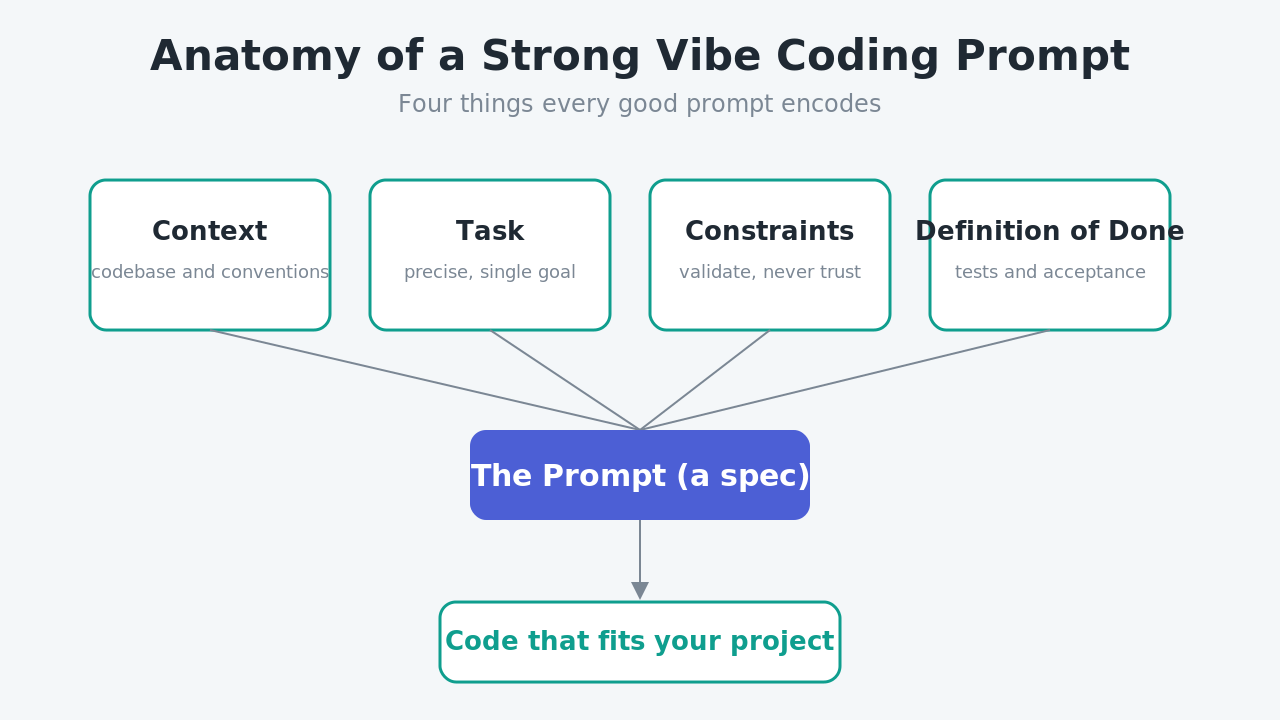
Notice how little is left to interpretation. The model still writes the code, but the space of acceptable answers has collapsed to roughly what you would have written yourself. That is the whole game.
Give it context and constraints
Context is the single highest-leverage part of any prompt. Models are strong pattern matchers, so the fastest way to get code that matches your project is to show them the pattern. Paste the relevant interface, name the libraries you use, and point at the file that holds your conventions. Constraints then fence off the failure directions: what to validate, what never to trust, which style to follow.
Specify the contract, not just the vibe
Make it nice is not a contract. Return a 400 with our AppError shape on invalid input, and a 201 with the object key on success is. The more your prompt reads like an API contract, the less the model improvises. This is the core of good vibe coding tips and tricks, and it is the same discipline we cover in context engineering versus prompt engineering: describe inputs, outputs, and edge cases, not adjectives.
Ask for tests in the same breath
Requesting tests alongside the code does two things. It forces the model to state its own assumptions about behavior, and it gives you an artifact you can actually verify without reading every line. If the test looks wrong, the code is probably wrong too, and you caught it in ten seconds instead of ten minutes.
A prompt workflow that keeps you in control
Single mega-prompts feel efficient but they concentrate risk. A better pattern is to break the work into a loop where you stay the decision-maker at each step. The workflow below is slower per message and dramatically faster per feature, because you spend almost no time debugging surprises.
First, plan. Ask the model to propose an approach before writing any code: before implementing, outline the files you will change and the functions you will add. You review the plan, correct the parts that are wrong, and only then approve implementation. Second, scaffold. Have it stub the structure so you can sanity-check the shape. Third, implement one piece at a time. Fourth, review the diff and either accept or send it back with a specific correction.
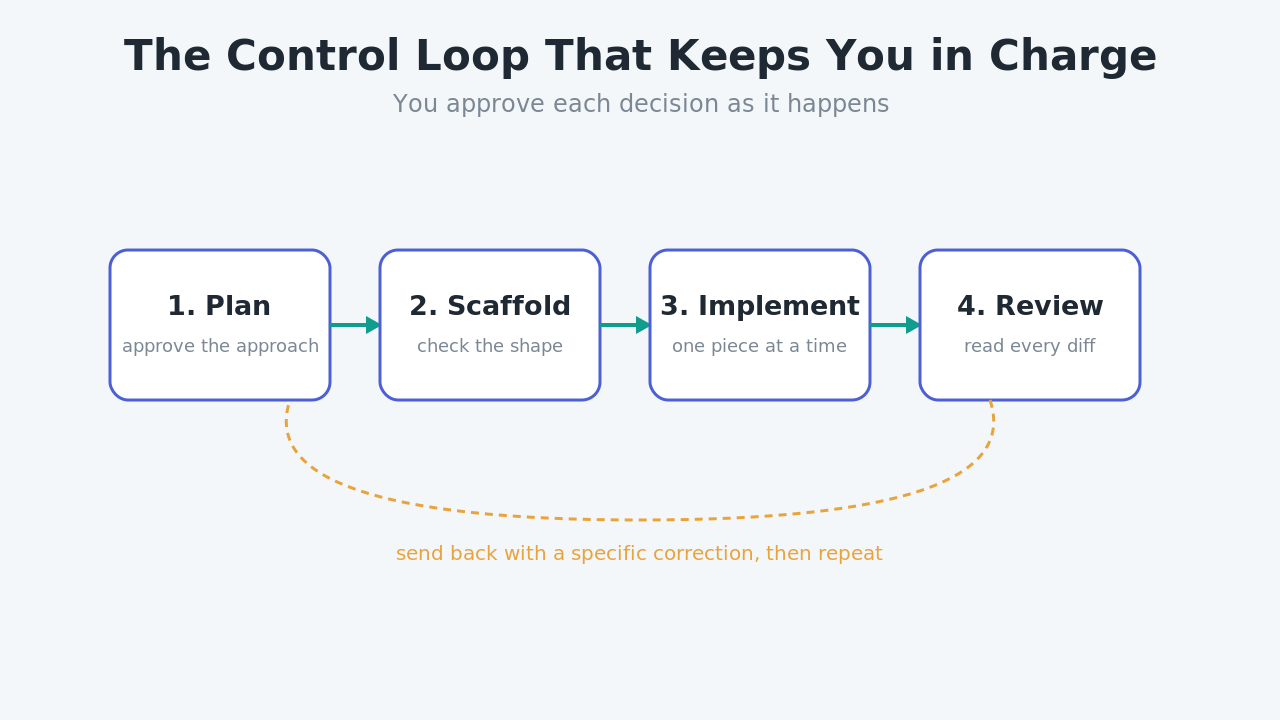
This plan-scaffold-implement-review loop is where vibe coding prompts stop being a gamble. You are not trusting a black box; you are approving each decision as it happens. It mirrors how good prompting works everywhere in modern engineering.
Reviewing what the AI wrote
Prompts get the code close. Review is what makes it correct. The hardest habit to build in vibe coding is treating generated code with the same suspicion you would treat a pull request from someone you have never worked with.
Read every diff before you accept it
If you accept changes you have not read, you are not vibe coding, you are gambling. Read the diff. Not to rewrite it, but to confirm it does what you asked and nothing you did not ask for. Watch specifically for silent scope creep: an extra dependency, a changed config value, a helpful refactor of a file you did not mention.
Guard against security drift
Generated code tends toward the shortest working version, and short often means unsafe. Watch for missing input validation, secrets pasted inline, SQL built with string concatenation, and permissive defaults on anything that touches auth or file access. A single line in your prompt, assume all input is hostile and validate accordingly, prevents most of it, but review is your backstop. This is exactly where the security and quality risks of vibe coding bite hardest.
Vibe coding prompt patterns worth stealing
A few reusable prompt shapes cover most day-to-day work. Keep them in a snippet file and adapt them per task. The refactor-with-guardrails prompt keeps changes contained:
Refactor extractUser() in auth.ts to reduce nesting. Do NOT change its
signature, its return type, or any behavior. Keep all existing tests
passing. Show me the diff only.
The debug prompt gives the model something to reason about instead of guessing:
This test fails with [paste error]. Here is the test and the function
under test [paste both]. Explain the root cause first, then propose the
smallest fix. Do not touch unrelated code.
The review prompt turns the model into a second reviewer of its own work:
Review the code you just wrote as if it were a PR. List any security
issues, missing edge cases, or deviations from the constraints I gave.
Each of these vibe coding prompts shares a trait: it narrows the model's freedom and asks for reasoning you can check. That is the pattern behind every good result.
Common mistakes that cost you control
Most bad sessions repeat the same handful of errors. Accepting large multi-file changes in one shot makes review impossible, so keep changes small. Prompting for features without naming your conventions produces code that works but does not fit. Skipping the plan step lets the model commit to an approach you would have rejected. And trusting green output without reading it is how insecure or subtly wrong code reaches production. Avoiding these is most of what separates smooth vibe coding best practices from a debugging marathon.
If you want to go further, pairing your prompts with a written specification before you start closes even more gaps. We compare that discipline directly in spec-driven development versus vibe coding, and for teams shipping to real users it is often the missing piece.
Bringing it together
Vibe coding is not about giving up control. It is about moving your effort upstream, from typing code to specifying it precisely and reviewing it ruthlessly. Strong vibe coding prompts carry the context, constraints, and definition of done that used to live in your working memory. A plan-scaffold-implement-review loop keeps you approving decisions instead of discovering them. And disciplined diff review catches the quality and security drift that vague instructions invite.
Do those three things and the speed of AI-written code stops being a liability. You get the velocity without surrendering the judgment that makes you an engineer. For more practical guides on building well in the AI era, browse the Levelop blog, or learn what we are building at Levelop.
Frequently asked questions
What makes a good vibe coding prompt?
A good prompt includes four things: context about your codebase and conventions, a precise task, hard constraints (what to validate, what to never trust, which style to match), and a clear definition of done such as required tests. The more your prompt reads like a specification instead of a wish, the closer the generated code lands to what you would have written yourself.
How do I keep AI-generated code secure?
Add an explicit instruction to treat all input as hostile and to validate accordingly, avoid inline secrets, and never build queries by string concatenation. Then review every diff as your backstop, watching for missing validation, permissive defaults, and anything touching auth or file access. Prompts reduce the risk; review is what catches what slips through.
Should I write tests when vibe coding?
Yes. Ask the model to produce tests in the same prompt as the code. Tests force the model to state its assumptions about behavior and give you a fast way to verify correctness without reading every line. If the test looks wrong, the implementation usually is too, and you catch it early.
Is vibe coding good for production apps?
It can be, if you keep changes small, review every diff, and pair prompts with a plan or written spec. The failure mode is accepting large, unread changes. Used with the review discipline described here, vibe coding prompts are perfectly viable for production work.
How is vibe coding different from using autocomplete?
Autocomplete suggests the next few tokens while you drive. Vibe coding hands the model the whole task: it interprets intent, chooses an implementation, and writes the code. That shift is why the prompt matters so much more. With autocomplete you own the design; with vibe coding your prompt has to encode it.